redwood: Errors from code splitting with Redwood Router (potentially)
Hi All, first of this is going to be a deep an obscure post, so bear with me!
Whats the problem? We have bugsnag enabled on our RW site, and every now and then I see an error related to loading chunks. The bug is incredibly difficult to reproduce, but from looking at the logs, it only happens when trying to navigate with redwood router, and the chunks need to be loaded. A few examples:
Example 1: (chunk is definitely there on the server)
ChunkLoadError Loading chunk 7 failed.
(missing: https://www.tape.sh/static/js/7.e9f522d7.chunk.js)
Example 2:
SyntaxError Unexpected token '<'
    https://www.tape.sh/static/js/7.e9f522d7.chunk.js:1:1
Syntax error, really?
Example 3: (similar to above)
Error Network error: JSON Parse error: Unrecognized token '<'
    ../../node_modules/apollo-client/bundle.esm.js:63:32 ApolloError
Other info that may be relevant
- We are using cloudflare in front of netlify, but I disabled netlify’s asset optimisation for JS because it does the weird thing of moving it into a different path on cloudfront. I want to let cloudflare handle all the caching
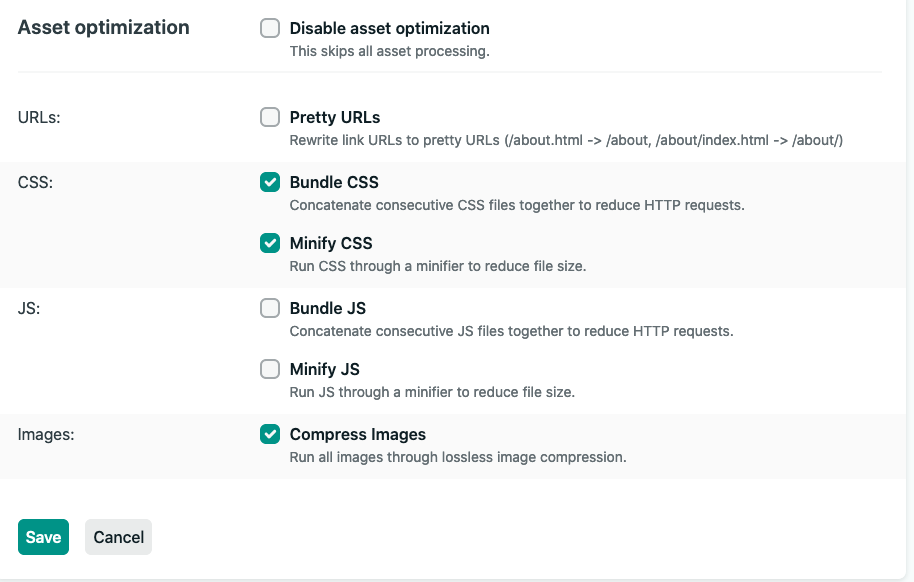
I’m not sure if its something that’s happening between cloudflare and netlify, but right now leaning towards RR/Webpack doing something
-
The unexpected token
<error, I wonder if the server is returning html - but why would it do this and why would it happen so rarely? -
I’m going to try disabling the automatic code splitting on RR, and see if it makes a difference.
Redwood version: 0.12
About this issue
- Original URL
- State: closed
- Created 4 years ago
- Comments: 15 (7 by maintainers)
@dthyresson - thank you, this is extremely helpful. I’ll look at trying this out in our staging env today.
Might be worth checking out:
Saw this note on Netlify Community about 522s + Netlify + Cloudflare: https://community.netlify.com/t/522-error-connection-timed-out/8138 …
https://community.netlify.com/t/common-issue-why-isn-t-my-ssl-certificate-provisioning-automatically-with-cloudflare-netlify-are-there-other-problems-with-using-cloudflare-in-front-of-netlify/138
OOO, update. Found one instance of the graphql error (not the navigation one) where it receives a 522, then throws the JSON parse error. Let’s take the apollo one separately, I think it’s a different issue - but you can imagine that if the server throws a 400 or 522 when it tries to load chunks, its the same issue.
I’m actually worried Netlify (or less likely my Cloudflare settings, which is just pass thru) is doing something funky now!
Update: Are you able to tell what devices are causing these errors? My gut feeling is that these are browsers that are unsupported by your browsers lists configuration.