redwood: Cannot find module '@redwoodjs/testing/web' when running Storybook
Having followed the tutorial up to chapter 5, i am getting this error in the dev console when i run yarn rw storybook:
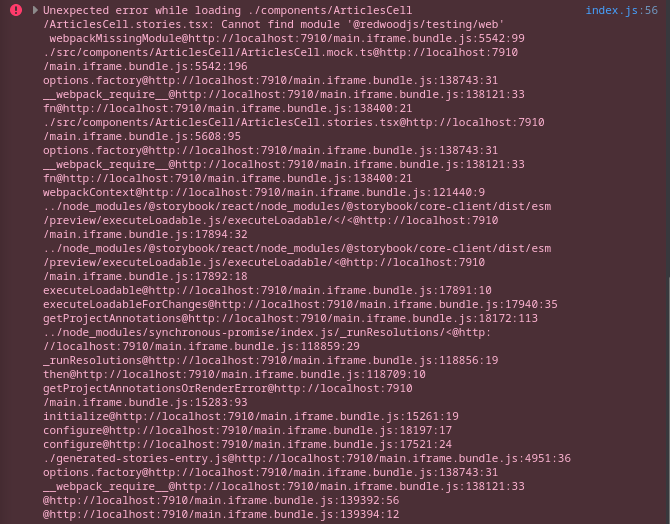
All of the stories just render a blank page in the UI, the Cells and Pages are not even listed.
I am unsure whether this is typescript related or not – from my experience any typescript errors are gracefully handled when compiling to JS, and this seems to be a webpack error message.
However, when i run the js-based https://github.com/redwoodjs/redwood-tutorial there is no such error – the dependencies listed in package.json are identical to my project, which you can check out here: https://github.com/Philzen/redwoodblog-tutorial-typescript
Any ideas what’s going on here greatly appreciated.
About this issue
- Original URL
- State: closed
- Created 2 years ago
- Comments: 15 (9 by maintainers)
OK FOUND ISSUE! This solves both issues.
Tried a bunch of theories, but pulling on the thread from this issue, it looks like this happens when storybook for some reason picks webpack 4 accidentally (extrapolating from this thread) - When there are multiple versions of webpack 5 (in our case, redwood is using 5.70.0, but storybook wants 5.71.0) - see this output from yarn why
The solution for now, is to force the resolution of webpack 5, but we should issue a patch with the updated webpack version so theres no mismatch. Note that its not the updated webpack that solves the problem, its definitely a storybook thing, because even if you set the webpack version to 5.70.0 it still works fine
In your root package.json
Walkthrough here: https://s.tape.sh/fMzJpPyA
Confirming that upgrading to the latest canary fixes it in the reproduction Gitpod!
Will be included in v1.0.1
After trying quite a few things to fix this, I have come up with the following workaround.
web/jsconfig.jsonto match the https://github.com/redwoodjs/redwood-tutorial/blob/main/web/jsconfig.json project.rm -r ./redwoodyarn rw storybookI’m not familiar enough with the project to know if all three are neccessary, But I am able to happily continue my tutorial experience now that I have done the above modifications.
Thanks @jtoar, then i am “glad” in the sense that this may actually be helpful.
I ran into another bump when i synced my repo further with the redwood tutorial repo. I thought it was due to me changing the imports back to
@redwoodjs/testing(removing/web) in https://github.com/Philzen/redwoodblog-tutorial-typescript/commit/16161a83ff2a7c4a129a06f2d7b07101f90cf632, but it actually happens when i sync the stories in https://github.com/Philzen/redwoodblog-tutorial-typescript/commit/28f4697ba7dd41f3e96654ef307119eecd2c2aa8.I could bisect it down to the offending line being:
As soon as this line appears in my story, storybook won’t even startup (or just crash on recompilation if already running) with:
Not sure if this is related, but i have a hunch it might as that function is declared via
web-test-globals.d.ts.I pulled down your repo (thanks for the reproduction!) and could reproduce this. I tried a few basic things (deleting yarn.lock, etc) to no avail. I’ll keep debugging 🤔