voice: Recognition and Bluetooth Headset : Error required condition is false : length <= _imp->_frameCapacity on production
Bug
When I start recognising I get this error : EDIT : it occurs when my phone is connected to a bluetooth headset !!
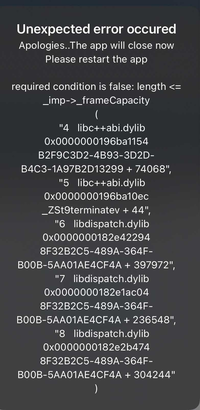
Environment info
Device on production: iPhone X with iOS : 14.1 Xcode : Version 12.1
npmPackages:
    "@react-native-community/voice": "^1.1.9",
    "react": "16.13.1",
    "react-native": "0.63.2",
and many other whose “react-native-exception-handler”: “^2.10.9”.
Reproducible sample code
create this hooks useRecognition.js
import React, {useState, useEffect, useRef} from 'react';
import {Platform} from 'react-native';
import Voice from '@react-native-community/voice';
import {useSelector} from 'react-redux';

const ERROR_MSG_NO_SPEECH = Platform.OS === 'ios' ? '203/Retry' : '7/No match';

export const useRecognition = ({setSpeechIsRunning, setVoiceIsAvailable}) => {
  const {lang} = useSelector((state) => state.settings); // One of this string values : 'fr, 'en, 'ar'.

  const [error, setError] = useState(null);
  const [results, setResults] = useState([]);
  const autoStopTimeout = useRef(null);

  useEffect(() => {
    // Attribute function to all listeners of Voice library
    Voice.onSpeechStart = onSpeechStart;
    Voice.onSpeechEnd = onSpeechEnd;
    Voice.onSpeechError = onSpeechError;
    Voice.onSpeechResults = onSpeechResults;
    Voice.onSpeechPartialResults = onSpeechPartialResults;
    Voice.onSpeechRecognized = onSpeechRecognized;
    Voice.onSpeechVolumeChanged = onSpeechVolumeChanged;

    if (error?.message && error.message !== ERROR_MSG_NO_SPEECH) {
      setError(null);
      setVoiceIsAvailable(false);
      Voice.destroy().then(Voice.removeAllListeners());
    }
    return function cleanUpListeners() {
      // Component will unmount
      Voice.destroy().then(Voice.removeAllListeners());
      clearTimeout(autoStopTimeout.current);
    };
  }, [error]);

  // HANDLER FUNCTIONS

  const resetAutoStopTimeout = () => {
    clearTimeout(autoStopTimeout.current);
    let timeout = setTimeout(async () => {
      await Voice.stop();
      setSpeechIsRunning(false);
    }, 1000);
    autoStopTimeout.current = timeout;
  };
  const startAutoStopTimeout = () => {
    let timeout = setTimeout(async () => {
      await Voice.stop();
      setSpeechIsRunning(false);
    }, 4000);
    autoStopTimeout.current = timeout;
  };

  const onSpeechError = async (e) => {
    setError(e.error);
    await Voice.destroy();
  };

  const onSpeechVolumeChanged = () => {};

  const onSpeechRecognized = (e) => {
    resetAutoStopTimeout();
  };

  const onSpeechStart = (e) => {
    startAutoStopTimeout();
  };

  const onSpeechEnd = (e) => {};

  const onSpeechResults = (e) => {
    setResults(e.value);
  };

  const onSpeechPartialResults = (e) => {};

  const checkRecognition = async (e) => {
    const isAvailable = await Voice.isAvailable();
    const isRecognizing = await Voice.isRecognizing();
    let speechServicesAndroid = undefined;
    if (Platform.OS === 'android') {
      speechServicesAndroid = await Voice.getSpeechRecognitionServices();
    }
    return {isAvailable, isRecognizing, speechServicesAndroid};
  };

  // ACTION FUNCTIONS
  const startRecognition = async () => {
    try {
      await Voice.start(lang);
      // await Voice.start('fr-FR');
    } catch (error) {
      console.error('Error on start recognization : ', error);
      setError(error);
    }
  };

  const stopRecognition = async () => {
    try {
      await Voice.stop();
    } catch (error) {
      console.error('Error on stop recognization : ', error);
      setError(error);
    }
  };

  return {
    startRecognition,
    stopRecognition,
    checkRecognition,
    results,
    error,
  };
};
I call this hooks in an other component like this :
import React, {useState, useEffect, useCallback, useRef} from 'react';
import { View, Button } from 'react-native';
import {useRecognition} from '../hooks';

// ....

const MyOtherComponent = () => {
// ...
  const [speechIsRunning, setSpeechIsRunning] = useState(true);
  const [voiceIsAvailable, setVoiceIsAvailable] = useState(true);

// ...
  const {
    startRecognition,
    stopRecognition,
    checkRecognition,
    results,
  } = useRecognition({setSpeechIsRunning, setVoiceIsAvailable});

useEffect(() => {
    if (speechIsRunning) {
      // Start
      startRecognition();
      checkVoiceAvailable();
    } else {
      // Stop
      stopRecognition();
    }
  }, [speechIsRunning]);

const checkVoiceAvailable = useCallback(async () => {
    // Check if voice recognition is available
    const {isAvailable, speechServicesAndroid} = await checkRecognition();
    if (speechIsRunning) {
      if (
        !isAvailable ||
        (Platform.OS === 'android'
          ? speechServicesAndroid?.length === 0
          : false)
      ) {
        setSpeechIsRunning(false);
        stopRecognition();
        setVoiceIsAvailable(false);
      }
    }
  }, [speechIsRunning]);

return (
    <View style={{flex : 1}}>
      <Button
        onPress={onPressLearnMore}
        title="Stop Reco"
      />
    </View>
  );
};

export default MyOtherComponent
EDIT : And you have to connect a bluetooth headset on your phone.
Thank you in advance !!!
About this issue
- Original URL
- State: closed
- Created 4 years ago
- Reactions: 3
- Comments: 25 (13 by maintainers)
Commits related to this issue
- fix(iOS): prevent crash with headset/bluetooth - Error "required condition is false : length <= _imp->_frameCapacity" - Issue #275 — committed to agliber/voice by agliber 3 years ago
This was released with 2.0.1! https://github.com/react-native-voice/voice/pull/294
Closing this issue for now, let me know if the issue still persists with the update. Reminder with v2 the package was moved to
@react-native-voice/voiceReally appreciate this, I’ll check it out later today
@agliber I had to refuse users from using bluetooth headset as a workaround ((