react-native-video: [iOS] Next video does not play while in background
Bug
Only tested in iOS.
If the app is in the foreground, setting a new source will update the player and a new video begins to play.
If the app is in the background, setting a new source does cause the onLoadStart and onLoad events to fire, but the next video does not play until the app is brought back into the foreground.
Environment info
react: 16.8.6
react-native: 0.60.0
Library version: 5.0.0
Steps To Reproduce
- Setup a player with background audio, and a video source of your choice.
- Programmatically change the source to a different video. (Using
setTimeoutis probably the best bet due to the nature of this issue). - Observe how the player changes the video.
- Repeat steps 1 - 2, but after the first video begins to play put the app into the background by going to the home screen or locking the device.
- Observe how the player does not automatically play the next video.
- Open the app up, observe how the player immediately begins playing the next video source.
Describe what you expected to happen:
- In either foreground or background mode, the video should change when the source prop updates.
Reproducible sample code
const [uri, setUri] = useState("https://myvideo.com/one.mpeg");

setTimeout(() => setUri("https://myvideo.com/two.mpeg"), 10000);

return <Video
    ignoreSilentSwitch="ignore"
    playInBackground
    playWhenInactive
    source={{ uri }}
    onLoad={handleLoad}
    onLoadStart={handleLoadStart}
/>
About this issue
- Original URL
- State: closed
- Created 5 years ago
- Comments: 30 (5 by maintainers)
Hey @tannguyen05. Open
RCTVideo.mAdd this code somewhere inside the class(before “end”)Also, check out the applicationDidEnterBackground, applicationWillEnterForeground methods and add 1 line:
It should look something like this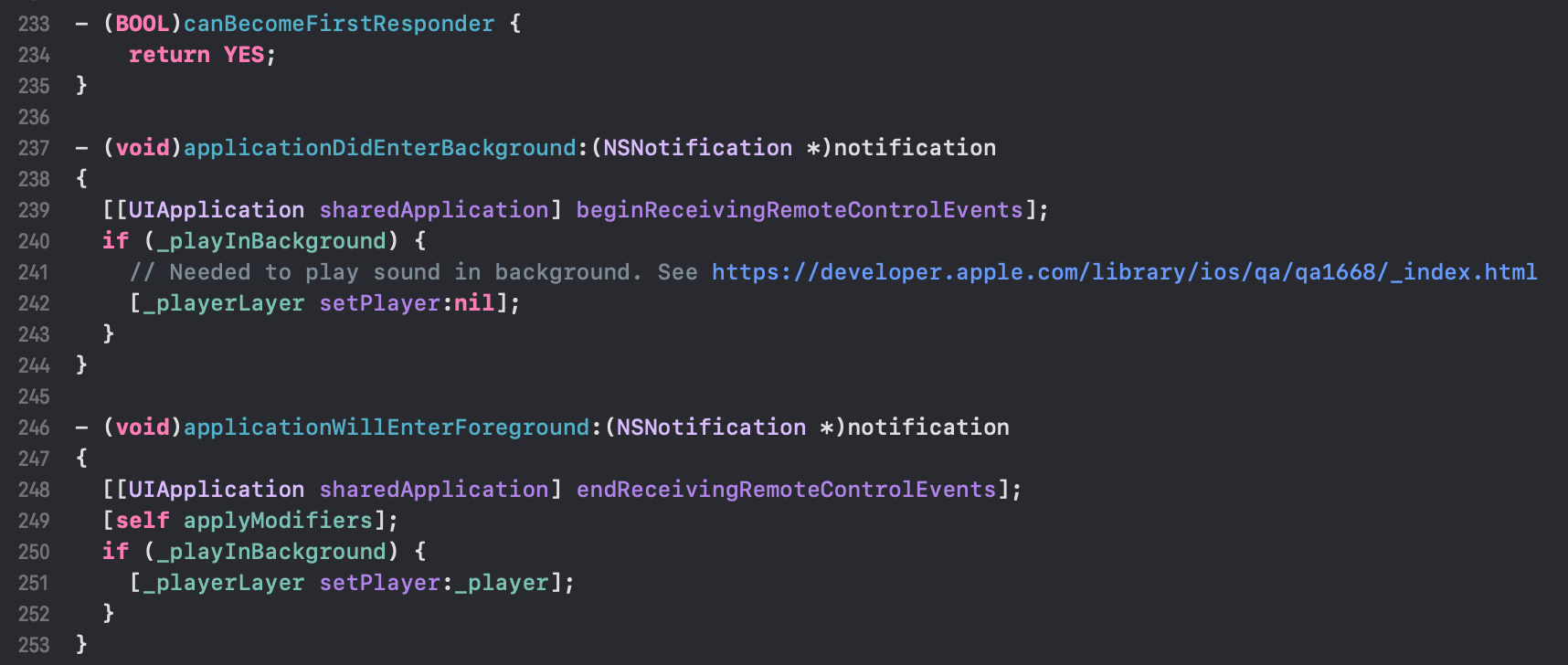 Let me know if this helped 😃
I’ve seems like been able to fix the issue. The issue was that it worked OK, but
[AVPlayer play]didn’t work at all when the device was locked no matter what. After some digging I was able to find a question on StackOverflow, mentioning how to fix this behavior https://stackoverflow.com/questions/11515883/playing-avaudio-from-ipod-library-while-device-is-locked We need to manually call[[UIApplication sharedApplication] beginReceivingRemoteControlEvents];to be able to control this[AVPlayer play]when device is locked. Also, obviously, we need to call[[UIApplication sharedApplication] endReceivingRemoteControlEvents]. I’ve put these lines intodidEnterBackground/willEnterForeground. It’s also important to addI’m not sure if it breaks anything. On our side, everything seems to work as before. @CHaNGeTe what do you think about this? Is it going to break anything? If not, I would be pleased to confirm a PR to fix this annoying bug 😃
@CHaNGeTe
I checked out https://github.com/react-native-community/react-native-video/pull/1787. While it didn’t fix this particular issue, it didn’t appear to break anything else.
I tried this inside
- (void)setSrc:(NSDictionary *)source, but maybe it wasn’t exactly what you were suggesting:instead of
I experienced the same behavior.