react-native-share: Share.shareSingle() throws unhandled promise rejection only on ios
Hi. this library is working fine on all cases on android but i am running into few issues on ios. My implementation of this lib is with a custom view component with icons when clicked will initiate the sharing process.
Environment:
"react": "16.2.0",
"react-native": "^0.53.3"
"react-native-share": "^1.0.27"
Using share as: import Share from 'react-native-share';
I have a facebook icon when pressed calls:
this.props.setTimeout(() => { Share.shareSingle({ ...this.state.shareOptions, social: 'facebook' }) }, 50);
Android produces desired behaviour however on ios i get the warning below.
Possible Unhandled Promise Rejection (id: 0):
Object {
  "error": Object {
    "code": "ECOM.RNSHARE1",
    "domain": "com.rnshare",
    "message": "The operation couldn’t be completed. Not installed",
    "nativeStackIOS": Array [
      "0   TestApp                          0x000000010ff94b26 RCTJSErrorFromCodeMessageAndNSError + 134",
      "1   TestApp                          0x000000010ff94a53 RCTJSErrorFromNSError + 275",
      "2   TestApp                          0x000000010ff25058 __41-[RCTModuleMethod processMethodSignature]_block_invoke_2.187 + 152",
      "3   TestApp                          0x000000010fe93c8d -[GenericShare shareSingle:failureCallback:successCallback:serviceType:] + 2301",
      "4   TestApp                          0x000000010fe91f75 -[RNShare shareSingle:failureCallback:successCallback:] + 373",
      "5   CoreFoundation                      0x0000000119118ccc __invoking___ + 140",
      "6   CoreFoundation                      0x0000000119118b84 -[NSInvocation invoke] + 308",
      "7   CoreFoundation                      0x00000001191318d6 -[NSInvocation invokeWithTarget:] + 54",
      "8   Battledore                          0x000000010ff2803c -[RCTModuleMethod invokeWithBridge:module:arguments:] + 2796",
      "9   TestApp                          0x000000010ffdc012 _ZN8facebook5reactL11invokeInnerEP9RCTBridgeP13RCTModuleDatajRKN5folly7dynamicE + 786",
      "10  TestApp                          0x000000010ffdbb3f _ZZN8facebook5react15RCTNativeModule6invokeEjON5folly7dynamicEiENK3$_0clEv + 127",
      "11  TestApp                          0x000000010ffdbab9 ___ZN8facebook5react15RCTNativeModule6invokeEjON5folly7dynamicEi_block_invoke + 25",
      "12  libdispatch.dylib                   0x0000000119f3773b _dispatch_call_block_and_release + 12",
      "13  libdispatch.dylib                   0x0000000119f38779 _dispatch_client_callout + 8",
      "14  libdispatch.dylib                   0x0000000119f42778 _dispatch_main_queue_callback_4CF + 1279",
      "15  CoreFoundation                      0x0000000119157c99 __CFRUNLOOP_IS_SERVICING_THE_MAIN_DISPATCH_QUEUE__ + 9",
      "16  CoreFoundation                      0x000000011911bea6 __CFRunLoopRun + 2342",
      "17  CoreFoundation                      0x000000011911b30b CFRunLoopRunSpecific + 635",
      "18  GraphicsServices                    0x000000011cf3ea73 GSEventRunModal + 62",
      "19  UIKit                               0x0000000114f6f0b7 UIApplicationMain + 159",
      "20  TestApp                          0x000000010fe9195f main + 111",
      "21  libdyld.dylib                       0x0000000113b5a955 start + 1",
    ],
    "userInfo": Object {
      "NSLocalizedFailureReason": "Not installed",
    },
  },
}
When i share it through whatsapp on ios, it takes me to the apple store and on pressing back to return to my app i get an error.

About this issue
- Original URL
- State: closed
- Created 6 years ago
- Reactions: 4
- Comments: 48 (6 by maintainers)
I’ve same issue on iOS Simulator. It’s should be fixed like this:
Don’t just CC me. Do the work: instrument the code, find the problem, post a PR
@chathura88 Thanks for helping here. Really appreciate it.
I followed the installation carefully and completed it with no issues.
1.) npm i react-native-share --save 2.) cd ios && pod install
I am using Xcode 12.4, and I have iOS 14.4.2 installed on my iPhone XS Max.
Here’s my info.plist:
@smaelbarry I’m on the same RN version (0.63.4). this is my current info.plist please check if you have followed all the steps in https://react-native-share.github.io/react-native-share/docs/install
but it is installed. I was running debugger on the physical device. Instead of opening whatsapp it opened App Store with whatsapp
SCREENSHOT OF THE ERROR
Understandably. I guess that solves the issue then. Thanks so much!
I was just asking if you have any news after 9 months, as the issue is closed
@mikehardy yes, I’ve logged that. it was inside trycatch and that’s what I see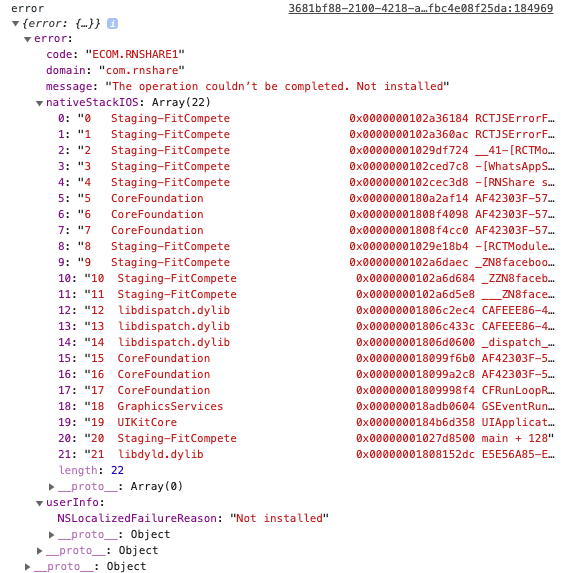
@jgcmarins Appologies for replying this late. I have been struglling with this issue till date
BELLOW IS MY REACT-NATIVE DETAILS react-native-cli: 2.0.1 react-native: 0.57.5 “react-native-share”: “^1.1.3”