react-native-maps: 'React/RCTView.h' file not found
Is this a bug report?
No
Have you read the Installation Instructions?
Yes
Environment
react: 16.2.0 react-native: 0.52.2 react-native-maps: 0.19.0 I’m using AppleMaps
Steps to Reproduce
I’ve just install react-native-maps into my project by following Installation instructions. Without react-native link usage.
Expected Behavior
Working maps.
Actual Behavior
I get error in xcode: 'React/RCTView.h' file not found.
By search in issues I find that I have to change:
AIRMap.h line 12
From #import <React/RCTComponent.h>
To #import "RCTComponent.h"

and

AIRMapCallout.h line 7
From #import "React/RCTView.h"
To #import "RCTView.h"
And all should be fine, but I get the next one error: 'React/RCTBorderStyle.h' file not found.
About this issue
- Original URL
- State: closed
- Created 6 years ago
- Reactions: 4
- Comments: 30 (1 by maintainers)
@helixbass thanks for pointing out that I might be mistaken. I went back to look at my project that was working even with
use_frameworksuncommented. Since it was a few months ago that I installedreact-native-mapsI forgot that I actually used the “manual” installation method that was listed in that version’s docs. It doesn’t solve this particular problem, but I was able to start a project using a Podfile withuse_frameworks(I’m using FBSDK, so I need it) and then install RN Maps manually. I hope this helps anyone needing to get past this issue while it’s being solved properly.Librariesand clickAdd Files to "Your Project Name"Look undernode_modules/react-native-maps/lib/iosand addAIRMaps.xcodeproj.libAIRMaps.ato `Build Phases -> Link Binary With Libraries.AIRMaps.xcodeprojinLibrariesand go theBuild Settingstab. Double click the text to the right ofHeader Search Pathsand verify that it has$(SRCROOT)/../../react-native/Reactas well as$(SRCROOT)/../../react-native/Libraries/Image- if they aren’t, then add them. This is so Xcode is able to find the headers that theAIRMapssource files are referring to by pointing to the header files installed within thereact-nativenode_modulesdirectory.var MapView = require('react-native-maps');+1 Having the same issue as above Though mine is importing the
React/UIView+React.hmoduleI can confirm that if you start a fresh project, react-native-maps works, but once you include
use_frameworks, runs into the issues stated aboveMy podfile looks like this:
Below are the errors that appear in XCode after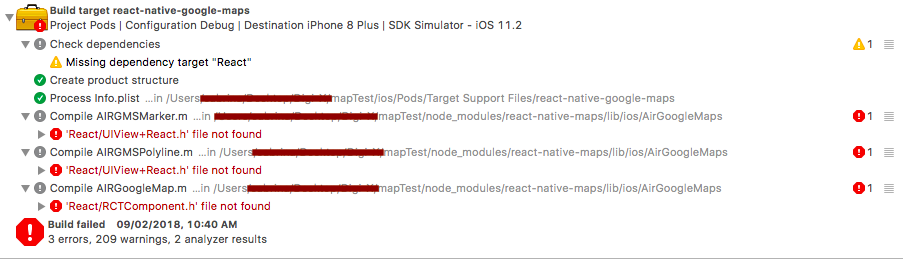
pod installwith podfile abovesudo rm -rf node_modules && yarn cache clean && yarn install && cd ios && pod deintegrate && pod install && cd …
that always works for me, I set it on package.json inside scripts, for example: “reinstall_force”: “sudo rm -rf node_modules && yarn cache clean && yarn install && cd ios && pod deintegrate && pod install && cd …”,
then just on terminal run: yarn reinstall_force
@rborn I am facing this issue in AIRMapCallout.h file
I can’t delete use_frameworks as I am using charts as a dependency that uses swift.
Please see my pod file:
I rolled back to another point in my project where I was using RN Maps 0.18.3 and even though I had
use_frameworksuncommented in that version of the Podfile everything worked. It’s only when I upgraded to 0.19.0 that this became a problem.@sabbyt54, did you found the solution ?