react-native-linear-gradient: library not found for -lBVLinearGradient RN 0.61.5
Hello. Have an issue with library autolonking
xCode version: Version 11.2.1 (11B500) React Native version: 0.61.5
Steps :
- Remove Podfile.lock
- Remove Pods dir + Build clean && DeliveryData remove
- Remove node_modules
- yarn install
- pod ‘BVLinearGradient’, :path => ‘…/node_modules/react-native-linear-gradient’
- cd ios && pod install
Error when archive.:
ld: library not found for -lBVLinearGradient
clang: error: linker command failed with exit code 1 (use -v to see invocation)
P.S. debug build work as expected
About this issue
- Original URL
- State: closed
- Created 5 years ago
- Reactions: 2
- Comments: 32
How did you solve this?
UPDATE: check that
pod 'BVLinearGradient', :path => '../node_modules/react-native-linear-gradient'is added to your Podfile and you didpod installthan openxcworkspaceinstead ofxcodeprojin Xcode and try to build. Worked for mePlease check if your Pod file platform :ios, ‘11.0’ matches with the minimum deployment target in the XCODE setting…
I apologize for not commenting. “Ah sh*t, here we go again”… So, first time I avoided this problem accidentally.
Today I switched to my old commit and this problem here… what a day =( How to fix:
Finally!!! Its very important! I just close the project and run under Project/ios/mypro.xcworkspace with a double tapping. And WOW -> this is fixed.
Please don’t blame me… we live in a very strange world. A bit of magic =)
FYI: I think steps № 7 and 10 fixed this problem. 100% 😉
Hi @foxbit19 i added also "pod ‘BVLinearGradient’, :path => ‘…/node_modules/react-native-linear-gradient’ " to PodFile but its not working for me. do you have any idea. I am using RN 0-62.2 and when i run react-native run-ios I take his error - react-native-linear-gradient (to unlink run: “react-native unlink react-native-linear-gradient”)
I have tried all the above methods, but none of them worked. Finally, I solved it like this: File - Working Settings,don’t use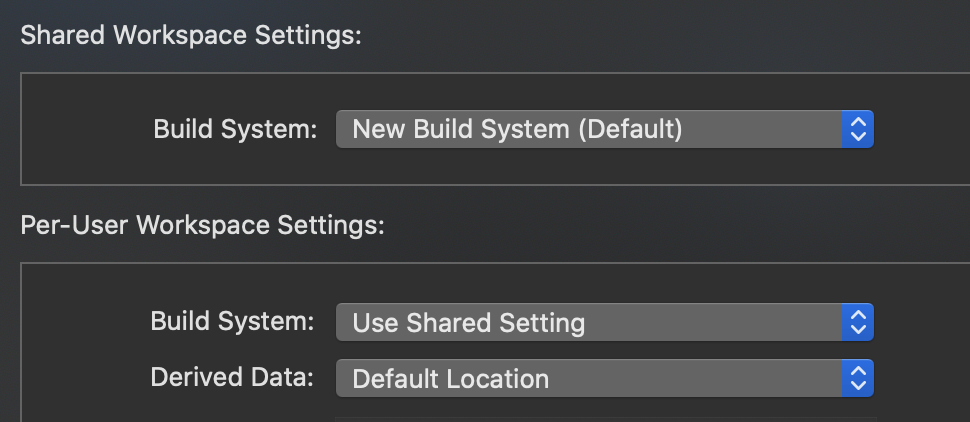
Legacy Build SystemWhat fixed it for me was:
Build Phases -> Link Binary With Libraries is now consists of: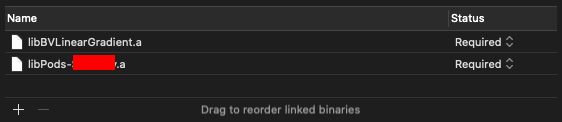
I tried doing 1 and 3 it didn’t work. I tried 2 and 3 still didn’t work but when I tried 1, 2 and 3 everything worked out. Hope this will help anyone.
after upgrading from react-native@0.61.5 to react-native@0.62.2 I faced with error again 😦
您好,我已经收到你的来信。Hello,I have received your letter. -----王乐城 mackwang
Unfortunately, for me it is still showing me the same error. Though i also have tried all scenario that you have done. Specially everyone suggesting to open ios/MyProj. xcworkspace and i have opened that one only. Still it is not working. Same error.
Where to update GymFile and Fastlane files?