google-signin: Error: A non-recoverable sign in failure occurred When use webClientId
I encountered this error when used
GoogleSignin.configure({
      webClientId: env.GOOGLE_WEB_ID,
      offlineAccess: true,
    });
It works if I remove webClientId (Webclient already active in web version). But i need use serverAuthCode. How to fix it, I tried the solution at the forum but could not fix it 😦
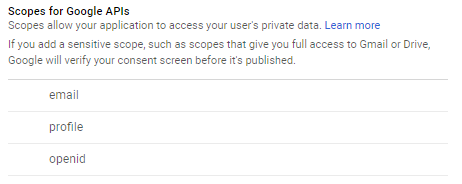
My scope in google console.
About this issue
- Original URL
- State: closed
- Created 6 years ago
- Comments: 25 (1 by maintainers)
finally, I understood. You have to go to Firebase console > authentication > google signin (make activate!) > web SDK setting. And its “Web client SDK” would be used for
GoogleSignin.configure.What worked for me:
cd ./android && ./gradlew signingReportSHA1ofTask :app:signingReport,Variant: debugAndroidTest,Config: debugProject Settings,Android app, add theSHA1google-services.json, put it in./android/appAuthentication, thenSign-in method, then pressGoogleWeb client IDand use that for yourGoogleSignin.configure({ webClientId: ... });Web client IDshould be the same as listed inhttps://console.developers.google.com/apis/credentials?project=<your_project_id>->Credentials->OAuth 2 Client ID->Web ClientSAME HERE!!!
same here too
Thanks all ! I solve it by doing the following steps :
hi, one of the maintainers here. I’m not using this functionality and don’t have time to fix this. If there’s anyone using the lib who needs this, please go ahead and provide a PR for this, I’ll be available for code review and help if necessary.
Thanks.
For my problem, I copied the application signing sha1 hash code from Application signing key certificate part of google play console > Release Management > App Signing page. Then I pasted it to Firebase settings and this solved the problem.
@uchar It worked for me. Thanks! Setting both SHA1 & SHA256 in firebase from the given link worked well.
if HAVING DEVELOPER_ERROR or “non recoverable sigin error” …
any one having issues with debug mode can watch this vedio it will satisfy you it has complete google login working with react native cli (init version )
link: https://www.youtube.com/watch?v=AHVaxhcoY98&t=124s
I get developer error