react-bootstrap: react-bootstrap's Modal does not work with React 16
Look like the recent react’s update has cause react-bootstrap modal to stop working. Here are the errors:

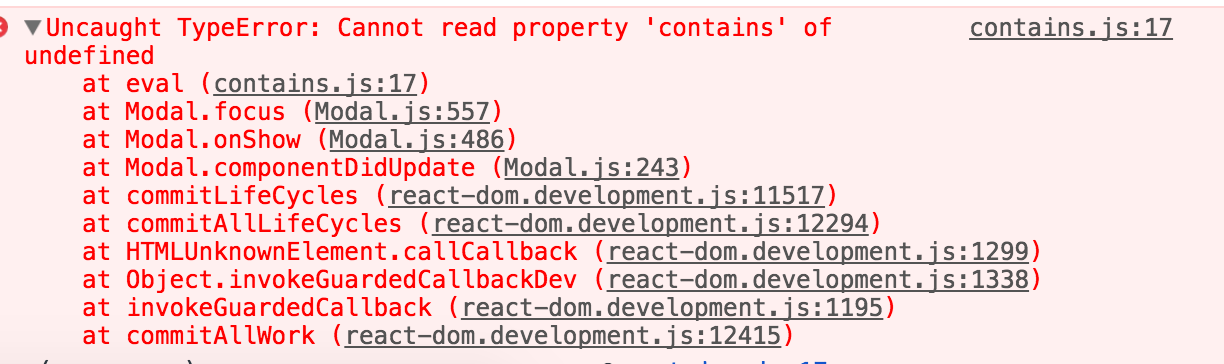
This issue is also discussed on react-overlays
https://github.com/react-bootstrap/react-overlays/issues/188
About this issue
- Original URL
- State: closed
- Created 7 years ago
- Reactions: 125
- Comments: 40 (4 by maintainers)
Commits related to this issue
- disable modals - see: https://github.com/react-bootstrap/react-bootstrap/issues/2812 — committed to cosm1c/health-mesh by cosm1c 7 years ago
- refactor: Applyed suggestions from code review. I have changed package.json for not accept React up than version 15 (https://github.com/react-bootstrap/react-bootstrap/issues/2812) to try to fix the e... — committed to juliozimmermann/udacity-readable by deleted user 7 years ago
- Improved cache control and React Modal fix - Fixed a bug which prevented modals from opening up after upgrading to React 16. For more information, see: https://github.com/react-bootstrap/react-bo... — committed to galadhremmin/Parf-Edhellen by galadhremmin 7 years ago
- Revert upgrade to React 16 due to broken react-bootstrap modals. (See Github issue https://github.com/react-bootstrap/react-bootstrap/issues/2812) This reverts commit d9b0d77e3f14c2d2619506958b2e3b8... — committed to metamorph-inc/openmeta-mms by jonathonw 7 years ago
- Revert upgrade to React 16 due to broken react-bootstrap modals. (See Github issue https://github.com/react-bootstrap/react-bootstrap/issues/2812) This reverts commit d9b0d77e3f14c2d2619506958b2e3b8... — committed to metamorph-inc/openmeta-visualizer by jonathonw 7 years ago
There is no good fix until we can upgrade the underlying portal component to the new react v16 api, which is almost done, we are working through some api considerations in the PR until then tho the modal isn’t supported in v16
As a workaround one can create new component
Or maybe someone has better solution would be nice.
version 0.7.3 of react-overlays seems to have fixed the issue.
I reinstalled react-bootstrap from npm (which grabbed the new react-overlays version) and it seems to work now with React 16.
well I just had to run on my terminal $ npm install --save react@15.6.2 react-dom@15.6.2 and this sorted out all my problems
@jahlela I got the same issue.
It appears that upon React 16, a click on Modal’s close sign (or a click outside Modal) that should have triggered
this.closeModalonly, now triggers not onlythis.closeModalin Modal component, but also thethis.openModalin the outer wrapper of Modal.I temporarily fixed it by moving Modal out of its wrapper by returning an array of both the wrapper/trigger and the Modal instead. You may try something as follows:
I suppose there should be some fix to Modal to reverse the incompatibility.
I used shim for react overlay modal inspired by https://github.com/react-bootstrap/react-overlays/issues/188#issuecomment-332554814
Same issue here. Then I go back to
reactandreact-domv15.6.2, everything works well.Given that we are loosing mount transitions when hacking it with a shim, and after messing with the transition api provided with react-overlays, I came to a conclusion that using new react portals is the best (and easiest) solution to hack your own modal, PS animating with react-motion
Here I made an example repo if anyone is interested https://github.com/touqeerkhan11/react-portal-example (demo https://touqeerkhan11.github.io/react-portal-example/)
Same here. When will there be an upgrade for
react-overlaysso that overlays are compatible withreact16? Meanwhile compelled to downgrade React back to v15.5.4.Looks like this is how third party plugins suspend penetration of progress)
After updating react-overlay npm, I confirmed that it works fine with React 16 on local development.
But I am using cdnjs.com on production. The react-bootstrap 0.31.3 hosted on cdnjs is bundling the old react-overlay npm. https://cdnjs.com/libraries/react-bootstrap
I’m happy that you can also update CDN.
@anaumov Thank you for the Modal shim - it got my project working again. However, I had to make a couple of changes to it to check if
thisexists becausethiswas undefined even incDMandcDU:And, the shim is still throwing an error onHide:
Hope this helps someone!
I just lost the mount animation by using this… But its working though with r16 so thats good
This is in fact fixed. Wipe cache and reinstall w/the latest react-overlays dep.
note for
yarnusers: you may have to remove, then addreact-bootstrapfor the dependencies to properly update.Working for me now, thanks for the updates!
An alternative to the show (until it gets fixed) is just wrap the modal in an if statement which is toggled in state change
The only downside is the click-outside-box-to-close won’t work but you can still add a ‘close’ button in the modal that will trigger the hide
If it helps to anyone, I was having this issue after upgrading react, then checked the react-bootstrap package.json file and found this:
So I downgraded the versions to the ones required and now it works fine.
I understand this is not a final solution, but if you don’t need the last React version, this could help.
Is this actually fixed? Would someone mind giving a simple example please of a modal that implements the onExited event and the “show” property? I can’t find the syntax to make it work.
thanks
I’ve upgraded my codebase to React 16.
I got the modals working, but the background is not darkened around the modal.
Also, the “show” argument doesn’t seem to work.
Hey folks! I’m upgrading to React16 and also ran into the
Cannot read property 'contains' of undefinederror when trying to open a react-bootstrap modal. I followed the aboveadvice to delete package-lock.json and reinstallreact-bootstrap@^0.31.3. Now my modal opens as expected, but the onHide is no longer working for click events (Close button, x in the corner, and outside the modal). Using thisesckey is the only way to dismiss the modal.The only thing that has changed is the upgrades for react and react-bootstrap, so I’m wondering if there is another step I missed?
Thanks!
Really impressive turnaround on this issue! Kudos to the maintainers and also the community.
Hello - I ran into this issue last night…
Here is a very simple demo app that does a few things:
Hope you get this sorted out soon - Cheers!
@gtwilliams03 Same problem here…