rclone: SFTP - error couldn't connect SSH: ssh: handshake failed: ssh: unable to authenticate, attempted methods [none], no supported methods remain
What is the problem you are having with rclone?
Error while trying to connect into specific SFTP.
What is your rclone version (output from rclone version)
rclone v1.51.0
- os/arch: linux/amd64
- go version: go1.13.7
Which OS you are using and how many bits (eg Windows 7, 64 bit)
Linux - Ubuntu
Which cloud storage system are you using? (eg Google Drive)
SFTP
The command you were trying to run (eg rclone copy /tmp remote:tmp)
rclone lsd remote_sftp:
A log from the command with the -vv flag (eg output from rclone -vv copy /tmp remote:tmp)
2020/04/27 23:03:33 DEBUG : pacer: low level retry 7/10 (error couldn’t connect SSH: ssh: handshake failed: ssh: unable to authenticate, attempted methods [none], no supported methods remain) 2020/04/27 23:03:44 DEBUG : pacer: low level retry 8/10 (error couldn’t connect SSH: ssh: handshake failed: ssh: unable to authenticate, attempted methods [none], no supported methods remain) … 2020/04/27 23:04:04 Failed to create file system for “XXXXXX:”: NewFs: couldn’t connect SSH: ssh: handshake failed: ssh: unable to authenticate, attempted methods [none], no supported methods remain
More information: FileZilla is working also sftp command line (OpenSSH).
/etc/ssh/ssh_config
Host *
   PasswordAuthentication yes
rclone.config
[c_sftp]
type = sftp
host = sftp.XXXXX.com
user = YYYY
pass = XXXXXXXXXX
disable_hashcheck = true
set_modtime = false
About this issue
- Original URL
- State: closed
- Created 4 years ago
- Reactions: 1
- Comments: 23 (9 by maintainers)
Commits related to this issue
- sftp: implement keyboard interactive authentication - fixes #4177 Some ssh servers are set up with keyboard interactive authentication which previously the sftp backkend was ignoring. — committed to rclone/rclone by ncw 4 years ago
- sftp: implement keyboard interactive authentication - fixes #4177 Some ssh servers are set up with keyboard interactive authentication which previously the sftp backkend was ignoring. — committed to negative0/rclone by ncw 4 years ago
I had this issue with the rclone version from ubuntu
Updated to
v1.62.2through the script installation resolved the issue 👍.I have same problem:
This server uses publickey authentication:
I had similar/same issue using current Ubuntu distribution version:
on SSH access to local container using public key auth. Upgrading to latest executable from website fixed this for me.
Thank you.
NICE! fixexd! both config works!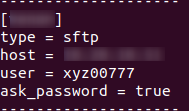
 Good Job 😃
still dont working 😦 i also tried it with remove the ask apssword and used the ask password advanced config of sftp remote setup