ray: [Core] Actors leaking memory
What happened + What you expected to happen
I noticed an issue in production with our ray server continually chewing up more and more memory:

So I went and made a small reproduction of our ray setup showing that actors are not releasing memory when they should.
Versions / Dependencies
ray==1.12.0
python==3.8.5
Reproduction script
The important part here is prior to the main section. The main code simply validates this behaviour in and out of local_mode, with different num_cpu values. Our case is that we have a stateful actor. We set its state once, and then use this state to do repeated evaluations of a function at different coordinates. However, we do not get our memory back after removing this state.
from collections import defaultdict
import os
import logging


import psutil
import ray
import numpy as np
import matplotlib.pyplot as plt

logging.basicConfig(level=logging.INFO)


@ray.remote
class Actor:
    def __init__(self):
        self.something_to_store = None

    def set_something(self, something_to_store):
        self.something_to_store = something_to_store

    def compute(self):
        return 1


def simulate_call(workers, pass_object):
    something_to_store = {"data": np.random.random((100000, 2)).tolist()}
    if pass_object:
        ray.get([w.set_something.remote(something_to_store) for w in workers])
    results = ray.get([w.compute.remote() for w in workers])
    return results


if __name__ == "__main__":

    print(f"Starting memory test with versio {ray.__version__}")
    results = defaultdict(list)
    process = psutil.Process(os.getpid())
    num_samples = 100
    scale = 1024**2

    # This is just iterating through parameters so I can check the memory issue is consistent
    for num_cpu in [1, 2, 4]:
        for local_mode in [True, False]:
            if ray.is_initialized():
                ray.shutdown()
            ray.init(num_cpus=num_cpu, num_gpus=0, include_dashboard=False, local_mode=local_mode)
            for pass_object in [True, False]:
                workers = [Actor.remote() for _ in range(num_cpu)]
                baseline = process.memory_info().rss / scale
                key = f"{pass_object=} {num_cpu=} {local_mode=}"
                print(key)
                while len(results[key]) < num_samples:
                    simulate_call(workers, pass_object)
                    results[key].append(process.memory_info().rss / scale - baseline)

    # Plotting out the memory usage as a function of iteration
    fig, axes = plt.subplots(nrows=2, sharex=True)
    for k, v in results.items():
        p = "pass_object=True" in k
        l = "local_mode=True" in k
        ax = axes[0] if l else axes[1]
        ax.plot(v, label=k, ls="--" if p else "-")
        ax.text(num_samples * 1.05, v[-1], k)
    axes[1].set_xlabel("Iteration")
    for ax in axes:
        ax.set_ylabel("Delta Memory usage (MB)")
        ax.set_xscale("log")
    fig.savefig("memory_usage.png", dpi=300, bbox_inches="tight")
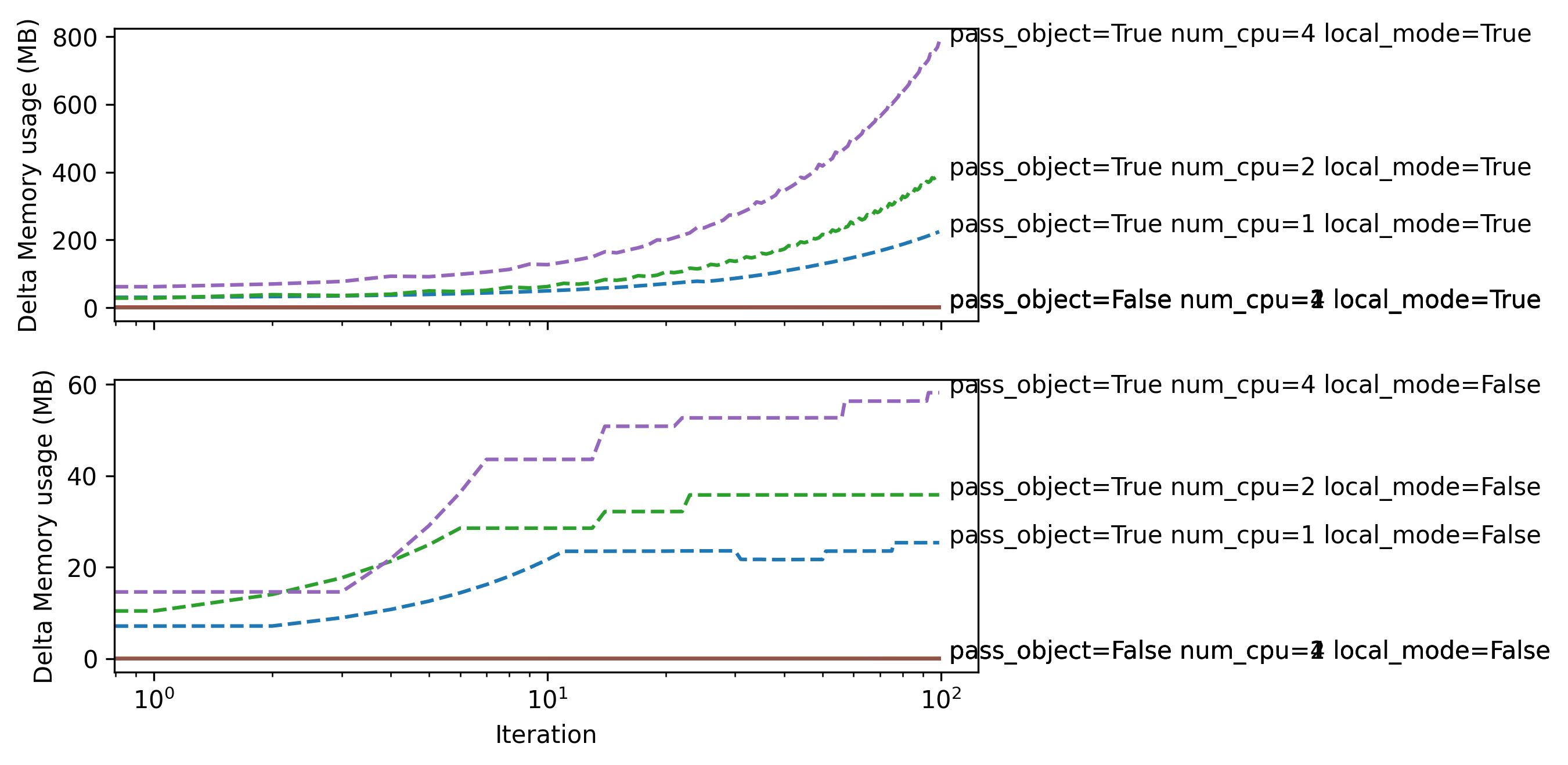
Running this script produces this output on my machine. When pass_obejct=False, we have no memory issues at all, because we never set the actor’s state. Then, we can see that the memory used by ray continually increases when local_mode=True,and it appears the state sent to the actors is never freed, even when the reference to something_to_store is updated and the old reference is lost. (Note this increase in memory is linear with iteration, I have the scale set to log). When local_mode=False, the state is sometimes freed, but still shows growing memory over time, when I would expect it to hold a single reference to the state at a given time, and then when this is freed, for the memory usage to return to the pass_object=False baseline.
Local mode results shown on top. Normal mode shown on bottom.
I have also tried:
- Explicitly calling
delon thesomething_to_storeobjects, both in the actors and outside. - Implementing a shutdown method on the actors to call after gathering the results to both
deland set the state to None - Explicitly calling
ray.killon the actors
However none of these free the memory that was originally allocated.
Issue Severity
High: It blocks me from completing my task.
About this issue
- Original URL
- State: closed
- Created 2 years ago
- Reactions: 4
- Comments: 16 (8 by maintainers)
Commits related to this issue
- Mark local mode as deprecated with warning message about possible memory leak (#26855) Mark local mode as deprecated with a warning message. Related issue number #24216 #26095 — committed to ray-project/ray by clarng 2 years ago
- Mark local mode as deprecated with warning message about possible memory leak (#26855) Mark local mode as deprecated with a warning message. Related issue number #24216 #26095 Signed-off-by: nanqi.... — committed to alipay/ant-ray by clarng 2 years ago
- Mark local mode as deprecated with warning message about possible memory leak (#26855) Mark local mode as deprecated with a warning message. Related issue number #24216 #26095 Signed-off-by: klwuib... — committed to yuanchi2807/ray by clarng 2 years ago
- Mark local mode as deprecated with warning message about possible memory leak (#26855) Mark local mode as deprecated with a warning message. Related issue number #24216 #26095 Signed-off-by: Catch-... — committed to alipay/ant-ray by clarng 2 years ago
- Mark local mode as deprecated with warning message about possible memory leak (#26855) Mark local mode as deprecated with a warning message. Related issue number #24216 #26095 Signed-off-by:... — committed to Rohan138/ray by clarng 2 years ago
- Mark local mode as deprecated with warning message about possible memory leak (#26855) Mark local mode as deprecated with a warning message. Related issue number #24216 #26095 Signed-off-by:... — committed to franklsf95/ray by clarng 2 years ago
- Mark local mode as deprecated with warning message about possible memory leak (#26855) Mark local mode as deprecated with a warning message. Related issue number #24216 #26095 — committed to gramhagen/ray by clarng 2 years ago
- Mark local mode as deprecated with warning message about possible memory leak (#26855) Mark local mode as deprecated with a warning message. Related issue number #24216 #26095 Signed-off-by: Stefan... — committed to Stefan-1313/ray_mod by clarng 2 years ago
Hi there, We are seeing a very similar issue. After running
ray.tunejobs, the memory on the head node never goes back down to what it was before the job was run. We are running ray tune on a kuberay cluster. The helm chart is adapted from https://github.com/ray-project/kuberay/blob/master/ray-operator/config/samples/ray-cluster.complete.yaml. Let me know if the helm chart we’re using would be helpful. We were able to reproduce this with a Ray tune example (below).We’ve noticed that there are idle workers that remain on the head node after the HPO tune jobs. If we kill those processes manually, the memory will go down but not back to the same level as before running the job.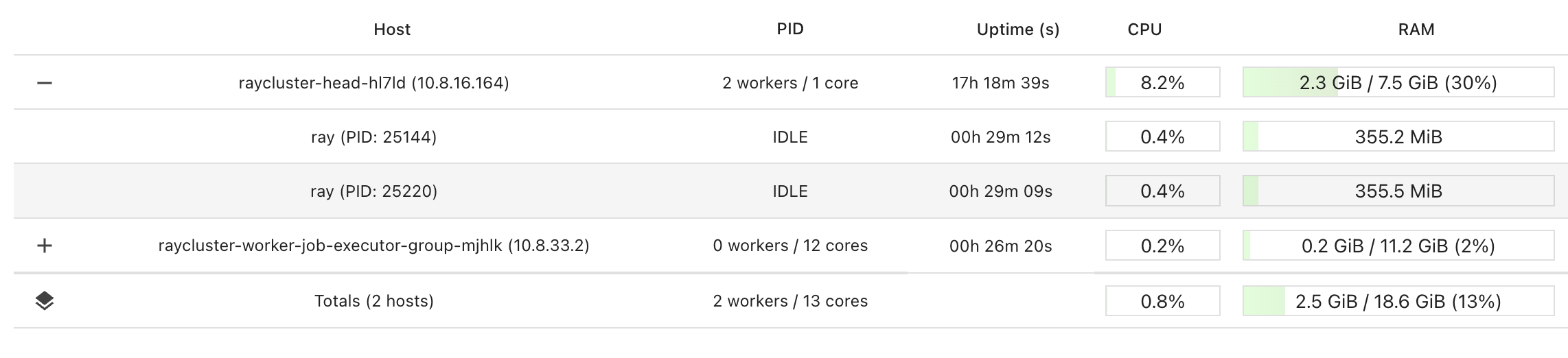
To reproduce:
Hey @Samreay I have had no bandwidth to take a look at this issue, but I will take it over shortly. Please remind me if I don’t update the status in 2 weeks.