rancher-desktop: docker socket not available after sleep/wake
⚠️ Workaround for this issue ⚠️
If your docker socket (or file mounts) are broken in this way, please quit “Rancher Desktop” and start it again.
Rancher Desktop Version
1.0.0-beta1
Rancher Desktop K8s Version
1.22.5
What operating system are you using?
macOS
Operating System / Build Version
12.1
What CPU architecture are you using?
arm64 (Apple Silicon)
Linux only: what package format did you use to install Rancher Desktop?
N/A
Windows User Only
No response
Actual Behavior
Client docker on macOS loses the sock connection with the docker agent on Lima VM. It happens after sleep wake process
macOS terminal
:~/ $ docker info                                                                                                                                                                                                               [9:27:08]
Client:
 Context:    default
 Debug Mode: false

Server:
ERROR: Cannot connect to the Docker daemon at unix:///var/run/docker.sock. Is the docker daemon running?
errors pretty printing info
when I connect to the lima VM and run docker info:
docker info
Client:
 Context:    default
 Debug Mode: false

Server:
 Containers: 11
  Running: 0
  Paused: 0
  Stopped: 11
 Images: 77
 Server Version: 20.10.11
 Storage Driver: overlay2
  Backing Filesystem: extfs
  Supports d_type: true
  Native Overlay Diff: true
  userxattr: false
 Logging Driver: json-file
 Cgroup Driver: cgroupfs
 Cgroup Version: 1
 Plugins:
  Volume: local
  Network: bridge host ipvlan macvlan null overlay
  Log: awslogs fluentd gcplogs gelf journald json-file local logentries splunk syslog
 Swarm: inactive
 Runtimes: io.containerd.runc.v2 io.containerd.runtime.v1.linux runc
 Default Runtime: runc
 Init Binary: docker-init
 containerd version: 1e5ef943eb76627a6d3b6de8cd1ef6537f393a71
 runc version: b9ee9c6314599f1b4a7f497e1f1f856fe433d3b7
 init version:
 Security Options:
  seccomp
   Profile: default
 Kernel Version: 5.10.88-0-virt
 Operating System: Alpine Linux v3.14
 OSType: linux
 Architecture: aarch64
 CPUs: 4
 Total Memory: 5.79GiB
 Name: lima-rancher-desktop
 ID: NRV2:C6GL:E4XF:CK4L:HIZZ:6EM4:3ERM:CCWW:DHGH:7F7F:CTIJ:WUMC
 Docker Root Dir: /var/lib/docker
 Debug Mode: false
 Registry: https://index.docker.io/v1/
 Labels:
 Experimental: false
 Insecure Registries:
  127.0.0.0/8
 Live Restore Enabled: false
Steps to Reproduce
- Select the dockerd engine option
- Put the macOS on sleep mode for more than 1~ hour
- Turn it on again and run any docker related command on macOS
Result
/ $ docker info                                                                                                                                                                                                               [9:27:08]
Client:
 Context:    default
 Debug Mode: false

Server:
ERROR: Cannot connect to the Docker daemon at unix:///var/run/docker.sock. Is the docker daemon running?
errors pretty printing info
Expected Behavior
After awake daemon should be reachable via socket
Additional Information
I need directions regarding which information would be helpful for troubleshooting this. Same behavior foud in the issue #1119
About this issue
- Original URL
- State: open
- Created 2 years ago
- Reactions: 54
- Comments: 67 (5 by maintainers)
I tried to make a symbolic link to file docker.sock in
~$USER/.rd/docker.sockand its work fine. Try this:It is fine here. I already started looking into it, and even reproduced the error once (after 3 days) on my M1 mini, but unfortunately had to reboot it to finish some work for the upcoming release, which is almost done now.
It will be my top priority to look into this problem once 1.1.0 has shipped.
I have gotten this with 0.7.1 and 1.0.0.beta.1, Mac OS 12.1 on Intel. Quitting and restarting Rancher Desktop fixes but is an annoyance. Biggest (and really only) gripe with Rancher Desktop.
Wanted to report that I have had this happen after I upgraded to 1.0.0 (MacOS 11.2.2, Intel). Restarting Rancher Desktop works but is a pain.
Intel MacBook Pro on power-supply (shouldn’t sleep), MacOS 12.2.1, RD 1.0.1
I left a docker run unattended over night and it seems I got kicked out of the container:
If I look at the logs, it seems to have happened around 2022-02-16T22:24:41.057Z, I wasn’t in front of the Mac
images.log:
lima.ha.stderr.log shows the following (time shift probably due to timezone?)
[EDIT: lima.log was classified as “binary” by VS Code, hence I didn’t look at it earlier. Turns out it has something legible in it…]
lima.log is a single line, with a lot of NUL characters in front of it.
as hexdump:
Other logs are either empty or don’t have anything for that time.
I hope this helps narrowing it down. If you think this is a different issue, I’m happy to create a new one for this.
Having the same issue with RD 1.0.0 (MacOS 12.1, Intel). After a long while dockerd becomes unavailable, not sleeping is required. Restarting RD brings dockerd back.
I’ve noticed this does not always happen after sleep (sometimes it continues to function), but also, it sometimes happens when the system has not slept, i.e. it’ll just sorta die. So it may not be caused by sleep/wake. As before, quit and restart fixes on 1.0.0.beta.1 Mac OS 12.1 Intel. Have not found any useful info in logs but I’ve been running in debug mode for a few days now.
There seems to be a mix of responses: for some this issue was fixed in RD 1.1.1 already, but others still experience it with 1.2.1. In the upcoming 1.3.0 release (hopefully later this week), we have a change to use
sftp-serverinstead of the built-in server in the Lima Host Agent. I only see this making a difference for the host mounts, but not for the forwarded sockets, but we’ll see…It would be helpful if everyone still experiencing this issue could try 1.3.0 (once released) and report if continue to have this problem or not! Thank you!
Ever since upgrading to Rancher Desktop v1.1.1 about 4 days ago I have not seen this problem any longer. This on a MacBook Pro Intel. MacOS v11.6.1
My system has been on/off network. sleep. joining different networks (traveling) and docker and k8s inside Rancher Desktop has been running without issues.
@mrballcb I think you might be onto something. After stopping k3s in a manner similar to rancher_k3s_stop.sh, dockerd has been accessible by the docker cli for over 24 hours without a restart on macOS Catalina—a record for me (but I’ll respond if my luck changes 😃
For reproducibility, the above gist appears to assume
limactlis in one’s PATH—which it wasn’t for me, so expanding on https://github.com/rancher-sandbox/rancher-desktop/issues/985#issuecomment-1026186522 I used:A few days before this, I had also tried stopping kubernetes per the method listed in the Rancher Desktop FAQ
but that didn’t resolve the issue.
I experience this daily on 1x MacBook Pro M1 2020, 2x Mac Mini M1 and 2x Mac Mini x86. My MacBook Pro is going to sleep so that might be related but the other four Mac Minis are used for CI and always on. I don’t use Docker for any running services, it’s only used when CI needs Docker to perform specific tasks. Sometimes there is no communication with the Docker daemon for over 24 hours.
This happens under macOS version 10.15.6, 11.1, 12.0.1 and 12.2 so it does not seem related to a specific OS version.
About 18 hours ago I restarted Rancher Desktop from the command line on all four Mac Minis. Today, all of them had lost connection to the daemon, easiest shown by just running:
Killing the remaining processes and restarting Rancher Desktop solves the issue:
I have not done any change or configuration meaning that by default I also run the default Kubernetes feature.
Maybe the very little actual use of Docker and the daemon might be the reason? However, since the Kubernetes feature is enable I’m constantly running at least the 11 default containers so it doesn’t feel very likely.
I can also provide any kind of logs or testing that might help you.
You could try this:
I had this happen to me yesterday after a day of working (~8 hours) and my computer not going to sleep. Rancher version 0.7.1.
That work-around worked for me. As one-line:
~/.rd/bin/rdctl shell sudo /etc/init.d/docker restartI also needed
export DOCKER_HOST=unix://$HOME/.rd/docker.sockFor me, I had to start docker daemon in the lima vm after creating the symlink.
Once that was done everything was fine. Maybe I missed that step somewhere in the docs.
Same issue’s happening here 😞
Rancher Desktop Version 1.4.1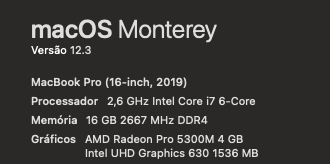
So, an interesting change in behavior: I am one of those that just needs the docker portion of Rancher Desktop. I found a stop_k3s shell script somewhere in a Rancher Desktop issue and last Friday morning I ran it after starting up Rancher Desktop. This evening I realized I have not had to restart Rancher Desktop on Sat, Sun, or today (Mon), and I unslept my MBPro each day. It worked all day long today, which has never happened before.
I haven’t dug into it, but at this point it seems that stopping k3s has changed something for me, for the better.
BTW, my collection of comments and observations is at https://gist.github.com/mrballcb/9996e94b7bf357dc8e70d1692d57da29
I’m having this issue as well. Every morning when I open my laptop, all
dockercommands fail with:Clicking the “Reset Kubernetes” button under “Kubernetes Settings” fixes it, but then I have to restart all my containers.
Here’s my system info: Rancher Desktop version: 1.0.0 MacOS: 11.6.2 (Big Sur) Using the dockerd container runtime Using kubernetes version v1.19.16 Using Rancher to creating symbolic links under
/usr/local/bin/dockerand/usr/local/bin/nerdctl(These checkboxes are selected under “Supporting Utilities”)Every time my laptop sleeps I get the same error.
I tried the ~/.rd/bin/rdctl shell sudo /etc/init.d/docker restart suggestion as well and it also didn’t change anything.
Rancher Desktop 1.8.1 macOS Ventura 13.4
This just happened but does not usually, at least up until now.
I tried the
~/.rd/bin/rdctl shell sudo /etc/init.d/docker restartsuggestion to no avail.I needed to quit Rancher Desktop and launch it again in order for
docker psto work.Rancher Desktop 1.8.1 macOS Ventura 13.3.1
Our mac is running 27/7 we are still affected and we have to restart the rancher-desktop from time to time. Do anyone know how to restart the Rancher-Desktop-UI from commandline? 😄
Have now had this happen once with 1.0.1, i.e. put computer to sleep, after wake the socket was not available; but also, I have had it not happen: Put computer to sleep, after wake everything was fine.
I think this is a duplicate of #716, but keeping both issues open, as there is discussion on both of them.
I tried to just restore the
docker.sockfile, but no success.Command to create the symlink:
ln -sf /var/run/docker.sock $HOME/Library/Application\ Support/rancher-desktop/lima/0/sock/docker