rancher: Unable to set up Rancher Keycloak SAML auth
Hi there,
Rancher versions: rancher/rancher:latest (v2.1)
Infrastructure Stack versions: kubernetes: 1.10.7_1521
Docker version:
Server Version: 18.03.1-ce
Storage Driver: overlay2
 Backing Filesystem: extfs
 Supports d_type: true
 Native Overlay Diff: true
Logging Driver: json-file
Cgroup Driver: cgroupfs
Swarm: inactive
Runtimes: runc
Default Runtime: runc
Init Binary: docker-init
containerd version: 773c489c9c1b21a6d78b5c538cd395416ec50f88
runc version: 4fc53a81fb7c994640722ac585fa9ca548971871
init version: 949e6fa
Kernel Version: 3.10.0-693.21.1.el7.x86_64
Operating System: CentOS Linux 7 (Core)
Operating system and kernel: (cat /etc/os-release, uname -r preferred)
Ref to Docker info above
Type/provider of hosts: (VirtualBox/Bare-metal/AWS/GCE/DO) Other (Virtual Server)
Setup details: (single node rancher vs. HA rancher, internal DB vs. external DB) Single node, internal DB
Environment Template: (Cattle/Kubernetes/Swarm/Mesos) k8s
Steps to Reproduce: Go to https://<your_rancher_url>/g/security/authentication/keycloak Fill the form according to https://rancher.com/docs/rancher/v2.x/en/admin-settings/authentication/keycloak/
My setup:
- Display Name Field = cn
- User Name Field = givenname
- UID Field = uid
- Groups Field = memberof
- Rancher API Host = https://<my_rancher_url>
- And private key + cert + Metada xml from Keycloak Then click on “Authenticate with Keycloak”
Expected Results: As suggested by Rancher, you should be redirected to Keycloak’s login page (pop-up)
Actual Results: A new window pops up, however you are not redirected to Keycloak’s login page but end up on the same URL https://<my_rancher_url>/g/security/authentication/keycloak?RelayState=<really_long_saml_stuff>
Additional observations. Few things I noticed:
- The SAML request is never sent to my keycloak server
- If I compare the SAML GET request from Rancher to a valid SAML GET request from another app, I can see there is no “Destination” attribute in the AuthnRequest tag
<?xml version="1.0" encoding="UTF-8"?>
<samlp:AuthnRequest xmlns:samlp="urn:oasis:names:tc:SAML:2.0:protocol" xmlns:saml="urn:oasis:names:tc:SAML:2.0:assertion" ID="id-60618df5801f187f14af8922069e14379b4a3c52" Version="2.0" IssueInstant="2018-10-08T16:09:14.257Z" AssertionConsumerServiceURL="https://my_rancher_url/v1-saml/keycloak/saml/acs" ProtocolBinding="urn:oasis:names:tc:SAML:2.0:bindings:HTTP-POST">
   <saml:Issuer Format="urn:oasis:names:tc:SAML:2.0:nameid-format:entity">https://my_rancher_url/v1-saml/keycloak/saml/metadata</saml:Issuer>
   <samlp:NameIDPolicy Format="urn:oasis:names:tc:SAML:2.0:nameid-format:transient" AllowCreate="true" />
</samlp:AuthnRequest>
Which might explain 1. 3. If I compare this request to another valid request, I can see the missing “Destination” attribute
<?xml version="1.0" encoding="UTF-8"?>
<samlp:AuthnRequest xmlns:samlp="urn:oasis:names:tc:SAML:2.0:protocol" xmlns:saml="urn:oasis:names:tc:SAML:2.0:assertion" AssertionConsumerServiceURL="myACS_URL" Destination="https://my_keycloak/auth/realms/my_realm/protocol/saml" ID="_4a3d5f17-d8c6-41e5-8393-d5b6e03a73e5" IssueInstant="2018-10-08T16:10:35Z" Version="2.0">
   <saml:Issuer>my_issuer</saml:Issuer>
   <samlp:NameIDPolicy AllowCreate="true" Format="urn:oasis:names:tc:SAML:1.1:nameid-format:emailAddress" />
</samlp:AuthnRequest>
- Contrary to all application for which I set up a SAML auth with Keycloak, I did not provide the “Identity provider SSO URL” to Rancher, even if this information is available in the metadata.xml file provided to Rancher. For ref, the metadata.xml I provided:
<?xml version="1.0" encoding="UTF-8"?>
<EntityDescriptor entityID="https://mykeycloak/auth/realms/my_realm"
                   xmlns="urn:oasis:names:tc:SAML:2.0:metadata"
                   xmlns:dsig="http://www.w3.org/2000/09/xmldsig#"
                   xmlns:xsi="http://www.w3.org/2001/XMLSchema-instance">
   <IDPSSODescriptor WantAuthnRequestsSigned="true"
      protocolSupportEnumeration="urn:oasis:names:tc:SAML:2.0:protocol">
      <SingleLogoutService
         Binding="urn:oasis:names:tc:SAML:2.0:bindings:HTTP-POST"
         Location="https://mykeycloak/auth/realms/my_realm/protocol/saml" />
   <NameIDFormat>urn:oasis:names:tc:SAML:2.0:nameid-format:persistent</NameIDFormat>
   <NameIDFormat>urn:oasis:names:tc:SAML:2.0:nameid-format:transient</NameIDFormat>
   <NameIDFormat>urn:oasis:names:tc:SAML:1.1:nameid-format:unspecified</NameIDFormat>
   <NameIDFormat>urn:oasis:names:tc:SAML:1.1:nameid-format:emailAddress</NameIDFormat>

      <SingleSignOnService Binding="urn:oasis:names:tc:SAML:2.0:bindings:HTTP-POST"
         Location="https://mykeycloak/auth/realms/my_realm/protocol/saml" />
      <KeyDescriptor use="signing">
        <dsig:KeyInfo>
          <dsig:KeyName>key_name</dsig:KeyName>
          <dsig:X509Data>
            <dsig:X509Certificate>my_cert</dsig:X509Certificate>
          </dsig:X509Data>
        </dsig:KeyInfo>
      </KeyDescriptor>
   </IDPSSODescriptor>
</EntityDescriptor>
Maybe that’s just a configuration issue on my side. I’ll gladly submit a PR on Rancher documentation regarding Keycloak conf when I figure this out.
About this issue
- Original URL
- State: closed
- Created 6 years ago
- Reactions: 1
- Comments: 23 (5 by maintainers)
Thanks for your report! We will look at it and if it is a bug, we will try to fix it in 2.1.2
@commiaI I just tried generating a cert using the command from the documentation
All parameters set to default (basically hit enter at each question), pasting the key and cert in Rancher and it’s working just fine.
They are correctly configured. Here is my configuration keycloak side :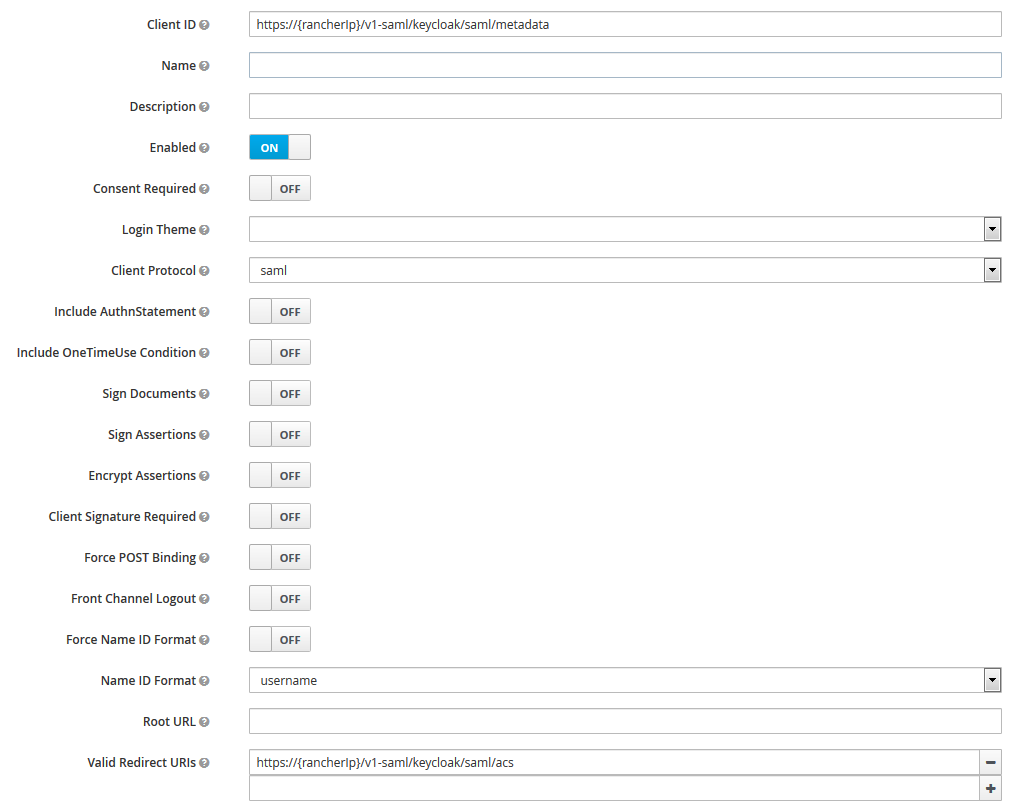
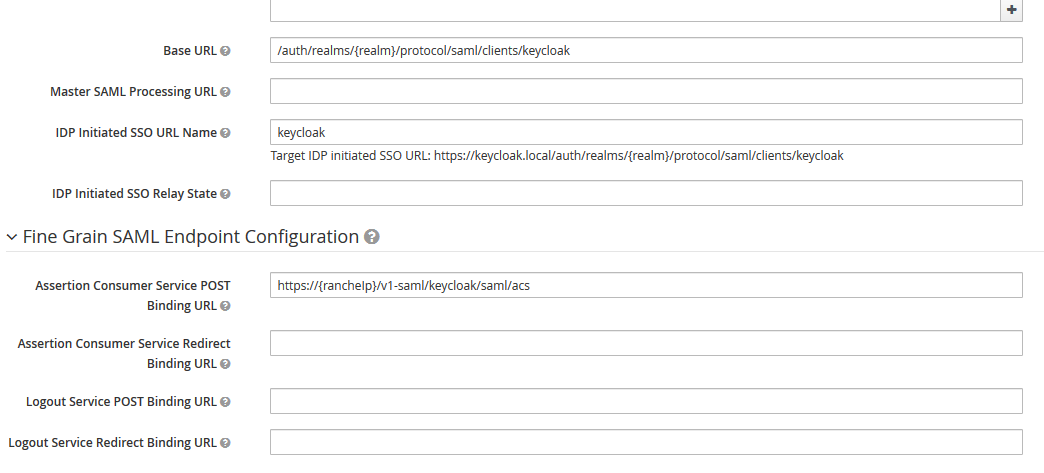
@mrajashree Perfect, that’s working, thanks a lot! I tried so many different conf and somehow I managed not to try with “Force post binding” turned off, shame on me. As I said before, I’ll gladly submit a PR to improve the documentation regarding SAML setup for Keycloak. Do you want me to close this issue anyway and submit the PR later?
@commiaI If you get a 403, check your Keycloak logs, you might have the wrong ClientID in Keycloak. The expected one is: clientId=https://<your_rancher_url>/v1-saml/keycloak/saml/metadata