rancher: "unable to create impersonator account: error getting service account token: serviceaccounts \"cattle-impersonation-system/cattle-impersonation-user-dxx4g\" not found - Error seen for Monitoring and Istio v1 charts and when using downloaded kubeconfig
Rancher Server Setup
- Rancher version: 2.5.9 -> 2.6.0-rc2 upgrade
- Installation option (Docker install/Helm Chart):
- If Helm Chart, Kubernetes Cluster and version (RKE1, RKE2, k3s, EKS, etc): helm install
Information about the Cluster
- Kubernetes version:
- Cluster Type (Local/Downstream): downsteram
- If downstream, what type of cluster? (Custom/Imported or specify provider for Hosted/Infrastructure Provider):
Describe the bug
when a user is logged in as admin, all monitoring v1 (v0.2.2) links are not working.
To Reproduce
- deploy rancher server v2.5.9
- on a downstream cluster, install monitoring (latest version, v0.2.2)
- grant a standard user permissions to this cluster i.e.
cluster ownerbefore the upgrade (see additional context) - verify that prometheus/grafana links are working
- grant a standard user permissions to this cluster i.e.
- upgrade rancher to v2.6.0-rc2
Result
"status":500,"statusText":"","data":"unable to create impersonator account: error getting service account token: serviceaccounts \"cattle-impersonation-system/cattle-impersonation-user-dxx4g\" not found from both prometheus and grafana.
Expected Result
monitoring v1 should continue to work after an upgrade
Screenshots
Additional context
- as a standard user that was created + added to the cluster before the upgrade, I am able to access monitoring v1 apps (prom, grafana) after the upgrade.
About this issue
- Original URL
- State: closed
- Created 3 years ago
- Comments: 15 (8 by maintainers)
Understanding the issue and PR fix: I reviewed the PR - the commit message explains the change that resolved this issue:
I also synced with Colleen to ensure I understand the change. Paraphrasing from what she mentioned to me: Basically, the problem we were seeing here was that if you created a cluster as a standard user then upgraded Rancher and then tried to access the cluster as the admin user, the mechanism for user impersonation would correctly dynamically create an impersonation service account for the admin user in the cluster, but the cached list of service accounts was not being updated. Basically this causes a stale cache. The object that holds the cache was only being created once at initialization and was NOT getting refreshed when requests were made later, so the code was modified so that this should refresh correctly upon each request.
When testing, I can deploy system charts like Istio and monitoring as mentioned prior. This is one way to test that the issue is fixed. We’ll also check that we can log in with kubectl/kubeconfig (with kubeconfig-generate-token = false) as this is another way to test effectively the same thing.
My checks PASSED
Reproduction Steps:
Not required. The issue has been reproduced several times by QA - each repro being 100% successful each time before the change (issue was not intermittent). I also discussed the issue with Sowmya.
Validation Environment:
Rancher version: 2.5.9 to v2.6-head
b43e4d9558/24/21 Rancher cluster type: HA, RKE v1.2.11 (this version is recommended for 2.5.9) Helm version: v3.3.4 Cert Manager version: v1.0.4 Certs: Self-signed Install command: (Installed via QA Jenkins ha-deploy job)Downstream cluster type: rke1 (rancher-provisioned with DO node driver) Downstream K8s version: v1.20.9 Downstream Notes: Created one cluster with admin user and one with standard user. The standard user created cluster should be accessible by the admin user post upgrade now when testing.
Validation steps:
For each downstream cluster created, create with 1 node with the etcd role, 1 node with the control plane role, 3 nodes with the worker role. These downstream clusters I created were with the DO node driver, 2vcpu 4gb for each node.
Install Rancher HA 2.5.9. Create a standard user. Create 1 cluster as the admin user. Create 1 cluster as the standard user. The admin cluster should have the standard user added as a cluster owner after cluster creation.
As the standard user, deploy monitoring and istio to the two clusters. Monitoring 0.2.2. Istio 1.5.901. Ensure the standard user can access monitoring grafana and istio links (kiali, jaeger, grafana, prometheus) (to ensure this works before upgrade).
Upgrade HA Rancher to v2.6-head
b43e4d955I did this in QA Jenkins with the ha-upgrade jobLog in as the ADMIN user, ensure the user is able to view details for both clusters. I see monitoring is working. Ensure the user is able to access Monitoring grafana. Ensure the user is able to access Istio links (kiali, jaeger). This works without any issues. NOTE: There is an error attempting to access Jaeger UI, but this appears to be unrelated to this specific issue.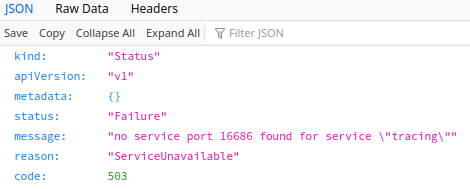 A bug will be filed for this separate issue. (To be linked here once issue is created)
Go to Global Settings, set kubeconfig-generate-token = false
Attempt to access kubectl client in the browser for both clusters. This works now. I am able to get nodes, list pods, etc. Note: To do this, you need to download the appropriate rancher cli and get this on your path. kubectl will use this for the authentication.
Additional Info: During all testing, monitor UI requests/responses for all POSTs/PUTs - ensure this looks good. No issues observed. During all testing, monitor rancher logs with kubetail. No issues observed. During testing, smoke tested a few other areas of the UI - ensured everything is accessible by the admin user, then checked with standard as well. No issues for either user in both clusters.
Setup provided to @cmurphy in an offline conversation.