rancher: Stuck on "Waiting to register with Kubernetes"

After add a node, the state of it stuck on “Waiting to register with Kubernetes”. Though it has registered if I use docker logs to see the kubelet log. And I can also deploy a new workload. (Aha I deploy a wordpress and it works well.

I cannot see any information about the nodes and cluster because the cluster has only this node.

I have checked every port required is open and the wss works well too.


|Versions|Rancher v2.0.2 UI: v2.0.48 | |Access|local admin| |Route|authenticated.cluster.nodes.index|

About this issue

  • Original URL
  • State: closed
  • Created 6 years ago
  • Reactions: 5
  • Comments: 37 (8 by maintainers)

Most upvoted comments

just wait some times…it will be ok

I appear to have just run into the same problem? I have 4 physical machines 1 - Rancher/Server 3 - Nodes in 1 cluster

Adding the first node to the cluster is fine, but adding any additional nodes to the same cluster fail. “Waiting to register with Kubernetes”

RancherOS v1.5.0 Rancher v2.1.6 Docker 18.06.1-ce, build e68fc7a

Error From Rancher Server UI: This cluster is currently Updating; areas that interact directly with it will not be available until the API is ready. [network] Host [10.10.0.6] is not able to connect to the following ports: [10.10.0.7:2379, 10.10.0.8:2379, 10.10.0.8:2380, 10.10.0.6:2379]. Please check network policies and firewall rules

screen shot 2019-02-21 at 1 34 38 am

Is 2379 only listening on ipV6 here in RancherOS? I ran sudo iptables -A INPUT -i eth0 -p tcp --dport 2379 --src 10.10.0.0/24 -j ACCEPT sudo iptables-save

But it doesn’t appear to persist between reboots, so I’m thinking this could be the problem. Will report back.

@portfield-slash Aha, I have tried. But it’s still registering. 😦

I’m stuck in a similar situation and believe that I’ve reproduced the issue.

At first, I had 2core2gb local KVM virtual machines. When running the Node Run Command provided in Rancher UI:

sudo docker run -d --privileged --restart=unless-stopped --net=host -v /etc/kubernetes:/etc/kubernetes -v /var/run:/var/run rancher/rancher-agent:v2.1.5 --server https://172.20.3.13:8443 --token zw58zqr8f8v8qsthprn7kc4dgrp6tj9hpl2jk86l8lklk8dmfqkvsv --ca-checksum 1c96c8817d767c3a34e8868e557edc1d27d8b2b3ceea1397c98757f95c34c13f --worker

I get the “Waiting to register with Kubernetes” message and stuck. image
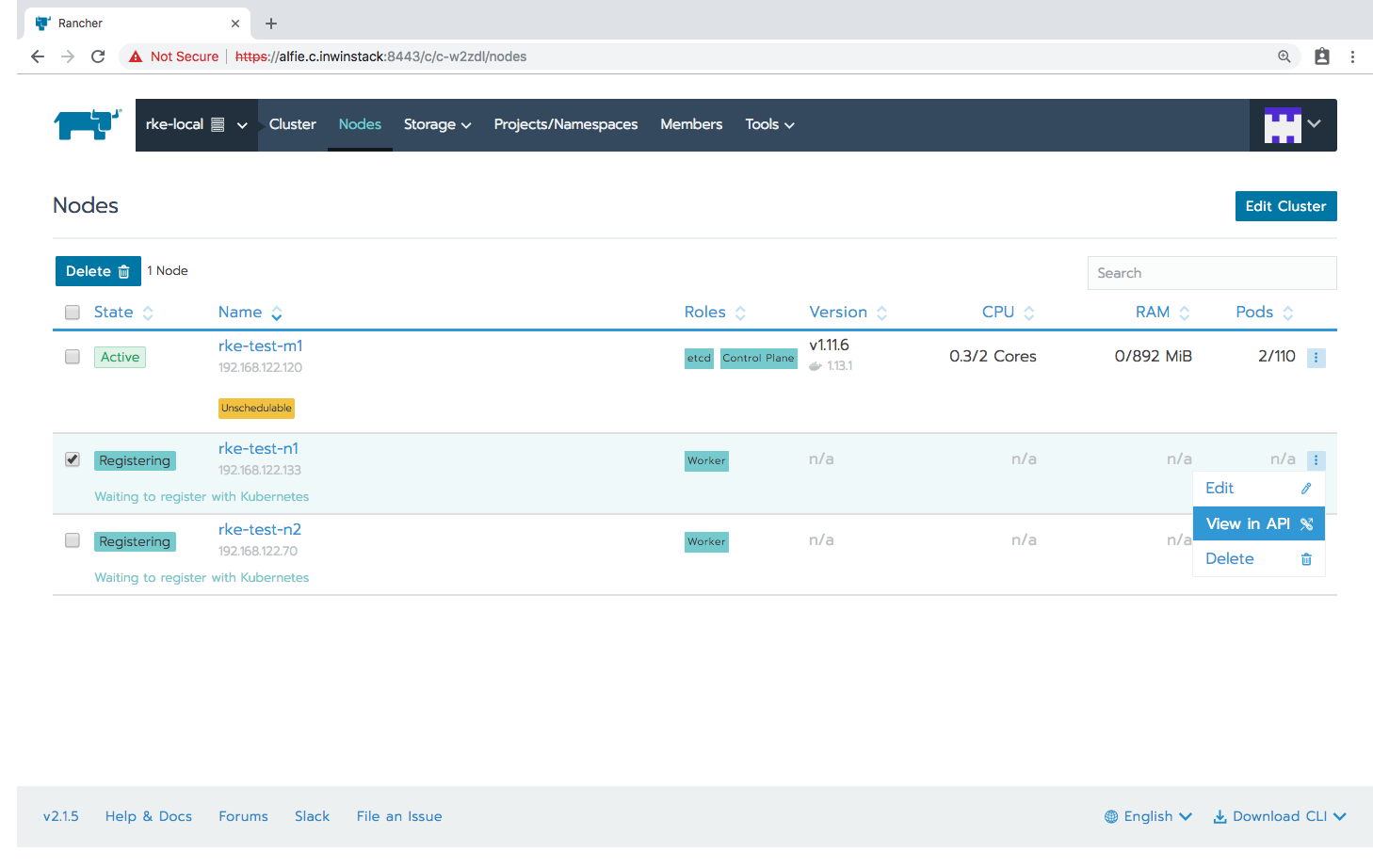
Not sure if this helps but here’s everything from the “View in API” tab:

{
"baseType": "node",
"clusterId": "c-w2zdl",
"conditions": [ 3 items
{
"status": "True",
"type": "Initialized"
},
{
"message": "waiting to register with Kubernetes",
"status": "Unknown",
"type": "Registered"
},
{
"status": "True",
"type": "Provisioned"
}
],
"controlPlane": false,
"created": "2019-02-11T06:03:13Z",
"createdTS": 1549864993000,
"creatorId": null,
"customConfig": {
"address": "192.168.122.133",
"type": "/v3/schemas/customConfig"
},
"dockerInfo": {
"debug": false,
"experimentalBuild": false,
"type": "/v3/schemas/dockerInfo"
},
"etcd": false,
"id": "c-w2zdl:m-5947d2c8ab82",
"imported": true,
"info": {
"cpu": {
"count": 0
},
"kubernetes": {
"kubeProxyVersion": "",
"kubeletVersion": ""
},
"memory": {
"memTotalKiB": 0
},
"os": {
"dockerVersion": "",
"kernelVersion": "",
"operatingSystem": ""
}
},
"ipAddress": "192.168.122.133",
"links": {
"remove": "…/v3/nodes/c-w2zdl:m-5947d2c8ab82",
"self": "…/v3/nodes/c-w2zdl:m-5947d2c8ab82",
"update": "…/v3/nodes/c-w2zdl:m-5947d2c8ab82"
},
"name": "",
"namespaceId": null,
"nodePoolId": "",
"nodeTemplateId": null,
"requestedHostname": "rke-test-n1",
"sshUser": "root",
"state": "registering",
"transitioning": "yes",
"transitioningMessage": "waiting to register with Kubernetes",
"type": "node",
"unschedulable": false,
"uuid": "b739a6c0-2dc2-11e9-ad2c-0242ac110002",
"worker": true
}

Heading to the machine rke-test-n1, docker logs for the rancher/rancher-agent container repeatedly shows:

time="2019-02-13T03:32:37Z" level=info msg="Connecting to wss://172.20.3.13:8443/v3/connect with token zw58zqr8f8v8qsthprn7kc4dgrp6tj9hpl2jk86l8lklk8dmfqkvsv"
time="2019-02-13T03:32:37Z" level=info msg="Connecting to proxy" url="wss://172.20.3.13:8443/v3/connect"
time="2019-02-13T03:33:00Z" level=info msg="Starting plan monitor"
time="2019-02-13T03:33:10Z" level=error msg="Failed to connect to proxy" error="read tcp 192.168.122.133:34638->172.20.3.13:8443: i/o timeout"

image


Referring to @superseb’s comment

the recommendation for small clusters is 2 vCPU and 4GB RAM

I later shutdown the workers (rke-test-n1 and rke-test-n2) and upgraded the specs in KVM to 2core4gb for both of them, then reboot. docker ps shows the containers restarted into a freshly UP status, yet the logs still remains as before. image


Requested info from issue template (for worker nodes): Docker version: (docker version,docker info preferred)

Client:
 Version:         1.13.1
 API version:     1.26
 Package version: docker-1.13.1-75.git8633870.el7.centos.x86_64
 Go version:      go1.9.4
 Git commit:      8633870/1.13.1
 Built:           Fri Sep 28 19:45:08 2018
 OS/Arch:         linux/amd64

Server:
 Version:         1.13.1
 API version:     1.26 (minimum version 1.12)
 Package version: docker-1.13.1-75.git8633870.el7.centos.x86_64
 Go version:      go1.9.4
 Git commit:      8633870/1.13.1
 Built:           Fri Sep 28 19:45:08 2018
 OS/Arch:         linux/amd64
 Experimental:    false

Operating system and kernel: (cat /etc/os-release, uname -r preferred)

cat /etc/os-release

NAME="CentOS Linux"
VERSION="7 (Core)"
ID="centos"
ID_LIKE="rhel fedora"
VERSION_ID="7"
PRETTY_NAME="CentOS Linux 7 (Core)"
ANSI_COLOR="0;31"
CPE_NAME="cpe:/o:centos:centos:7"
HOME_URL="https://www.centos.org/"
BUG_REPORT_URL="https://bugs.centos.org/"

CENTOS_MANTISBT_PROJECT="CentOS-7"
CENTOS_MANTISBT_PROJECT_VERSION="7"
REDHAT_SUPPORT_PRODUCT="centos"
REDHAT_SUPPORT_PRODUCT_VERSION="7"

uname -r

3.10.0-862.14.4.el7.x86_64

Type/provider of hosts: (VirtualBox/Bare-metal/AWS/GCE/DO) KVM

Host specification (CPU/mem) 2 Cores, 4096MiB


ps. the Master VM (2 Cores, 2048MiB) works fine and kubectl get nodes also shows rke-test-m1 is Ready image

As described on https://rancher.com/docs/rancher/v2.x/en/tasks/clusters/creating-a-cluster/create-cluster-custom/, the recommendation for small clusters is 2 vCPU and 4GB RAM, also because the k8s components need to run and take a chunk of the system.

We have an open issue regarding incomplete kernels here: https://github.com/rancher/rancher/issues/10499

As this is far offtopic, @YangKeao if you can provide information requested in https://github.com/rancher/rancher/issues/13689#issuecomment-396901983, we can investigate further.