rancher: Rancher Cattle Cluster Agent Could not Resolve Host
What kind of request is this (question/bug/enhancement/feature request): bug
Steps to reproduce (least amount of steps as possible):
Provision new HA cluster using RKE. The cluster.yml file should only have the nodes stanza. 3 nodes with all roles assigned. Delete one of the 3 rancher pods.
root@massimo-server:~# kubectl delete pod/rancher-6dc68bb996-95rbw -n cattle-system
Result:
The rancher pod is recreated due to the ReplicaSet but the cattle cluster agent fails and goes into CrashLoopBackOff state.
root@massimo-server:~# kubectl logs --follow \
  pod/cattle-cluster-agent-7bcbf99f56-vdrbs -n cattle-system

INFO: Environment: CATTLE_ADDRESS=10.42.1.5 CATTLE_CA_CHECKSUM= CATTLE_CLUSTER=true CATTLE_INTERNAL_ADDRESS= CATTLE_K8S_MANAGED=true CATTLE_NODE_NAME=cattle-cluster-agent-7bcbf99f56-vdrbs CATTLE_SERVER=https://massimo.rnchr.nl
INFO: Using resolv.conf: nameserver 10.43.0.10 search cattle-system.svc.cluster.local svc.cluster.local cluster.local options ndots:5
ERROR: https://massimo.rnchr.nl/ping is not accessible (Could not resolve host: massimo.rnchr.nl)
Using curl from outside of the cattle agent pod
root@massimo-server:~# curl https://massimo.rnchr.nl/ping
pong
Environment information
- Rancher version (
rancher/rancher/rancher/serverimage tag or shown bottom left in the UI): rancher/rancher v2.1.1 - Installation option (single install/HA): HA
Cluster information
- Cluster type (Hosted/Infrastructure Provider/Custom/Imported): RKE provisioned
- Machine type (cloud/VM/metal) and specifications (CPU/memory): cloud, 2 CPU/4 GB
- Kubernetes version (use
kubectl version):
Client Version: version.Info{Major:"1", Minor:"12", GitVersion:"v1.12.2", GitCommit:"17c77c7898218073f14c8d573582e8d2313dc740", GitTreeState:"clean", BuildDate:"2018-10-24T06:54:59Z", GoVersion:"go1.10.4", Compiler:"gc", Platform:"linux/amd64"}
Server Version: version.Info{Major:"1", Minor:"11", GitVersion:"v1.11.3", GitCommit:"a4529464e4629c21224b3d52edfe0ea91b072862", GitTreeState:"clean", BuildDate:"2018-09-09T17:53:03Z", GoVersion:"go1.10.3", Compiler:"gc", Platform:"linux/amd64"}
- Docker (use
docker info):
Containers: 1
 Running: 1
 Paused: 0
 Stopped: 0
Images: 1
Server Version: 17.03.2-ce
Storage Driver: aufs
 Root Dir: /var/lib/docker/aufs
 Backing Filesystem: extfs
 Dirs: 5
 Dirperm1 Supported: true
Logging Driver: json-file
Cgroup Driver: cgroupfs
Plugins:
 Volume: local
 Network: bridge host macvlan null overlay
Swarm: inactive
Runtimes: runc
Default Runtime: runc
Init Binary: docker-init
containerd version: 4ab9917febca54791c5f071a9d1f404867857fcc
runc version: 54296cf40ad8143b62dbcaa1d90e520a2136ddfe
init version: 949e6fa
Security Options:
 apparmor
 seccomp
  Profile: default
Kernel Version: 4.4.0-138-generic
Operating System: Ubuntu 16.04.5 LTS
OSType: linux
Architecture: x86_64
CPUs: 2
Total Memory: 3.859 GiB
Name: massimo-server
ID: 747D:4N33:DFHF:IWOG:Z3RK:G22I:3663:ZSHQ:5HKF:SOGK:M3V4:EKQA
Docker Root Dir: /var/lib/docker
Debug Mode (client): false
Debug Mode (server): false
Registry: https://index.docker.io/v1/
Experimental: false
Insecure Registries:
 127.0.0.0/8
Live Restore Enabled: false

WARNING: No swap limit support
gz#11051
About this issue
- Original URL
- State: open
- Created 6 years ago
- Reactions: 50
- Comments: 133 (1 by maintainers)
Same problem, 7 clusters all set up in the same way, but 1 cluster get lookup errors. Solved this by editing the deployment and changing the DNS policy from ClusterFirst to Default:
Deleting the cattle cluster agent pod, fixes it. Why is the cattle cluster agent having issues resolving the host when a rancher pod is recreated?
Unfortunately this issue is still there in 2.4.5
I am managing 3 clusters (1 is local) using rancher and 2 out of 3 had this problem. I didn’t see this issue on my development cluster but both local and production had this issue (both of them are on AWS).
The workaround that we have applied is to edit the “cattle-cluster-agent” workload to give local IP for your rancher URL -
This worked like a charm for us and no more failure/restart of the cluster-agent were observed after that.
Hope this helps for you too !!!
I also have run into this issue after performing a restore from etcd snapshot. For me, cattle-cluster-agent is fine during cluster initialization, but after restoring from etcd snapshot, the cattle-cluster-agent will not be able to resolve the hostname.
It’s a bit confusing because I am unsure how it was able to do so during cluster initialization. It is as if the agent uses
DefaultdnsPolicy during cluster initialization but then afterward, if it is ever rebooted, it resorts to the default configuration ofClusterFirstdnsPolicy.As a workaround, I edit the cattle-cluster-agent workload after initializing such that my dns nameservers are configured (could also just set dnsPolicy to
Default)Would be nice to see this as a possible configuration when configuring cluster at initialization.
I have been having this issue as well. I think I have solved why this issue is happening and have found two temporary fixes for it. The real solution will be for rancher to change their deployment logic or to not specify a default cluster domain name.
This issue, at least for me has been being caused by specifying a domain in the rke config file like: services: kubelet: cluster_domain: mycluster.com
The problem to the fact that the cattle-cluster-agent pod is querying kube-dns to resolve the name to your rancher cluster (let us say it is rancher.mycluster.com). Kube-dns does not have an entry for rancher.mycluster.com, and thanks to the cluster_domain specification in the RKE config file, believes it is authoritative for mycluster.com and answers cattle-cluster-agent that there are no records for that name. This causes the cattle-cluster-agent pod to bootloop and fail.
To fix this you can change the yml for cattle-cluster-agent and either edit the dnspolicy or the value the CATTLE_SERVER variable provides to the pod.
dnspolicy If you change the dnspolicy to Default from ClusterFirst this will cause the pod to go to external dns servers (not kube-dns) for name resolution. This makes resolution of rancher.mycluster.com work, however this will break attempts by the cattle-cluster-agent pod to contact other pods (I do not know if it needs to do so)
CATTLE_SERVER The other fix for this is to edit the yml entry for CATTLE_SERVER and change the value from https://rancher.mycluster.com to https://rancher. This make the pod send a request to kube-dns for resolution of “rancher” which it does have an entry for, as that is the pod name which is inserted into kube-dns thanks to the magic of kubernetes, resulting in a working pod.
Long term rancher should probably make the second fix presented here the default value for CATTLE_SERVER when it comes up by default. That should prevent this issue from occurring.
I almost gave up, this saved me as well, thanks!
Solved this by editing the deployment,setting hostNetwork to true and changing the DNS policy from ClusterFirst to ClusterFirstWithHostNet:
kubectl edit deployment cattle-cluster-agent -n cattle-system
…
hostNetwork: true dnsPolicy: ClusterFirstWithHostNet
…
I have the same issue on some clusters while others work perfectly fine while they are set up exactly the same and they are using the same rancher2 server. The server is located on external servers using a normal, official domain name (google’s 8.8.8.8 resolves it for example). cattle-cluster-agent can still not resolve the hostname, while the cluster internal kube-dns can resolve it without problems, as well as the host system. When I switch dnsPolicy to “None” and manually add an external dns like this - everything works fine:
I’ve also noticed, that Events shows (no matter if it’s working or not)
Scaled down replica set cattle-cluster-agent-128cfc8df7 to 0although state is “running” and I can execute a shell in the docker. So it’s not scaled to 0.以下转自这个 issues https://github.com/rancher/rancher/issues/18832#issuecomment-547728856
Adding host alias to the cattle agent can be done in this way:
Thank you Bro That’s really worked
Same problem here Imported EKS cluster: Rancher 2.4.12 Ubuntu 20 Docker 19.03.8 Log for cattle-cluster-agent
I managed to solve the problem by doing the following procedure.
systemctl disable firewalld systemctl stop firewalld iptables -P FORWARD ACCEPT modprobe br_netfilter sysctl net.ipv4.ip_forward sysctl net.bridge.bridge-nf-call-iptables=1 sysctl --system sudo iptables -P FORWARD ACCEPT
set paramater : vi /etc/sysctl.d/50-docker-forward.conf
** net.ipv4.ip_forward = 1 net.bridge.bridge-nf-call-ip6tables = 1 net.bridge.bridge-nf-call-iptables = 1 **
for mod in ip_tables ip_vs_sh ip_vs ip_vs_rr ip_vs_wrr; do sudo modprobe $mod; echo $mod | sudo tee -a /etc/modules-load.d/iptables.conf; done
sudo systemctl enable network sudo systemctl disable NetworkManager
reboot;
this is mine (fix)
rancher server : 192.168.110.210 rancher.t.org
Edit ( button)
click save button
then return the Workload: cattle-cluster-agent
Success
Hi Having the same issue on a CentOS Linux release 7.7.1908 (Core). Nameserver in the cattle-cluster-agent is set to nameserver 10.43.0.10 when using the ClusterFirst.
Kernel version: 3.10.0-1062.9.1.el7.x86_64
RKE version: v1.0.4
Rancher version: v2.3.5
Kubernetes version:
Docker version:
Logs cattle-cluster-agent:
Workaround Changed the dnsPolicy from the cattle-cluster-agent deployment: From:
To:
Regards Matthias
I had exactly the same issue with Ubuntu server 18.04 LTS and docker 18.06.1-ce. Cluster was created with rke. Deleting and recreating the cattle-cluster-agent pod did not help.
I set the
CATTLE_SERVERenv of cattle-cluster-agent to the configured rancher ingress service, so kube-dns can resolve it:rancher.cattle-system.svc.cluster.localor<service>.<namespace>.<cluster>Afterwards the pod started, but I don’t know if this is correct. Normally you would go over external LB? But in my case this did not work because my cluster dns domain overlaps with dns domain outside in real network…works for me:
dnsPolicy: Default hostNetwork: true
Thanks !!
Hi all, I had faced the same issue and I have resolved it by, going to the namespace “cattle-system” in the Kubernetes cluster you provisioned, edit the deployment “cattle-cluster-agent” and click on show advanced options, and expand networking, and under "Host Aliases ( /etc/hosts entries ) maintain the IP address ( load balancer IP or any node IP of your rke cluster on which rancher server is deployed ) and DNS name of your rancher server endpoint.
The “cattle-cluster-agent” will change status from “crashloopbackoff” to running status.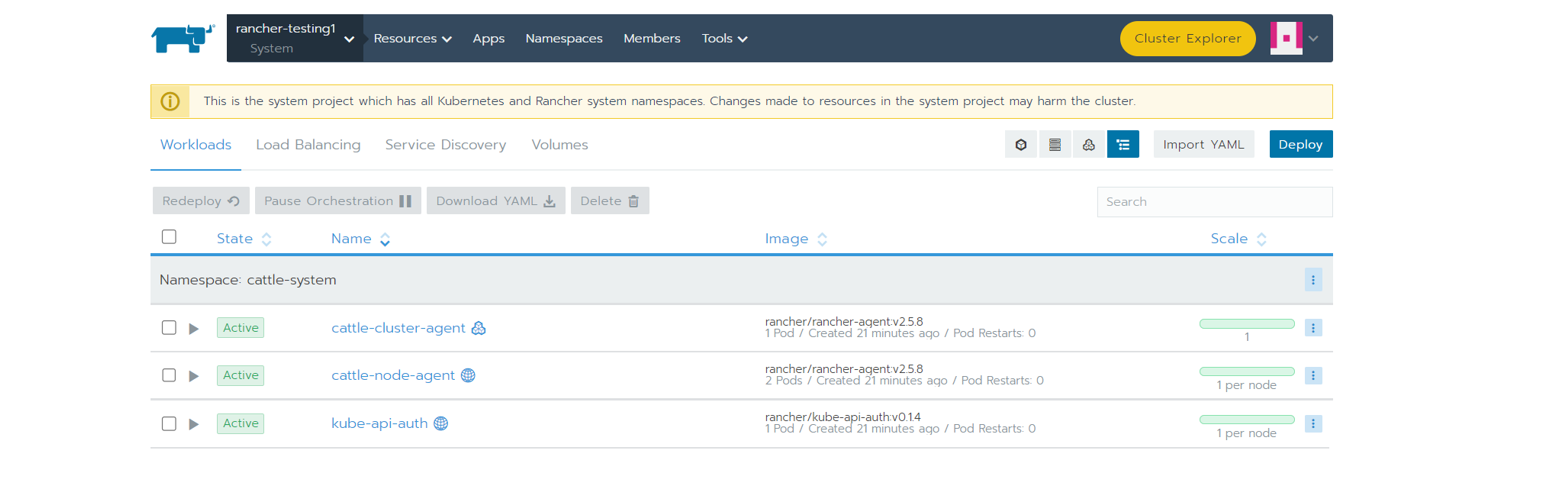
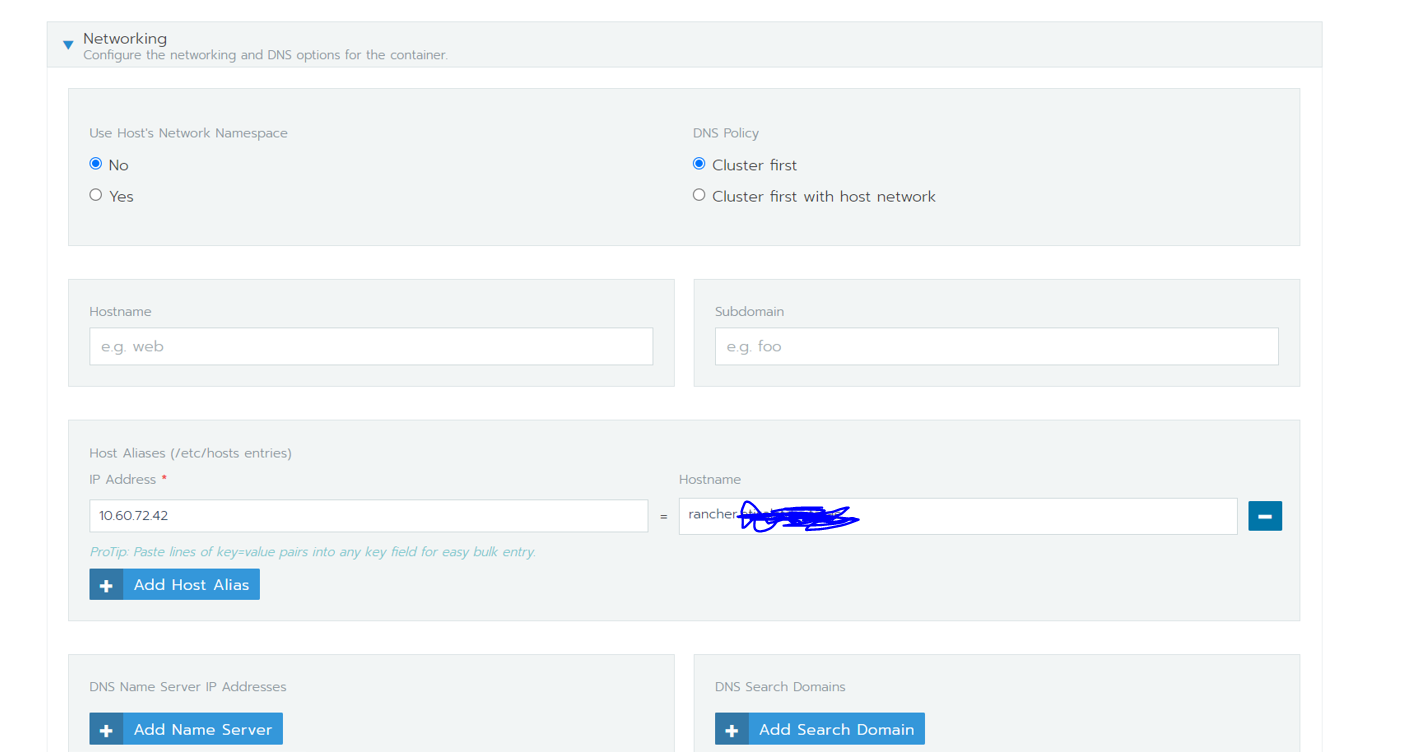
When I deployed a port with nodeport , nodeport wasn’t generated as the “cattle-cluster-agent” wasn’t in running status. As soon as I made above change, the nodeport was immediately visible under “netstat -tnlup”
Attached couple of screenshots that may help you.
I have found a way to apply the ‘hack’ without the use of kubectl.
docker ps -aopen that source file with a text editor, and add the host entry for your rancher.example.com
restart the container At this point, your cluster should continue putting itself together.
But this does not address the underlying issue regarding coredns. What I am currently testing out is adding a config to coredns which declares our dns server in it. And it seems to pick up the slack for that.
But some internal communications remain broken. For instance, for a redis deployment redis replica can not connect to redis master over ClusterIP. The cause for my woes is attempting to get iptables+firewalld to behave with k8s 1.19 and centos 8.3. Your issue may be different.
TLDR; the ‘hack’ only addresses a side effect of the root cause, not the actual issue itself, unfortunately 😢
I got the same error where it could not resolve the host. However in my situation it happens during cluster creation, so I cannot use kubectl since the cluster is not ready yet.
What can I do to fix this issue (without kubectl)?
Unbelievable that this is not resolved yet. I faced this issue more than 1 year back (I don’t remember how I resolved back then). Now I am installing rancher 2.4 on a brand new Windwos 10 (docker-desktop) and Im facing the exact same issue.
Im installing using helm, and I cant find a way to use the workaround:
Workaround Changed the dnsPolicy from the cattle-cluster-agent deployment: From:
dnsPolicy: ClusterFirst To:
dnsPolicy: Default
same issue
Rancher 2.4.4 Kubernetes Version: v1.18.3 minikube 1.11 Docker 19.03.8
Could this be related to the CNI used in the downstream clusters ?
I’m running Rancher 2.7.0 with Docker Compose :
My test environment is based on K3s clusters :
Flannel(K3s’default) CNINo issue when importing the cluster into Rancher.
Antrea(1.9.0) CNINo issue when importing the cluster into Rancher.
Cilum(1.12.4) CNINo issue when importing the cluster into Rancher.
Calico(3.24.5) CNIWhen importing the cluster into Rancher :
Resolved by adding this to the
cattle-cluster-agentdeployment :I did not have to modify the default DNS policy :
been 3 years and issue still surface once in a while, depending on DNS setup (CNAME or A records, *. prefix etc) - fact is something in cattle-agent code does not resolve DNS properly, while at the same time other containers on the same node resolves it fine
I’m able to fix issue on rhel8 after running below commands,
` sudo iptables -P FORWARD ACCEPT
echo ‘net.ipv4.ip_forward = 1’ | sudo tee -a /etc/sysctl.d/50-docker-forward.conf
for mod in ip_tables ip_vs_sh ip_vs ip_vs_rr ip_vs_wrr; do sudo modprobe $mod; echo $mod | sudo tee -a /etc/modules-load.d/iptables.conf; done
sudo dnf -y install network-scripts
sudo systemctl enable network
sudo systemctl disable NetworkManager`
Got this from here https://github.com/superseb/rancher/commit/cacc5837ab50db42b078f32ac236dc3367130db1
On Debian 10, this issue is caused by the change from iptables to nftables.
This is resolved with:
Regards Jason
We are having this issue too after an upgrade to k8s 1.16.4 Our seemingly to work workaround was to setup a hostalias:
This ended up being DNS for me as well - the cattle-cluster-agent was constantly rebooting and not allowing for items like ingress to work properly. I had tried the dnsPolicy setting as suggested, tried putting in entries in the hosts file, tried variations on the host OS, Kubernetes version, and Rancher version, all to no avail.
What did work was setting up DNS “properly.” Using the “roll your own / Custom” option in the Rancher Cluster Creation, not specifying any additional settings (such as private /public addresses), on a greenfield Ubuntu 18.04 setup (with both ipv4 and ipv6 addresses) / Rancher 2.3.3 / Kubernetes 1.16, I started by setting a DNS ‘search’ setting (in the netplan yaml, ethernets/eth0/nameservers/search) for all of the boxes in the mix. I then stood up an internal DNS server with a DNS zone to match, and then ensured that all of the boxes had host (A/AAAA) entries for both IPv4 and IPv6. With that in place, everything magically started working. Did NOT adjust the dnsPolicy setting in the end.
Dear @armanriazi, did you find the solution for it?
I have the same problem.
@onkar-dhuri please help out on this. And if anyone from Rancher is reading this… This is a problem so many people have had for a really long time. Can you dedicate a page in your docs to addresses thia 1 particular problem. It’s a humble request. Thanks.
still here
Same issue.
I am using rancher v2.4.3 with latest RKE v1.2.0-rc1 and docker 19.03.9
Still there in v2.4.3 as well.
I ran into this issue when I used a pfsense firewall as a load balancer in front of my cluster. I was able to resolve it by changing my outbound NAT as recommended here in the pfsense docs:
https://docs.netgate.com/pfsense/en/latest/book/loadbalancing/troubleshooting-server-load-balancing.html#unable-to-reach-a-virtual-server-from-a-client-in-the-same-subnet-as-the-pool-server
Essentially the fact that my nodes were on the same subnet as my load balancer caused traffic to not route properly because of incorrect source and destination IPs. This led to the failure in deployment described in this issue even though I was able to use my cluster for the most part normally otherwise. It may not necessarily represent what others have seen here, but could be a potential item to look at for others.
Note: This change does result in you losing some information regarding what host traffic originates from in traffic that hits your load balancer. This was not important to me so I did not worry about that loss of information, but others may.
Restart all worker and master nodes one by one then finally restart Rancher installed VM helped to resolve issue for us. It’s due to network calico update caused for us.
Hi folks,
I have faced same issue and I just solved after patched as follows: kubectl -n cattle-system patch deployments cattle-cluster-agent --patch ‘{“spec”: {“template”: {“spec”: {“hostAliases”: [{“hostnames”:[“<Rancher Hostname>”],“ip”: “<Rancher IP>”}]}}}}’
Hope that it works for you as well.
Cheers. Bruno Almeida
I think that there are several possible reasons, but just to add one possible solution: allow masquerading:
sudo firewall-cmd --zone=public --add-masquerade --permanentThere is some discussion on reference: https://stackoverflow.com/a/61256515/17052885
The background of that is that some (not all?) CNIs will use masquerade rules when doing SNAT in order to reach DNS server.
And this in my setup didn’t require implementation of any other workarounds mentioned here.
I hit this issue sometimes with Rancher HA setups on AWS. Usually downstream clusters or even the local ha agent fails to resolve the name. Security policy is open for both incoming and outgoing network, No firewall on ubuntu image used for the RKE cluster setup.
In my case I don’t think is a firewall issue. If I change the DNS server in the cattle-cluster-agent to 1.1.1.1 i usually get the thing fixed.
I also ended up deploying a dns server in my local network.
Oh my God,I’m tired, I re-run it now and then with a virtualbox VM and it still doesn’t work the same way!
unbelievable
@brunobertechini , it’s really weird, whatever the provider aws, minikube, docker-desktop, I still have a host resolution error.
`INFO: Environment: CATTLE_ADDRESS=10.42.0.26 CATTLE_CA_CHECKSUM=04629d3294e6f84c25d055f13539346540170ad380a43375cbedf47f9aa5ca54 CATTLE_CLUSTER=true CATTLE_FEATURES=dashboard=true CATTLE_INTERNAL_ADDRESS= CATTLE_K8S_MANAGED=true CATTLE_NODE_NAME=cattle-cluster-agent-6d85bc69d-fkx6r CATTLE_SERVER=https://k3s
INFO: Using resolv.conf: search home nameserver 192.168.64.1
ERROR: https://k3s/ping is not accessible (Could not resolve host: k3s)`
After changed the dnsPolicy from the cattle-cluster-agent deployment: From:
dnsPolicy: ClusterFirst To:
dnsPolicy: Default
I still got the same error from dns resolution from cattle-cluster-agent
https://k3s/ping is reachable by my browser i got a pong
Workaround Changed the dnsPolicy from the cattle-cluster-agent deployment: From:
dnsPolicy: ClusterFirst To:
dnsPolicy: Default
I had this issue because I wanted to create master node with controlplane + etcd only. It seems that worker role is compulsory anyway. So I’ve created master node with the 3 roles and no more worries ! After I could create additional nodes with worker role only. Then I tainted my master node to prevent new pods to be deployed on it.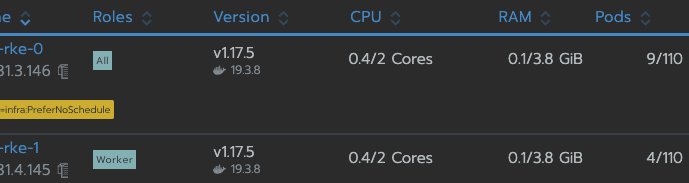
I think Rancher should be more explicit about roles requirements for RKE because it’s an outstanding key feature but the UX is discutable for custom node creation.
For me, changing the CATTLE_SERVER solves at first, but other places seem to point to the same address inside the pod.
I fixed it by adding a host alias (/etc/hosts entries) to point to the internal IP address for both cattle-cluster-agent and cattle-node-agent.
Looks like rancher should have an internal IP setting that it should use for this. In AWS, this causes additional cost unnecessarily.
Glad it at least partly worked for you @TheAifam5! Always good to hear a post helps someone.