quill: Error: The given range isn't in document
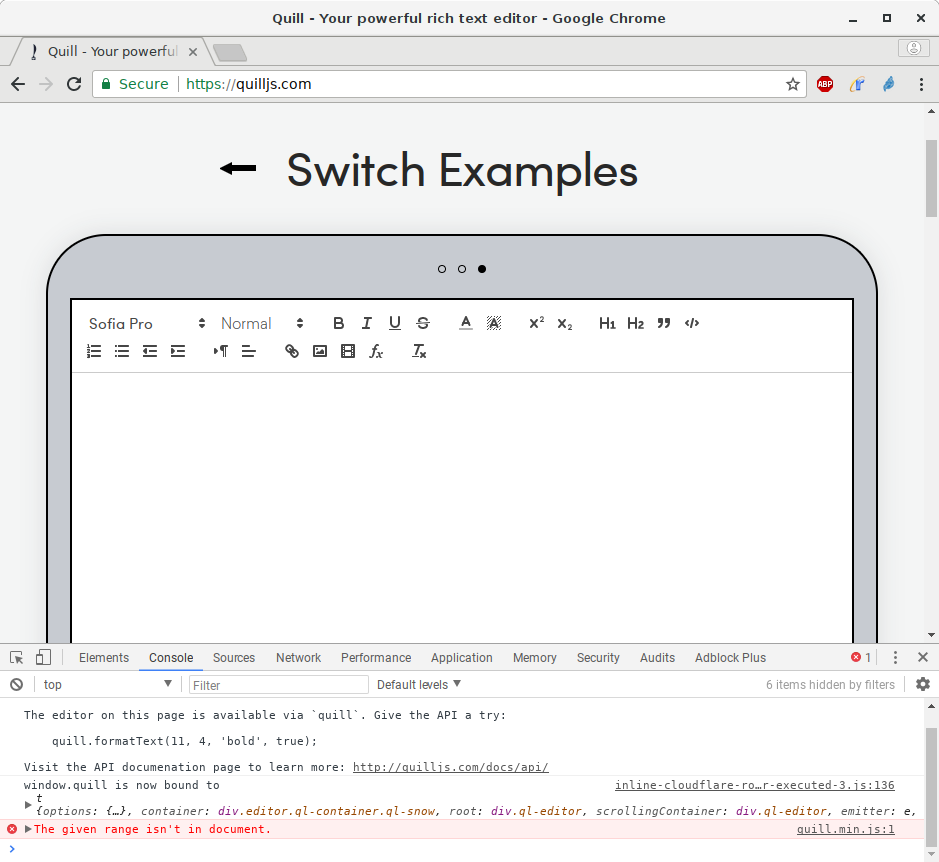
I noticed an annoying The given range isn't in document error during text editing in Chrome. I found one way to reproduce the problem in the Quill demo on your website so I guess this means this is a problem in Quill and not in my code.
Steps for Reproduction
- Visit quilljs.com and switch to the third demo (The one where you can set a text color).
- Click into the text area to focus the editor.
- Select all text with
Ctrl-A. - Remove selected text with
Del. The document must be completely empty now. - Select a text color with the color picker in the toolbar.
- Type multiple lines of text (Can’t be reproduced with just one line).
- Select all content again with
Ctrl-A. - Type new text.
Expected behavior:
The new text must replace the selected text.
Actual behavior:
The selected text is removed, the error message The given range isn't in document is thrown and the editor looses the focus.
Platforms: Chrome 63.0.3239.132 on Debian Linux 9.3
Version: 1.3.5
About this issue
- Original URL
- State: closed
- Created 6 years ago
- Reactions: 15
- Comments: 51 (1 by maintainers)
Commits related to this issue
- add guard for selection setting closes #1940 — committed to Biteable/quill by jhchen 6 years ago
- add guard for selection setting closes #1940 — committed to Biteable/quill by jhchen 6 years ago
- add guard for selection setting closes #1940 — committed to quilljs/quill by jhchen 6 years ago
I solve this issue by caching the
modulesprops, instead of keep creating a new instance during each render.Before:
After:
Had the same problem and fixed it by not using the ‘value’ prop on the editor, but rather the ‘defaultValue’, which is apparently unmanaged to some extent. Using ‘react-quill’, fyi. Hope it helps.
I wrapped the
<ReacQuill/>component within a<div>container, and it workedSomeone in the future may appreciate this:
You can’t assign a prop to value directly. You must assign it to state first. If you dont do this, the value of content will be always the prop value.
I’m getting the same error when using mobx to observe the entire delta object returned by the editor.
Also have the same message using pasteHTML with a large text containing a embed image:
@jhchen should we re-open this one?
@jhchen @kayahr I found the bug always occurring when text is null. I rewrite the paste function to fix it.
I have the same problem when using Angular and PrimeNG UI library. The error is occurring however only when Quill editor is being used in a modal dialog. The error is occurring in this function of the PrimeNG wrapper for Quill editor.
Hi! Just wanted to leave what solved the issue for me: After removing the object
modulesin the ReactQuill component , the issue stopped. So i realized, that the modules object passed directly into the component makes it render all modules on every keypress.Hope it works for you guys!
More info in : (https://stackoverflow.com/questions/59825450/react-quill-custom-image-handler-module-causing-typing-issues-with-the-editor)
thanks a lot. This works like charm. You saved my day!
Where do you get the Editor class from?
Fixed it in Angular 7 by adding below code. @ViewChild(‘editor’) editor: Editor; setTimeout(() => { this.editor.writeValue(data); this.editor.quill.setSelection(null, data.length, null); }, 100);
using this library via react-quill, i ended up switching to uncontrolled component which helped
In my case, I was able to solve this issue (at least in Chrome 69) by performing the update asynchronously:
I don’t know if this causes issues in other browsers or environments, and literally just now figured this out. In my case, I have a custom React wrapper around Quill which may periodically (but not too frequently) receive an updated value of the editor.
@DeyLak I’ve tried your solution and I don’t see the error anymore although when the component was re-rendered the range position is always at the start. Might need to add something at the componentWillUnmount()?
@abelski21 I was able to fix this issue the same way, with this dirty hack(I’m using react-quill, but I think, something similar is possible for main library, cause it uses internal Quill objects via react ref):
Ofcourse, this is only a temporarily solution.
I’ve stumbled upon this problem as well, or at least very similar.
I managed to track the down the problem and workaround it. On my case I created a custom embed and applied some style to it. When you select the embed and type over it, there seems to be a change on quill to adjust styling or something like that.
What I did was to apply the styling to the underlying tag instead of the main one. This may not work for this case since my embed is immutable and has an editable wrapper to handle changes attempts (default Quill construction for this kind of blots).
Here’s my use case: https://codepen.io/ivanalejandro0/pen/GdOBjQ
To solve this problem I just had to change:
to
@jhchen why is this issue closed if it was merged in
develop(the unstable version of Quill as far as I understand)? Can you please offer a solution for the 1.3.6 stable version? Or do an intermediate release?IMHO the fix you have committed doesn’t seem to be a breaking change and it can easily be a minor bump.
@evonox I’m having the same issue. Did you find a solution? NOTE: oddly, i don’t get the message the first time, but all subsequent times. I’m also using a NgPrime modal window and editor. importing through Angular-cli
PING
Any updates or fix for this? I’m also having the same problem using ReactQuill with custom toolbar handlers. It appears to be working fine if I only use the mention custom toolbar together with combination of generic toolbar buttons, but when I click the markImportant (which only updates the observable) it throws an error same with what others experienced above:
Here’s my code: