pip: [BUG] stderr duplication failed
setuptools version
setuptools==56.0.0
Python version
Python 3.9
OS
Windows
Additional environment information
No response
Description
I use gui_scripts with a blank function. If i use pip install -e . or py setup.py install nothing happens, as expected. If i do pip install . or use setup.py to make a binary dist then install it, i get stderr duplication failed in a prompt. This happens before any code gets run.
Expected behavior
Nothing
How to Reproduce
# setup.py
from setuptools import setup

setup(
    name="test",
    packages=["test"],
    entry_points={
        "gui_scripts": [
            "test-script=test:main"
        ]
    }
)
# test/__init__.py
def main():
    pass
Run above commands
Output

Code of Conduct
- I agree to follow the PSF Code of Conduct
About this issue
- Original URL
- State: closed
- Created 3 years ago
- Comments: 133 (57 by maintainers)
Just waiting for a response from @rayzchen (and anyone else) and then I should be able to cut a release soon after that.
Thanks @cbrnr and @carlkl for redoing the tests. Looking promising 🤞
I think you probably cannot generalize to all launchers for Windows. I just tried
pip install mnelaband the launcher works (it didn’t prior to v22).I can’t reproduce this - it might be something specific in @rayzchen 's environment. I’m using Python 3.9.7 on Windows 10.
And no error dialog box comes up. If I additionally install
pywin32, change thetestapplication to the following:and reinstall using
env\Scripts\pip install .followed by runningenv\Scripts\hello, I get the expected message box:Didn’t hear from @rayzchen, but
distlib0.3.5 has just been released on PyPI.Thanks. everyone, for the feedback. I’ve commented on the PR by @mbikovitsky and am aiming to merge the changes soon.
The linked zip file contains some .exe files - just copy them over the files in
<venv>\Lib\site-packages\pip\_vendor\distlibfor whichever pip you’re testing with. That directory should already have the .exe files released with whichever version ofdistlibis vendored into that specificpipinstallation.I’m not sure that’ll work, because
pipvendorsdistlibrather than having it as a normal dependency. I would clone thedistlibrepo, then copy the.exefiles into the corresponding place in apipinstallation. For example, if you create a venv atc:\Temp\foothen that would be the directoryc:\Temp\foo\Lib\site-packages\pip\_vendor\distlib- you can overwrite the.exefiles in there. Then you can try installing the above test application and invokinghello.exe, or other windowed application of your choice.I think it would be useful to separate out scenarios that need to be considered by the GUI launcher from those that need to be considered by the console launcher. I’m wary of making things in the launcher too complex for the intended use case - which ISTM are nearly always console scripts. Even when the GUI launcher is used, I doubt whether the child application will consider all of these issues around shutdown as thoroughly as all this, if at all!
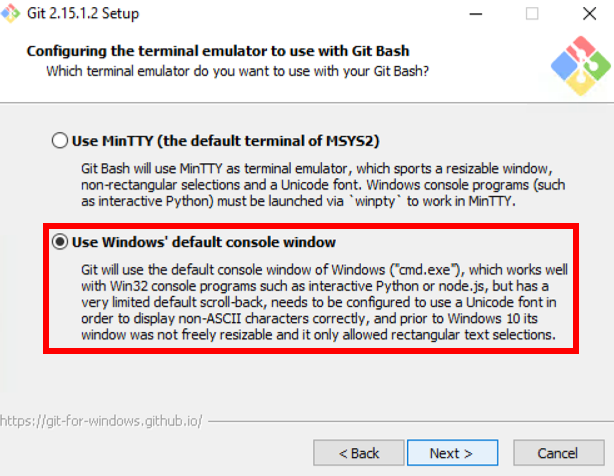
My testing has revealed that it works fine (all 3 handles are actually valid) when run in MSYS2 via MinTTY, but not via “Windows default console”