osrm-backend: windows osrm-extract of North America failing with I/O Error occurred

Newcomer to this project, and was able to get the build generated with the latest files, after running into a couple of other issues For anyone reading this in the future, here were the errors that may help you troubleshoot during Windows build:

  • The build failed when there was a space in the filepath during cmake – removing spaces in the path where the source was stored fixed that.
  • When I first tried build/release/osrm-extract.exe, there were error messages about missing DLLs – copying dependencies tbb.dll and libexpat.dll from osrm-deps/lib/ into build/release/ remedied this issue.

Now on to the thing I don’t know how to fix : ) My environment is a W10 Pro 64-bit installation with 32GB of RAM, 2TB SSD, and Ryzen 7 3700X CPU

I attempted to extract the North America pbf, but am hitting an I/O issue. (log at the bottom) I can successfully extract a smaller .pbf (Washington state), but probably don’t have enough RAM for the whole of NA.

Whenever it begins the below step, I reliably run into the error:

Generating edge-expanded graph representation I/O error occurred: ..\..\..\map_pbfs\north-america-latest.osrm : /extractor/barriers (possible cause: "Invalid argument") (at include\storage/tar.hpp:52)

I’ve tried to find a solution in the issues here, but no luck. I’ve tried 10+ variations, and no matter what I try it always errors at that point. Remedies I’ve tried:

  • I’ve tried to compile with stxxl, but saw no difference. – I checked the default stxxl location and also created a .stxxl.txt file, but didn’t see the temp file get created.
  • Attempted various number of threads by using the -t argument (as low as -t 2).
  • Set Windows virtual memory allocation to 200GB, which allocated a large pagefile.sys (as I understand, this is similar to allocating a Linux swap file)

Is there a way I can get more detail about this error? I read in one of the issue threads that this particular step in the extract was Memory heavy, and several others have hit errors here before as well. If it is a RAM limitation, I would expect to see the virtual memory to be used, and then the process would just take a few orders of magnitude longer.

I’d prefer to run extract locally (without having to rent a machine), so let me know if there is any additional information I can provide to assist in debugging this issue. Any and all suggestions and help are appreciated.

command and output:

osrm-extract.exe …....\map_pbfs\north-america-latest.osm.pbf -p …..\profiles\car.lua [info] Parsed 0 location-dependent features with 0 GeoJSON polygons←[0m [info] Using script …..\profiles\car.lua←[0m [info] Input file: north-america-latest.osm.pbf←[0m [info] Profile: car.lua←[0m [info] Threads: 16←[0m [info] Parsing in progress…←[0m [info] input file generated by osmium/1.8.0←[0m [info] timestamp: 2020-07-30T20:59:02Z←[0m [info] Using profile api version 4←[0m [info] Found 3 turn restriction tags:←[0m [info] motorcar←[0m [info] motor_vehicle←[0m [info] vehicle←[0m [info] Parse relations …←[0m [info] Parse ways and nodes …←[0m [info] Using profile api version 4←[0m [info] Using profile api version 4←[0m [info] Using profile api version 4←[0m [info] Using profile api version 4←[0m [info] Using profile api version 4←[0m [info] Using profile api version 4←[0m [info] Using profile api version 4←[0m [info] Using profile api version 4←[0m [info] Using profile api version 4←[0m [info] Using profile api version 4←[0m [info] Using profile api version 4←[0m [info] Using profile api version 4←[0m [info] Using profile api version 4←[0m [info] Using profile api version 4←[0m [info] Using profile api version 4←[0m [info] Using profile api version 4←[0m [info] Using profile api version 4←[0m [info] Using profile api version 4←[0m [info] Using profile api version 4←[0m [info] Using profile api version 4←[0m [info] Using profile api version 4←[0m [info] Parsing finished after 439.976 seconds←[0m [info] Raw input contains 1256813774 nodes, 105408556 ways, and 91104 relations, 349251 restrictions←[0m [info] Sorting used nodes … ok, after 4.44185s←[0m [info] Erasing duplicate nodes … ok, after 0.50473s←[0m [info] Sorting all nodes … ok, after 27.1483s←[0m [info] Building node id map … ok, after 55.3839s←[0m [info] Confirming/Writing used nodes … ok, after 19.9171s←[0m [info] Writing barrier nodes … ok, after 0s←[0m [info] Writing traffic light nodes … ok, after 0s←[0m [info] Processed 257548049 nodes←[0m [info] Sorting edges by start … ok, after 62.3636s←[0m [info] Setting start coords … ok, after 98.7579s←[0m [info] Sorting edges by target … ok, after 32.4669s←[0m [info] Computing edge weights … ok, after 124.666s←[0m [info] Sorting edges by renumbered start … ok, after 47.7229s←[0m [info] Writing used edges … ok, after 9.78324s – Processed 271992387 edges←[0m [info] Writing way meta-data … ok, after 0.603115s – Metadata contains << 30512033 entries.←[0m [info] Sorting used ways … ok, after 0.307405s←[0m [info] Collecting start/end information on 29 maneuver overrides…ok, after 0.375136s←[0m [info] Collecting start/end information on 29 maneuver overrides…ok, after 0.034667s←[0m [info] Collecting start/end information on 349251 restrictions…ok, after 2.53855s←[0m [info] Collecting start/end information on 349251 restrictions…ok, after 2.91023s←[0m [info] writing street name index … ok, after 0.481568s←[0m [info] extraction finished after 936.353s←[0m [info] Generating edge-expanded graph representation←[0m [info] RAM: peak bytes used: <not implemented on Windows>←[0m ←[31m[error] I/O error occurred: …....\map_pbfs\north-america-latest.osrm : /extractor/barriers (possible cause: “Invalid argument”) (at include\storage/tar.hpp:52)←[0m

About this issue

  • Original URL
  • State: closed
  • Created 4 years ago
  • Comments: 23 (10 by maintainers)

Most upvoted comments

As it turns out, getting docker running on top of a Windows AWS instance is not an easy task, and I ultimately failed to get it running. Nested virtualization is not enabled in EC2, and every time I enabled hyper-v on a metal machine (including using amazon’s AMI), RDP stopped working and I could no longer access the instance.

What I did discover, however, is a workaround to get docker working with (more) swap memory on Windows, which allowed me to use osrm-extract on the whole of North America overnight with just 32GB of RAM and a decent SSD. As @danpat mentions, there is likely still a problem with error handling on windows native binaries. This workaround is more of a workaround for the Docker limitation than it is a change to osrm itself.

What I did:

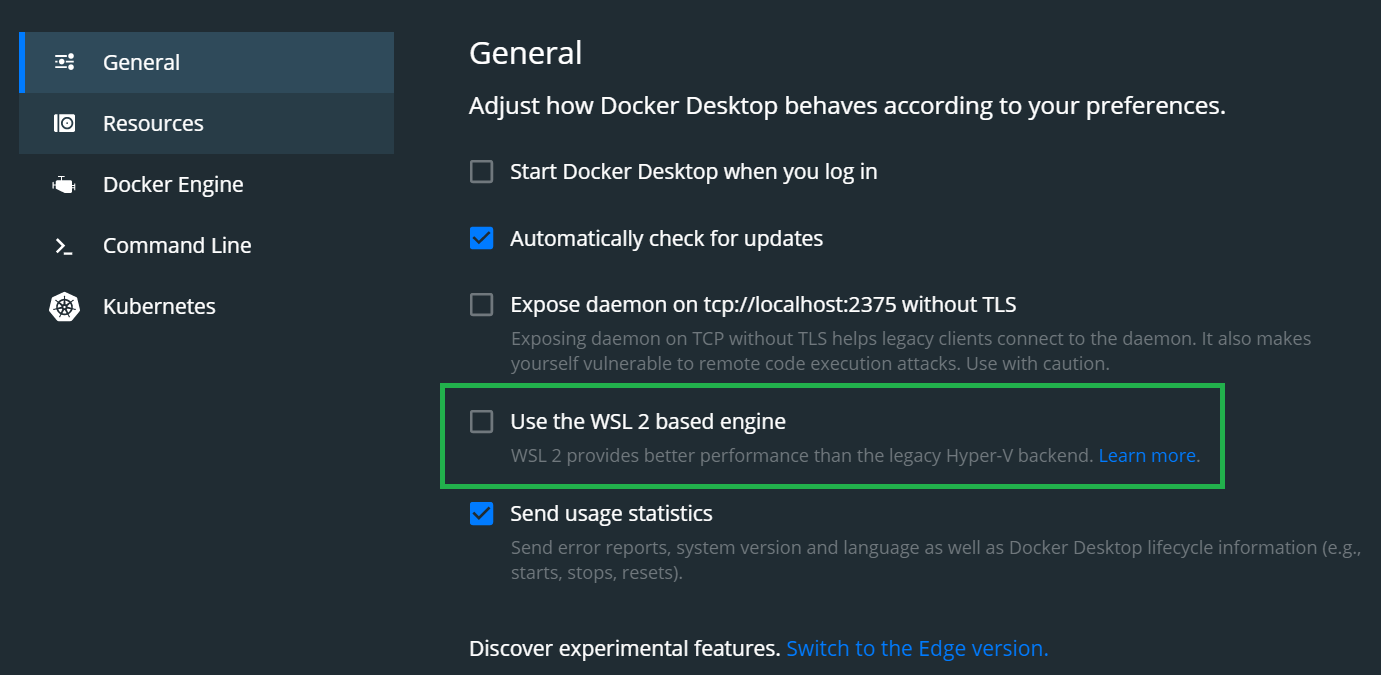
  1. Open Docker settings, and uncheck the “General > Use the WSL 2 based engine” option, to default back to the legacy hyper-v virtualization. This enables an “advanced” tab under resources with more fine-grain options for memory usage, including a slider for swap memory, memory, etc.

  2. The maximum value available in the swap slider, by default, is 4GB (which is the default windows limit for a pagefile size). In order to increase this amount, I modified an entry in the docker settings file, which is located at %appdata%/Docker/settings.json

    • swapMiB”: 65536
    • Once the above option is adjusted, the slider for the swap memory has a higher maximum value (in this case, 64GB).
  3. Modified the amount of available virtual memory on Windows. (Press the windows key, then type and select “View Advanced System Settings”. Click the Advanced tab > Under Virtual MEmory, choose Change… > Uncheck “Automatically manage page file size for all drives” > Select the Custom Size bubble > Enter a filesize in the Initial and maximum Size fields (I chose 65536 for both) > Click the Set button. You will need to restart your PC, then double check that the option is set properly on reboot.

  4. Add my local directory to the Resources > File Sharing tab, so that I can map that local folder to the docker data directory (and osrm will be able to access the .pbf I have on my Windows file system within the Docker virtualization)

  5. Choose memory options for Docker, then run osrm-extract. (I chose 26GB for memory, and 64GB for Swap). Also, make sure to allow for all of your CPUs cores to be used as well (Settings defaulted to a max of 2 CPU usage).

I did not need to provide -m or --memory-swap parameters to the docker command.

Command and results Additional Notes:

  • Docker has a global limit for the amount of resources it can use, which is defined in the Resources > Advanced settings and also in the settings.json file. In order to allow Docker to use more resources (and not hit the std::bad_alloc exception), I needed to increase the amount of virtual memory (swap memory) that it could access.

    • You may not need to edit the Windows virtual memory limit in order for this to work, but I had a strange problem where Docker reset the maximum to 4GB while I was fiddling with the settings file, so I changed the pagefile size and it remedied that issue.
  • You might still be able to directly edit the Docker settings.json and continue using the WSL2 (or whatever version it is in the future) for Docker. That seems like it would be ideal, so you don’t have to map the File Share, and it is allegedly up to 20x faster than the Hyper-V virtualization. I haven’t tested this out, so cannot verify.

Edit, added screenshots of the Docker settings screens: defaulttohyperv moreswap
As it turns out, getting docker running on top of a Windows AWS instance is not an easy task, and I ultimately failed to get it running. Nested virtualization is not enabled in EC2, and every time I enabled hyper-v on a metal machine (including using amazon’s AMI), RDP stopped working and I could no longer access the instance.

What I did discover, however, is a workaround to get docker working with (more) swap memory on Windows, which allowed me to use osrm-extract on the whole of North America overnight with just 32GB of RAM and a decent SSD. As @danpat mentions, there is likely still a problem with error handling on windows native binaries. This workaround is more of a workaround for the Docker limitation than it is a change to osrm itself.

What I did:

  1. Open Docker settings, and uncheck the “General > Use the WSL 2 based engine” option, to default back to the legacy hyper-v virtualization. This enables an “advanced” tab under resources with more fine-grain options for memory usage, including a slider for swap memory, memory, etc.
  2. The maximum value available in the swap slider, by default, is 4GB (which is the default windows limit for a pagefile size). In order to increase this amount, I modified an entry in the docker settings file, which is located at %appdata%/Docker/settings.json
    • swapMiB”: 65536
    • Once the above option is adjusted, the slider for the swap memory has a higher maximum value (in this case, 64GB).
  3. Modified the amount of available virtual memory on Windows. (Press the windows key, then type and select “View Advanced System Settings”. Click the Advanced tab > Under Virtual MEmory, choose Change… > Uncheck “Automatically manage page file size for all drives” > Select the Custom Size bubble > Enter a filesize in the Initial and maximum Size fields (I chose 65536 for both) > Click the Set button. You will need to restart your PC, then double check that the option is set properly on reboot.
  4. Add my local directory to the Resources > File Sharing tab, so that I can map that local folder to the docker data directory (and osrm will be able to access the .pbf I have on my Windows file system within the Docker virtualization)
  5. Choose memory options for Docker, then run osrm-extract. (I chose 26GB for memory, and 64GB for Swap). Also, make sure to allow for all of your CPUs cores to be used as well (Settings defaulted to a max of 2 CPU usage).

I did not need to provide -m or --memory-swap parameters to the docker command.

Command and results
C:\Users\dobbe>docker run -t -v "C:\OSRM_Backend\map_pbfs:/data" osrm/osrm-backend osrm-extract -p /opt/car.lua /data/north-america-latest.osm.pbf
Unable to find image 'osrm/osrm-backend:latest' locally
latest: Pulling from osrm/osrm-backend
75cb2ebf3b3c: Pull complete
a8dd5bdc8042: Pull complete
752bbde38b76: Pull complete
68255c2c530b: Pull complete
2ad217ff4b0b: Pull complete
Digest: sha256:edb3b950bea1fcda04318d32f7be667768ee6d4aefa24333a04ba435a3101d46
Status: Downloaded newer image for osrm/osrm-backend:latest
[info] Parsed 0 location-dependent features with 0 GeoJSON polygons
[info] Using script /opt/car.lua
[info] Input file: north-america-latest.osm.pbf
[info] Profile: car.lua
[info] Threads: 16
[info] Parsing in progress..
[info] input file generated by osmium/1.8.0
[info] timestamp: 2020-07-30T20:59:02Z
[info] Using profile api version 4
[info] Found 3 turn restriction tags:
[info]   motorcar
[info]   motor_vehicle
[info]   vehicle
[info] Parse relations ...
[info] Parse ways and nodes ...
[info] Using profile api version 4
[info] Using profile api version 4
[info] Using profile api version 4
[info] Using profile api version 4
[info] Using profile api version 4
[info] Using profile api version 4
[info] Using profile api version 4
[info] Using profile api version 4
[info] Using profile api version 4
[info] Using profile api version 4
[info] Using profile api version 4
[info] Using profile api version 4
[info] Using profile api version 4
[info] Using profile api version 4
[info] Using profile api version 4
[info] Using profile api version 4
[info] Using profile api version 4
[info] Using profile api version 4
[info] Using profile api version 4
[info] Using profile api version 4
[info] Using profile api version 4
[info] Using profile api version 4
[info] Using profile api version 4
[info] Using profile api version 4
[info] Using profile api version 4
[info] Using profile api version 4
[info] Parsing finished after 637.262 seconds
[info] Raw input contains 1256813774 nodes, 105408556 ways, and 91104 relations, 349251 restrictions
[info] Sorting used nodes        ... ok, after 2.92049s
[info] Erasing duplicate nodes   ... ok, after 0.585645s
[info] Sorting all nodes         ... ok, after 38.5296s
[info] Building node id map      ... ok, after 21.1336s
[info] Confirming/Writing used nodes     ... ok, after 322.661s
[info] Writing barrier nodes     ... ok, after 0s
[info] Writing traffic light nodes     ... ok, after 0s
[info] Processed 257548049 nodes
[info] Sorting edges by start    ... ok, after 159.436s
[info] Setting start coords      ... ok, after 311.195s
[info] Sorting edges by target   ... ok, after 201.887s
[info] Computing edge weights    ... ok, after 430.772s
[info] Sorting edges by renumbered start ... ok, after 195.958s
[info] Writing used edges       ... ok, after 78.8719s -- Processed 271992385 edges
[info] Writing way meta-data     ... ok, after 5.00166s -- Metadata contains << 30512033 entries.
[info] Sorting used ways         ... ok, after 2.49456s
[info] Collecting start/end information on 29 maneuver overrides...ok, after 0.461053s
[info] Collecting start/end information on 29 maneuver overrides...ok, after 0.103761s
[info] Collecting start/end information on 349251 restrictions...ok, after 3.841s
[info] Collecting start/end information on 349251 restrictions...ok, after 51.2419s
[info] writing street name index ... ok, after 2.13797s
[info] extraction finished after 2475.66s
[info] Generating edge-expanded graph representation
[info] . 10% . 20% . 30% . 40% . 50% . 60% . 70% . 80% . 90% . 100%
[info] Node compression ratio: 0.198459
[info] Edge compression ratio: 0.239994
[info]  graph compression removed 27513264 annotations of 30512033 in 901.383 seconds
[info] Find segregated edges in node-based graph ...
[info] ok, after 6914.82s
[info] Segregated edges count = 1123233
[info] Writing nodes for nodes-based and edges-based graphs ...
[info] Geometry successfully removed:
  compressed edges: 130375800
  compressed geometries: 543377690
  longest chain length: 6987
  cmpr ratio: 0.239936
  avg chain length: 4.16778
[info] Generating edge expanded nodes ...
[info] . 10% . 20% . 30% . 40% . 50% . 60% . 70% . 80% . 90% . 100%
[info] Expanding via-way turn restrictions ...
[info] . 10% . 20% . 30% . 40% . 50% . 60% . 70% . 80% . 90% . 100%
[info] Generated 124902989 nodes (22148 of which are duplicates)  and 271623209 segments in edge-expanded graph
[info] Generating edge-expanded edges
[info] [warn] Turn is a u turn but not turning to the first connected edge of the intersection. Node ID: 5388229, OSM link: http://www.openstreetmap.org/?zoom=18&mlat=32.808567&mlon=-116.964088
[warn] Turn is a u turn but not turning to the first connected edge of the intersection. Node ID: 12600053, OSM link: http://www.openstreetmap.org/?zoom=18&mlat=42.235804&mlon=-73.282519
[warn] Turn is a u turn but not turning to the first connected edge of the intersection. Node ID: 13005388, OSM link: http://www.openstreetmap.org/?zoom=18&mlat=42.460153&mlon=-83.154748
.[info] Using profile api version 4
[info] Using profile api version 4
 10% [warn] Turn is a u turn but not turning to the first connected edge of the intersection. Node ID: 40771718, OSM link: http://www.openstreetmap.org/?zoom=18&mlat=40.214208&mlon=-77.111079
.[warn] Turn is a u turn but not turning to the first connected edge of the intersection. Node ID: 41759187, OSM link: http://www.openstreetmap.org/?zoom=18&mlat=32.533973&mlon=-81.013553
[warn] Turn is a u turn but not turning to the first connected edge of the intersection. Node ID: 47420994, OSM link: http://www.openstreetmap.org/?zoom=18&mlat=39.17513&mlon=-95.425205
 20% [warn] Turn is a u turn but not turning to the first connected edge of the intersection. Node ID: 59013462, OSM link: http://www.openstreetmap.org/?zoom=18&mlat=32.726113&mlon=-104.388261
[warn] Turn is a u turn but not turning to the first connected edge of the intersection. Node ID: 60604512, OSM link: http://www.openstreetmap.org/?zoom=18&mlat=34.925952&mlon=-98.098521
[warn] Turn is a u turn but not turning to the first connected edge of the intersection. Node ID: 63048185, OSM link: http://www.openstreetmap.org/?zoom=18&mlat=35.203096&mlon=-97.007773
[warn] Turn is a u turn but not turning to the first connected edge of the intersection. Node ID: 63048185, OSM link: http://www.openstreetmap.org/?zoom=18&mlat=35.203096&mlon=-97.007773
[warn] Turn is a u turn but not turning to the first connected edge of the intersection. Node ID: 63877866, OSM link: http://www.openstreetmap.org/?zoom=18&mlat=30.702555&mlon=-98.15127
.[warn] Turn is a u turn but not turning to the first connected edge of the intersection. Node ID: 67003352, OSM link: http://www.openstreetmap.org/?zoom=18&mlat=40.613165&mlon=-80.593898
[warn] Turn is a u turn but not turning to the first connected edge of the intersection. Node ID: 70494280, OSM link: http://www.openstreetmap.org/?zoom=18&mlat=37.973642&mlon=-85.039928
[warn] Turn is a u turn but not turning to the first connected edge of the intersection. Node ID: 73968211, OSM link: http://www.openstreetmap.org/?zoom=18&mlat=36.851942&mlon=-86.912602
[warn] Turn is a u turn but not turning to the first connected edge of the intersection. Node ID: 76903390, OSM link: http://www.openstreetmap.org/?zoom=18&mlat=35.669448&mlon=-79.219801
 30% [warn] Turn is a u turn but not turning to the first connected edge of the intersection. Node ID: 81507820, OSM link: http://www.openstreetmap.org/?zoom=18&mlat=39.259168&mlon=-103.323219
.[warn] Turn is a u turn but not turning to the first connected edge of the intersection. Node ID: 105203720, OSM link: http://www.openstreetmap.org/?zoom=18&mlat=42.90808&mlon=-76.529193
 40% [warn] Turn is a u turn but not turning to the first connected edge of the intersection. Node ID: 106419517, OSM link: http://www.openstreetmap.org/?zoom=18&mlat=43.17285&mlon=-75.175466
. 50% [warn] Turn is a u turn but not turning to the first connected edge of the intersection. Node ID: 133142097, OSM link: http://www.openstreetmap.org/?zoom=18&mlat=46.149721&mlon=-66.944733
[warn] Turn is a u turn but not turning to the first connected edge of the intersection. Node ID: 140951928, OSM link: http://www.openstreetmap.org/?zoom=18&mlat=47.376815&mlon=-61.855283
.[warn] Turn is a u turn but not turning to the first connected edge of the intersection. Node ID: 153429971, OSM link: http://www.openstreetmap.org/?zoom=18&mlat=41.884403&mlon=-87.621391
[warn] Turn is a u turn but not turning to the first connected edge of the intersection. Node ID: 154283912, OSM link: http://www.openstreetmap.org/?zoom=18&mlat=39.503392&mlon=-86.035354
 60% .[warn] Turn is a u turn but not turning to the first connected edge of the intersection. Node ID: 177693598, OSM link: http://www.openstreetmap.org/?zoom=18&mlat=39.402342&mlon=-76.5681
[warn] Turn is a u turn but not turning to the first connected edge of the intersection. Node ID: 177693598, OSM link: http://www.openstreetmap.org/?zoom=18&mlat=39.402342&mlon=-76.5681
[warn] Turn is a u turn but not turning to the first connected edge of the intersection. Node ID: 177693598, OSM link: http://www.openstreetmap.org/?zoom=18&mlat=39.402342&mlon=-76.5681
[warn] Turn is a u turn but not turning to the first connected edge of the intersection. Node ID: 180791831, OSM link: http://www.openstreetmap.org/?zoom=18&mlat=44.876509&mlon=-91.92906
 70% [warn] Turn is a u turn but not turning to the first connected edge of the intersection. Node ID: 190739929, OSM link: http://www.openstreetmap.org/?zoom=18&mlat=32.297026&mlon=-90.192487
.[warn] Turn is a u turn but not turning to the first connected edge of the intersection. Node ID: 198062407, OSM link: http://www.openstreetmap.org/?zoom=18&mlat=47.062794&mlon=-122.918649
[warn] Turn is a u turn but not turning to the first connected edge of the intersection. Node ID: 202591740, OSM link: http://www.openstreetmap.org/?zoom=18&mlat=47.919453&mlon=-97.029392
 80% [warn] Turn is a u turn but not turning to the first connected edge of the intersection. Node ID: 221248388, OSM link: http://www.openstreetmap.org/?zoom=18&mlat=40.068212&mlon=-83.159958
.[warn] Turn is a u turn but not turning to the first connected edge of the intersection. Node ID: 221602562, OSM link: http://www.openstreetmap.org/?zoom=18&mlat=20.675552&mlon=-103.359575
[warn] Turn is a u turn but not turning to the first connected edge of the intersection. Node ID: 223932726, OSM link: http://www.openstreetmap.org/?zoom=18&mlat=45.885885&mlon=-73.429043
 90% [warn] Turn is a u turn but not turning to the first connected edge of the intersection. Node ID: 244060922, OSM link: http://www.openstreetmap.org/?zoom=18&mlat=32.647657&mlon=-99.013664
[warn] Turn is a u turn but not turning to the first connected edge of the intersection. Node ID: 245063125, OSM link: http://www.openstreetmap.org/?zoom=18&mlat=38.660294&mlon=-87.167102
[warn] Turn is a u turn but not turning to the first connected edge of the intersection. Node ID: 245478745, OSM link: http://www.openstreetmap.org/?zoom=18&mlat=21.318817&mlon=-158.029205
[warn] Turn is a u turn but not turning to the first connected edge of the intersection. Node ID: 245478745, OSM link: http://www.openstreetmap.org/?zoom=18&mlat=21.318817&mlon=-158.029205
[warn] Turn is a u turn but not turning to the first connected edge of the intersection. Node ID: 245478745, OSM link: http://www.openstreetmap.org/?zoom=18&mlat=21.318817&mlon=-158.029205
.[warn] Turn is a u turn but not turning to the first connected edge of the intersection. Node ID: 247256144, OSM link: http://www.openstreetmap.org/?zoom=18&mlat=33.548615&mlon=-96.902825
[warn] Turn is a u turn but not turning to the first connected edge of the intersection. Node ID: 252784716, OSM link: http://www.openstreetmap.org/?zoom=18&mlat=30.762764&mlon=-86.425417
[warn] Turn is a u turn but not turning to the first connected edge of the intersection. Node ID: 253378194, OSM link: http://www.openstreetmap.org/?zoom=18&mlat=47.177364&mlon=-122.298449

[info] Sorting and writing 29 maneuver overrides...
[info] done.
[info] Renumbering turns
[info] Writing 0 conditional turn penalties...
[info] Generated 271623209 edge based node segments
[info] Node-based graph contains 124873739 edges
[info] Edge-expanded graph ...
[info]   contains 243820156 edges
[info] Timing statistics for edge-expanded graph:
[info] Renumbering edges: 181.937s
[info] Generating nodes: 5139.15s
[info] Generating edges: 1999.46s
[info] Generating guidance turns
[info] . 10% . 20% . 30% . 40% . 50% . 60% . 70% . 80% . 90% .
[info] done.
[info] Created 266 entry classes and 92283 Bearing Classes
[info] Handled: 363516 of 673861 lanes: 53.9452 %.
[info] Assigned 277767401 turn instruction types:
[info]   new name: 6331792 (2.28%)
[info]   continue: 14764187 (5.32%)
[info]   turn: 112342408 (40.44%)
[info]   merge: 113220 (0.04%)
[info]   on ramp: 183472 (0.07%)
[info]   off ramp: 125137 (0.05%)
[info]   fork: 1303433 (0.47%)
[info]   end of road: 47454139 (17.08%)
[info]   notification: 1596 (0.00%)
[info]   enter roundabout: 61186 (0.02%)
[info]   enter and exit roundabout: 3776 (0.00%)
[info]   enter rotary: 2907 (0.00%)
[info]   enter and exit rotary: 226 (0.00%)
[info]   enter roundabout turn: 21875 (0.01%)
[info]   enter and exit roundabout turn: 33 (0.00%)
[info]   (noturn): 28633475 (10.31%)
[info]   (suppressed): 66031259 (23.77%)
[info]   roundabout: 3841 (0.00%)
[info]   exit roundabout: 73558 (0.03%)
[info]   rotary: 282 (0.00%)
[info]   exit rotary: 3484 (0.00%)
[info]   roundabout turn: 26 (0.00%)
[info]   exit roundabout turn: 22164 (0.01%)
[info]   (stay on roundabout): 93745 (0.03%)
[info]   (sliproad): 196180 (0.07%)
[info] Assigned 277767401 turn instruction modifiers:
[info]   uturn: 12516370 (4.51%)
[info]   sharp right: 3783736 (1.36%)
[info]   right: 78297722 (28.19%)
[info]   slight right: 5773072 (2.08%)
[info]   straight: 90645852 (32.63%)
[info]   slight left: 5622884 (2.02%)
[info]   left: 77019733 (27.73%)
[info]   sharp left: 4108032 (1.48%)
[info] Guidance turn annotations took 1728.36s
[info] Writing Intersection Classification Data
[info] ok, after 48.9458s
[info] Writing Turns and Lane Data...
[info] ok, after 81.2224s
[info] Saving edge-based node weights to file.
[info] Done writing. (71.93)
[info] Computing strictly connected components ...
[info] Found 145815 SCC (20 large, 145795 small)
[info] SCC run took: 16.2199s
[info] Building r-tree ...
[info] Constructing r-tree of 271623209 segments build on-top of 257548049 coordinates
[info] finished r-tree construction in 63.6001 seconds
[info] Writing edge-based-graph edges       ...
[info] ok, after 393.414s
[info] Processed 243820156 edges
[info] Expansion: 9115 nodes/sec and 4420 edges/sec
[info] To prepare the data for routing, run: ./osrm-contract "/data/north-america-latest.osrm"
[info] RAM: peak bytes used: 24204996608

Additional Notes:

  • Docker has a global limit for the amount of resources it can use, which is defined in the Resources > Advanced settings and also in the settings.json file. In order to allow Docker to use more resources (and not hit the std::bad_alloc exception), I needed to increase the amount of virtual memory (swap memory) that it could access.
    • You may not need to edit the Windows virtual memory limit in order for this to work, but I had a strange problem where Docker reset the maximum to 4GB while I was fiddling with the settings file, so I changed the pagefile size and it remedied that issue.
  • You might still be able to directly edit the Docker settings.json and continue using the WSL2 (or whatever version it is in the future) for Docker. That seems like it would be ideal, so you don’t have to map the File Share, and it is allegedly up to 20x faster than the Hyper-V virtualization. I haven’t tested this out, so cannot verify.

Edit, added screenshots of the Docker settings screens: defaulttohyperv moreswap