prism: line breaks get deleted when calling prism.highlightElement(code)
I set up my HTML using the following snippet:
<div>
 <pre><code class=" language-js" contenteditable="true"></code></pre>
</div>
When I call prism.highlightElement(code); from the following TypeScript snippet:
import * as prism from "prismjs";

const code: HTMLElement = document.getElementsByTagName("code")[0];

prism.highlightElement(code);
… all line breaks in the <code> element get deleted when calling prism.highlightElement(code).
The result is that all code is getting displayed in a single line then:
before
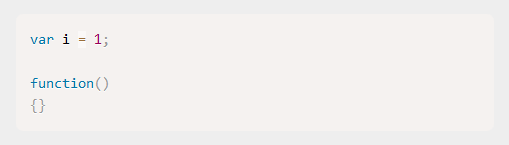
after
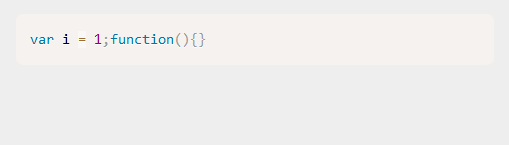
I believe this is not supposed to happen?
About this issue
- Original URL
- State: closed
- Created 5 years ago
- Comments: 20 (8 by maintainers)
The hook appears to be incorrect. The correct hook name is:
before-highlightinnerTexthas a few other properties which make it less useful for Prism. It would also change the current behavior of Prism, so for some people out there, this might be a breaking change.Also, you can use hooks to make Prism use
innerText.I had this issue trying to add Prism.js to Anki card template and I fixed it by adding this hook to Prism.js code. Thank you!
Prism’s HTML output is intended for
preelements which usewhite-space: preby default. Set this property for the element you’re using for displaying code, and everything should work fine.Performance aside: Is breaking change not enough reason?
Also, I don’t think that it’s a good idea for the text Prism highlights to change depending on whether the element is being rendered or not.
What do you think @mAAdhaTTah ?