Karabiner-Elements: Unable to load kext on High Sierra (10.13)
Obviously High Sierra is still very early, at Developer Preview 1, but I thought I’d mention that the Karabiner Elements 0.91.1 kext is not able to be loaded:
kiryo:~ root# kextutil -v 6 /Library/Extensions/org.pqrs.driver.Karabiner.VirtualHIDDevice.kext/
Kext user-space log filter changed from 0xff2 to 0xfff.
Kext kernel-space log filter changed from 0xff2 to 0xfff.
Kext library architecture set to x86_64.
Can't stat /AppleInternal - No such file or directory.
Defaulting to kernel file '/System/Library/Kernels/kernel'
Kext library recording diagnostics for: validation authentication dependencies warnings.
/Library/Extensions/org.pqrs.driver.Karabiner.VirtualHIDDevice.kext appears to be loadable (not including linkage for on-disk libraries).
System policy prevents loading the kernel extension.
kiryo:~ root#
I verified it with codesign and it appears to be fine:
kiryo:~ root# codesign --display --verbose=4 /Library/Extensions/org.pqrs.driver.Karabiner.VirtualHIDDevice.kext/
Executable=/Library/Extensions/org.pqrs.driver.Karabiner.VirtualHIDDevice.kext/Contents/MacOS/VirtualHIDDevice
Identifier=org.pqrs.driver.Karabiner.VirtualHIDDevice.v040600
Format=bundle with Mach-O thin (x86_64)
CodeDirectory v=20200 size=1138 flags=0x0(none) hashes=29+3 location=embedded
Hash type=sha256 size=32
CandidateCDHash sha1=9dab0ba54dd0ec03c72e50593e69fb75819336a7
CandidateCDHash sha256=91f95ed243acbf16c435025dd467091d428ce6b0
Hash choices=sha1,sha256
Page size=4096
CDHash=91f95ed243acbf16c435025dd467091d428ce6b0
Signature size=8959
Authority=Developer ID Application: Fumihiko Takayama (G43BCU2T37)
Authority=Developer ID Certification Authority
Authority=Apple Root CA
Timestamp=25 May 2017 at 17:45:47
Info.plist entries=20
TeamIdentifier=G43BCU2T37
Sealed Resources version=2 rules=12 files=0
Internal requirements count=1 size=212
kiryo:~ root# codesign --verify --verbose=4 /Library/Extensions/org.pqrs.driver.Karabiner.VirtualHIDDevice.kext/
/Library/Extensions/org.pqrs.driver.Karabiner.VirtualHIDDevice.kext/: valid on disk
/Library/Extensions/org.pqrs.driver.Karabiner.VirtualHIDDevice.kext/: satisfies its Designated Requirement
kiryo:~ root#
This install was upgraded from Sierra, where I was using the fork of 0.90.68 with Hyper key support, and that continued to work after the upgrade, and my Gatekeeper settings are still to allow App Store & Identified Developers.
I think the errors involved here are new, at least I haven’t seen them anywhere else, and Google doesn’t seem to know about them, so maybe some kind of kext policy has changed in 10.13 - except I would note that Little Snitch’s kext loads fine.
About this issue
- Original URL
- State: closed
- Created 7 years ago
- Reactions: 2
- Comments: 19 (3 by maintainers)
You should enable kext as @jkooker said.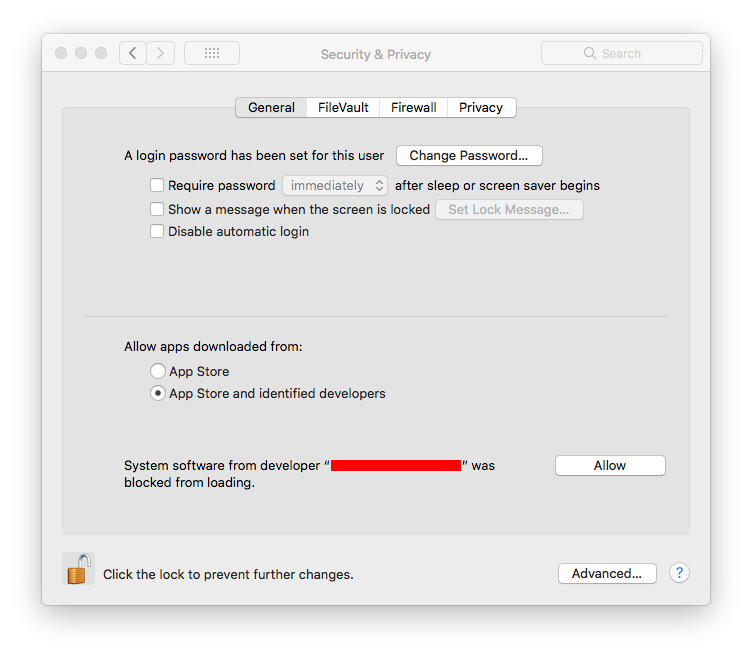
@tekezo I’m unable to click the allow button, have you encountered that before? The button turns blue like it’s pressed, but nothing happens. Both with and without the lock in the lower left engaged. Have tried rebooting, reinstalling as well as completely uninstall and installing from scratch.
I added an alert into Karabiner-Elements Preferences for High Sierra in v0.91.10. You can allow the kext easily.
FWIW I was able to load the kext with SIP disabled (and after it has loaded once, SIP can be re-enabled)
Apple just published a tech note about this. Technical Note TN2459: Secure Kernel Extension Loading
#1017
I just tried updating from 90.92 to 91.5 while leaving the security & privacy pane open (tried something similar a few times earlier). I didn’t observe a chance to ‘Allow’ at any point even after quitting and relaunching karabiner-elements.
This issue seems to affects multiple drivers I’ve had installed, though the popup warning to re-install the driver was observed:
just installed High Sierra, and when I do a fresh install from Homebrew Cask (version 90.92) it works fine but when I update to latest beta update (91.5) the kext fails to load.
I can uninstall and reinstall, downgrading to 90.92, and it works fine until I update to 91.5 again, so its clearly a combination of the new High Sierra kext permissions and some change in Karabiner Elements between 90.92 and 91.5
Still a thing after OSX 10.13.6 upgrade. At least change the name of the app to “Karabiner” or something so that it’s instantly recognisable?
Note: I’m just posting this here as a reference, but I’ve been observing that whenever updating to newer karabiner versions in high sierra beta 4 my machine will not completely boot, where under verbose mode I observe error messages such as “kextd stall”, “WindowServer died”. I can’t quite pin this as a karabiner issue yet, but if anyone’s experiencing similar you may want to file a radar and reference rdar://33527317 .
The workaround so far has been to go into recovery mode and re-install high sierra.