portainer: A stack with the normalized name already exists
Bug description Trying to create a new stack with the given name gives an error that the name already exists.
Expected behavior Stack to be created
Portainer Logs
time="2022-06-01T06:51:06Z" level=info msg="2022/06/01 06:51:06 http error: A stack with the normalized name 'samba' already exists (err=A stack with the normalized name 'samba' already exists) (code=409)"
Steps to reproduce the issue:
- Create new stack named
samba - See error in UI and log – stack not created.
Technical details:
- Portainer version: 2.13.1
- Docker version (managed by Portainer): 20.10.16
- Kubernetes version (managed by Portainer): N/A
- Platform (windows/linux): Linux
- Command used to start Portainer (
docker run -p 9000:9000 -p 8000:8000 portainer/portainer): something like that, way out of my command history, starts automatically now - Browser: Chrome/Safari/Firefox
- Use Case (delete as appropriate): Using Portainer at Home
- Have you reviewed our technical documentation and knowledge base? Yes
Additional context This is a very similar issue to https://github.com/portainer/portainer/issues/4745 The fixes for that issue point to using the UI to view orphaned stacks. I enabled this and tried to see any orphaned stacks but did not see any orphaned stacks listed.
I also had my docker host misconfigured to be a lone swarm manager when I first created the samba stack. Then I realized I didn’t want to be in a swarm (it’s a home server with just one host) so I deleted the swarm stack and left the swarm with docker swarm leave --force, but now I hit this problem when I recreate the stack with the same name as before.
Also FWIW: I don’t have any containers hidden. And I don’t see any stacks listed by docker stack ls when temporarily create a swarm.
About this issue
- Original URL
- State: closed
- Created 4 years ago
- Comments: 15
I was having this issue today after having some issues with Docker Swarm that resulted in me needing to remove the swarm and recreate it with some custom network options.
(Irrelevant banter about why I had to recreate the swarm: Docker Swarm created an ingress network with the same 10.0.0.0/24 range that my real network uses, which prevented me accessing any published services. Not relevant to this issue, other than it was the trigger for Portainer issues).
After I recreated the swarm, Portainer wasn’t displaying any Swarm stacks I had created with the previous swarm ID, and gave me the error about ‘A stack with the normalized name ‘flowise’ already exists.’ when I tried to re-add one.
Solution:
I went to the Environments page, removed the swarm environment from there, and simply re-added it. Now if I click on ‘Stacks’ and press the ellipsis icon (3 dots) at the top right and select ‘Show all orphaned stacks’, the stacks it was complaining about existing before show up correctly, and I can associate them with the current environment. PITA to have to go through one by one and re-associate, but at least there’s no cruft hiding behind the scenes anymore.
Prior to recreating the environment in Portainer, the ‘Show all orphaned stacks’ didn’t reveal anything new.
I had a similar problem with a stack, but i could delete the orphaned stacks that were not showing up after ticking this option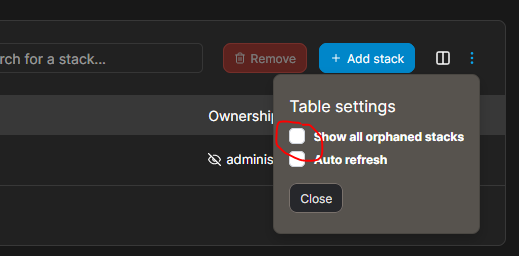
thanks that fixed my issue.
@bverkron
We have a known issue with the Associate button in 2.15 and 2.16. The workaround is to downgrade to 2.14.2. You can then use the Associate button to bring back the stack back into Control:Total instead of Orphan. Then, upgrade back up.
Thanks!
I have the same issue and I believe it was caused by the same issues as OP. Originally had docker setup as a single node swarm. Created a stack in Portainer (called
homepage). Later decided to switch to Docker standalone so left the swarm (I believe I used the same or very similar command to OP). Now I am stuck with an orphaned stack that does not show up in the UI and I cannot delete.This is what’s returned by the API (truncated). You can see I had to create the new instance of the
homepagestack with a different name as it would not allow me to usehomepagedue to the orphaned stack.Attempting to delete the stack via the API does not work…
Any suggestions @tamarahenson?