polybar: Tray icon transparency problem
Hello everybody,
i have a problem with the polybar tray. The dropbox icon appears with transparent background und fragments of the time text. I have no clue what this causing this issue. Can anybody help?
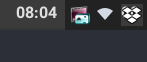
polybar 3.0.5-git

Features: +alsa +curl +i3 -mpd +network

X extensions: +randr (+monitors) -render -damage -sync -composite +xkb +xrm

Build type: RelWithDebInfo
Compiler: /usr/bin/clang++
Compiler flags: -march=x86-64 -mtune=generic -O2 -pipe -fstack-protector-strong -fno-plt -Wall -Wextra -Werror -O2 -pedantic -pedantic-errors
Linker flags: -Wl,-O1,--sort-common,--as-needed,-z,relro,-z,now
Arch Linux
Kernel 4.13.12-1-ARCH
i3-gaps + compton -f -b
Intel Integrated Graphics
Best regards
About this issue
- Original URL
- State: closed
- Created 7 years ago
- Reactions: 13
- Comments: 24 (11 by maintainers)
I’m not sure if this is the same issue but I frequently see tray icons rendered with their transparent regions as black instead of transparent.
See for example the hangouts icon:
But also happens with the gtk-redshift icon (left most).
This is on git master commit a7ad68d.
Not a solution but a bit of a hack. I am using dropbox and am facing the same problem, but if you launch compton after dropbox has started, i.e. the dropbox icon is up and running on polybar, then the issue does not appear. I use the following script on startup (I’m using i3) which launches everything nicely
I am not sure if a permanent solution exists at this time.
I can confirm this bug with the dark tray icon of KeepassXC
For the moment, I don’t have any issues and I hope it stays that way; still a great tip!
Does this also happen, if compton (or any other compositioner) is not running?