pnpm: pnpm completion doesn't work in zsh

pnpm version: 6.32.3

Code to reproduce the issue:

  1. pnpm install-completion zsh
  2. exec zsh
  3. pnpm <tab><tab>

Expected behavior:

pnpm should show completions when tabbing. It should show the completion for various flags in pnpm.

Actual behavior:

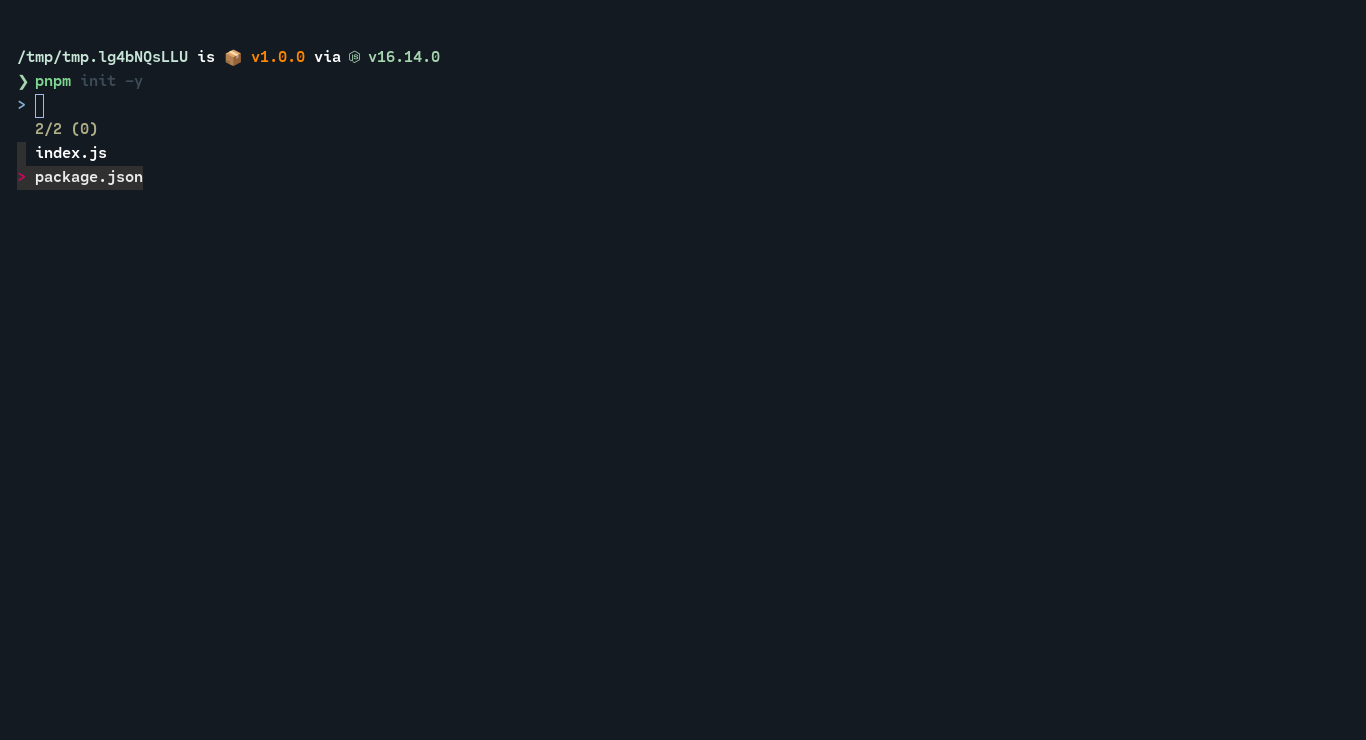
pnpm only gives completion for local files and nothing else. It doesn’t give completions for flags,subcommands,various packages,etc. image
Additional information:

  • I tried pnpm install-completion bash and it worked.
  • I tried pnpm install-completion fish and it worked.
  • I tried to do pnpm install-completion zsh with empty .zshrc thinking it might be something to do with my own zsh configuration and it also didn’t work.
  • node -v prints: v16.14.0
  • Windows, macOS, or Linux?: Linux (5.16.14-1-MANJARO)

About this issue

  • Original URL
  • State: open
  • Created 5 years ago
  • Reactions: 28
  • Comments: 28 (5 by maintainers)

Most upvoted comments

Ref to this thread: https://github.com/marlonrichert/zsh-snap/discussions/180#discussioncomment-3002906

pnpm uses a lib that generates these things for it but this lib imo does it wrong already. pnpm should just provide a zsh to load without requiring another lib/manager.

worked with

pnpm completion zsh >| ~/completion-for-pnpm.zsh
echo 'source ~/completion-for-pnpm.zsh' >> ~/.zshrc

Ref: https://pnpm.io/completion

pnpm: v9.7.0 node: v22.6.0 os: Ubuntu 22.04

pnpm 8.6.12 zsh 5.9 (x86_64-pc-linux-gnu) node 20.5.1

pnpm install-completion zsh does creates all files and all path are valid, however the auto completion does not work on pnpm neither pnpm run

I’ve managed to get it work by directly sourcing pnpm.zsh directly in the shell however the completion are the same for pnpm and pnpm run

I would expect the pnpm run completions to only autocomplete scripts in package.json

This does work as expected, the issue seems to be on your end.

Hey guys,

I was looking for better Zsh completions for pnpm myself, especially for package.json scripts - the way I had it setup for yarn - but couldn’t find anything satisfying. So, I went ahead and built a plugin to handle it. Check it out here: michakfromparis/zsh-pnpm-completions.

I threw a bunch of aliases and live npm package completion on top while at it.

Hope this helps you guys too! Let me know if this works for you.

Cheers,

@michakfromparis

I had the same issue (pnpm v10.1.0 installed via Homebrew), the pnpm completion zsh script outputs the following:

#compdef pnpm
###-begin-pnpm-completion-###
if type compdef &>/dev/null; then
  _pnpm_completion () {
    local reply
    local si=$IFS

    IFS=$'\n' reply=($(COMP_CWORD="$((CURRENT-1))" COMP_LINE="$BUFFER" COMP_POINT="$CURSOR" SHELL=zsh pnpm completion-server -- "${words[@]}"))
    IFS=$si

    if [ "$reply" = "__tabtab_complete_files__" ]; then
      _files
    else
      _describe 'values' reply
    fi
  }
  # When called by the Zsh completion system, this will end with
  # "loadautofunc" when initially autoloaded and "shfunc" later on, otherwise,
  # the script was "eval"-ed so use "compdef" to register it with the
  # completion system
  if [[ $zsh_eval_context == *func ]]; then
    _pnpm_completion "$@"
  else
    compdef _pnpm_completion pnpm
  fi
fi
###-end-pnpm-completion-###

Which didn’t work for me since the output of the value assigned to the reply here reply=($(COMP_CWORD="$((CURRENT-1))" COMP_LINE="$BUFFER" COMP_POINT="$CURSOR" SHELL=zsh pnpm completion-server -- "${words[@]} never matched the condition hereif [ "$reply" = "__tabtab_complete_files__" ]; then as it only outputs the list of available commands and not __tabtab_complete_files__, see following video https://github.com/user-attachments/assets/06b47341-6a30-4c4f-9450-8682fc28fa4c.

For this reason, I ended only seing “values” being shown as completions.

So I ended up making (a big word for making Claude Sonnet do the work) a custom completion script myself which works well enough for me right now, if you want to use it, replace the pnpm completion script with it (make sure to clear your zsh completion cache as well).

  • Script
#compdef pnpm

_pnpm() {
  if type compdef &> /dev/null; then
    _pnpm_completion() {
      local curcontext="$curcontext" state line
      typeset -A opt_args

      # Define commands that should allow file completions
      local file_commands=(add install link)
      # Define commands that should allow package name completions
      local pkg_commands=(add remove uninstall)

      # Function to format completions
      format_completions() {
        local -a formatted=()
        local item desc
        
        for item in $@; do
          # Clean up the item
          item="${item//[[:space:]]+/ }"  # Collapse multiple spaces
          
          # Handle items with existing descriptions (containing --)
          if [[ $item == *--* ]]; then
            desc="${item#*--}"  # Get description after --
            item="${item%--*}"  # Get item name before --
            # Clean up both parts
            item="${item//[[:space:]]/}"
            desc="${desc//[[:space:]]/}"
            # Only add description if it's different from the item name
            if [[ "$item" != "$desc" ]]; then
              formatted+=("${item}:${desc}")
            else
              formatted+=("${item}")
            fi
          else
            # For items without descriptions, just clean up the item
            item="${item//[[:space:]]/}"
            formatted+=("${item}")
          fi
        done
        
        # Sort and return formatted items
        print -l "${(i)formatted[@]}"
      }

      # Get completions from pnpm
      local reply
      reply=($(COMP_CWORD="$((CURRENT-1))" COMP_LINE="$BUFFER" COMP_POINT="$CURSOR" SHELL=zsh pnpm completion-server -- "${words[@]}"))

      case $CURRENT in
        2) # First argument
          # Format and display command completions
          local -a formatted_commands
          formatted_commands=($(format_completions "${reply[@]}"))
          _describe 'commands' formatted_commands
          ;;
        *)
          if [[ " ${file_commands[@]} " =~ " ${words[CURRENT-1]} " ]]; then
            if [[ ${words[CURRENT]} == ./* || ${words[CURRENT]} == ../* || ${words[CURRENT]} == /* || -z ${words[CURRENT]} ]]; then
              _files
            elif [[ " ${pkg_commands[@]} " =~ " ${words[CURRENT-1]} " ]]; then
              if [[ -f package.json ]]; then
                # Get installed packages from package.json
                local -a packages
                packages=(
                  $(cat package.json | jq -r '.dependencies // {} | keys[]' 2>/dev/null)
                  $(cat package.json | jq -r '.devDependencies // {} | keys[]' 2>/dev/null)
                )
                # Sort and remove duplicates
                packages=(${(ui)packages})
                # Add them directly to completion without descriptions
                compadd -a packages
              fi
            fi
          elif [[ ${words[CURRENT-1]} == "run" ]]; then
            if [[ -f package.json ]]; then
              # Get only script names from package.json
              local -a scripts
              scripts=($(cat package.json | jq -r '.scripts | keys[]' 2>/dev/null))
              # Sort script names
              scripts=(${(i)scripts})
              # Add them directly to completion
              compadd -a scripts
            fi
          else
            local -a formatted_values
            formatted_values=($(format_completions "${reply[@]}"))
            _describe 'values' formatted_values
          fi
          ;;
      esac
    }

    if [[ $zsh_eval_context == *func ]]; then
      _pnpm_completion "$@"
    else
      compdef _pnpm_completion pnpm
    fi
  fi
}

_pnpm "$@"
  • Completion cache reset (double check where these files are located on your system before running it)
rm -f ~/.zcompdump*
autoload -U compinit
compinit
exec zsh

@zetlen Tried your plugin, didn’t work.

Have the same issue