powershell: [BUG] Get-PnPPage results in "Object reference not set to an instance of an object"
Reporting an Issue or Missing Feature
An unexpected error when executing a cmdlet
Expected behavior
I expected to receive the page object from “Get-PnPPage”
Actual behavior
I’ve got the following error:
Get-PnPPage : Object reference not set to an instance of an object.
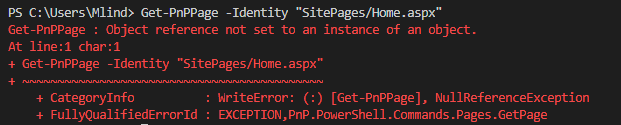
Steps to reproduce behavior
Get-PnPPage -Identity “Home”
What is the version of the Cmdlet module you are running?
PnP.PowerShell 0.3.33
Which operating system/environment are you running PnP PowerShell on?
- Windows
About this issue
- Original URL
- State: closed
- Created 6 years ago
- Comments: 22 (11 by maintainers)
Been a short while, now updated to v1.1.2 and everything seems to be fixed! Thanks alot for the effort in investigating this!
@jansenbe - yeah, mine was a weird one. Got fixed after updating Az module to v5.4.0 , looks like some conflict with application insights DLL.
Unfortunately the issue persists on the original tenant… I’m looking into sharing access.
@jansenbe
I’ve just setup a developer tenant and there seemed to be a problem regarding a connection using client id, client secret and url.
I found some information on the following blog: https://www.koskila.net/literally-breaking-changes-to-app-authentication-on-sharepoint-😵/
Well that fix feeled like a step backwards so i’ve now established a connection using a certificate
Connect-PnPOnline -ClientId -CertificatePath -CertificatePassword -Url -TenantNow Get-PnPPage is working like a charm, so it might be a mismatch with the way of authentication. I will setup the same certification connection on the production tenant and let you know wether this solves my problem there as well.
@jansenbe : FYI, internally that’s using ACS Auth using the PnP Framework AuthManager.