phaser: Scale manager bug for iOS PWA
-
Phaser Version: 3.16.1
-
Operating system: iOS 11, iOS 12
-
Browser: Safari PWA
Description
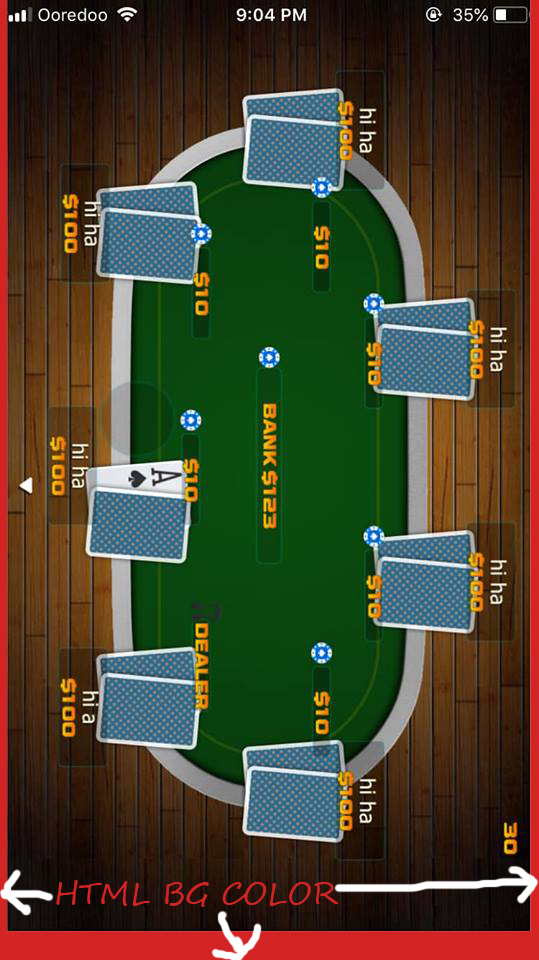
If I use viewport-fit=cover for iOS PWA app, the scale manager FIT method will not accurately calculate the biggest height of canvas’ parent. There is small space left at the bottom of the device because the game move up to fill the notch area. (battery percentage area on older i-Phones) this is not just centering issue. because of FIT nature, I also get smaller game width. Since html background color is now taking the whole screen on PWA mode, the canvas should be able to use all the area of the device on PWA mode with viewport-fit-cover as well.
Example Test Code
<meta name="viewport" content="width=device-width,initial-scale=1.0, user-scalable=no, viewport-fit=cover">
scale: { mode: Phaser.Scale.FIT, autoCenter: Phaser.Scale.CENTER_BOTH, }
Additional Information
About this issue
- Original URL
- State: closed
- Created 5 years ago
- Comments: 20
Actually, the example above does not scale.
But this game scales and installs a ServiceWorker for offline usage. https://github.com/yandeu/phaser3-typescript-platformer-example
Hope it helps 😃
Coool. I guess it works now perfectly on your iPhone X?
It’s a simple “bug” how PWA are loaded. I will commit the code and explain how and why it works like this as soon I find another 15 min. 😁
I do not think this is a Phaser issue. I have also built PWAs with Phaser and it takes the whole screen size on both iOS and Android.
This is how I did it. https://github.com/yandeu/phaser-project-template/tree/master/src