payload: Data from nested lists in richt text is incorrect
Bug Report
Nested lists from the rich text fields are rendering incorrectly.
In Payload:
 In my frontend:
 This is the incorrect HTML it generates:
 And this is what it’s supposed to generate (ignore the ::marker or spans, just look at the structure):
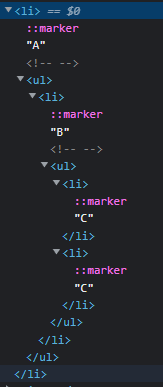 .
.
The <ul> of the second level would kinda need to be part of the first level; however, it’s not. This is the relevant part of the data from the rest API.
{
    "type":"li",
    "children":[
        {
            "text":"A"
        }
    ]
},
{
    "type":"li",
    "children":[
    {
        "type":"ul",
        "children":[
            {
                "type":"li",
                "children":[
                {
                    "text":"B"
                }
                ]
            },
            {
                "type":"li",
                "children":[
                {
                    "type":"ul",
                    "children":[
                        {
                            "type":"li",
                            "children":[
                            {
                                "text":"C"
                            }
                            ]
                        },
                        {
                            "type":"li",
                            "children":[
                            {
                                "text":"C"
                            }
                            ]
                        }
                    ]
                }
                ]
            }
        ]
    }
    ]
},
As you can see, “B” is not part of “A” here. Not sure if that’s an issue with what the rest API outputs or with how it’s rendered (I just followed what’s explained in your docs there).
About this issue
- Original URL
- State: closed
- Created 2 years ago
- Reactions: 1
- Comments: 16 (11 by maintainers)
Commits related to this issue
- fix: #551 - rich text nested list structure — committed to payloadcms/payload by jmikrut 2 years ago
- Merge pull request #1722 from payloadcms/fix/#551 fix: #551 - rich text nested list structure — committed to payloadcms/payload by jmikrut 2 years ago
Hallelujah it’s a Christmas miracle.
I just wasted about 1,000,000 brain cells on fixing this issue but it is now done and will be released shortly!
@katywings it sure is!
We are going to tackle this issue next. Give us a few days here and I will report back with our progress. Thanks for the video - this is super helpful!
this resolved yet? @jmikrut
Thanks @katywings for the video. Just came across this / likely related issue on the editor.
When exiting indented list formatting to add some regular text after the list, caret/text remains indented. And when doing “unindents” it messes up the indents on the list above.
Repro steps for this:
@jmikrut Do you think the weird behaviour about the indent/outdent feature, that I show in the video below, might be related to this issue 😃?
Video: https://user-images.githubusercontent.com/4012401/188283007-92e96d94-2dc9-4b51-8d4b-2c924c5e1b41.mp4