OrchardCore: Creating content in a nested workflow fails (`database table is locked`)
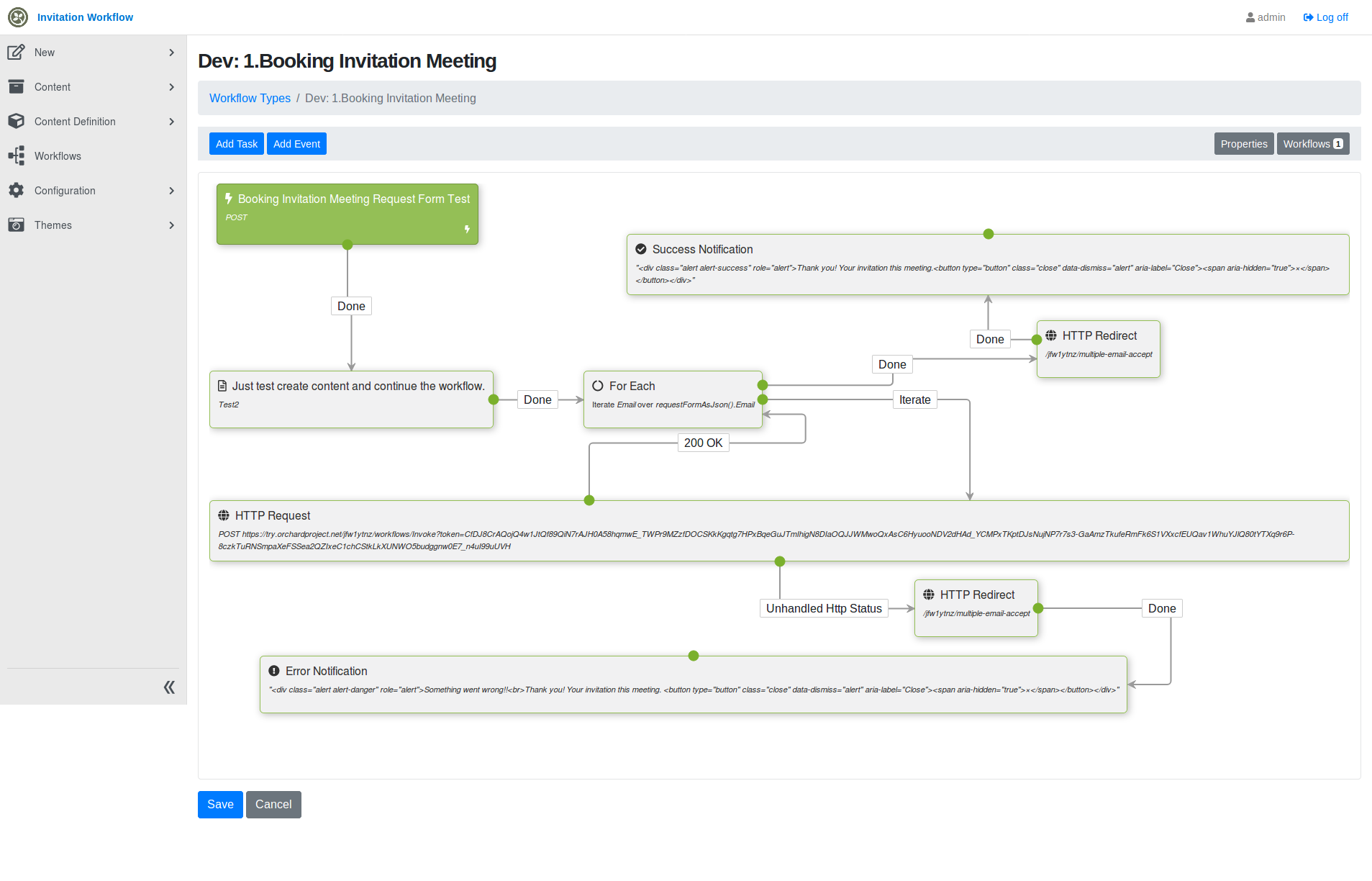
We have a workflow where a convenor can create a meeting slot and invite multiple people to meet.
- An item is created to represent the meeting.
- We iterate invitees and kick off a confirm/decline workflow for each of them.
This blows up due to the create item task. If we remove that task, it works. Is this supposed to work, are we doing something wrong?
Here’s a zip to reproduce the issue: Exportworkflows.zip
Create item and start a workflow instance per invitee
Here we’re creating a placeholder Test2 item, but in reality that will be a meeting-slot item which lists the meeting details and the invitees.
Send email and await response for an invitee
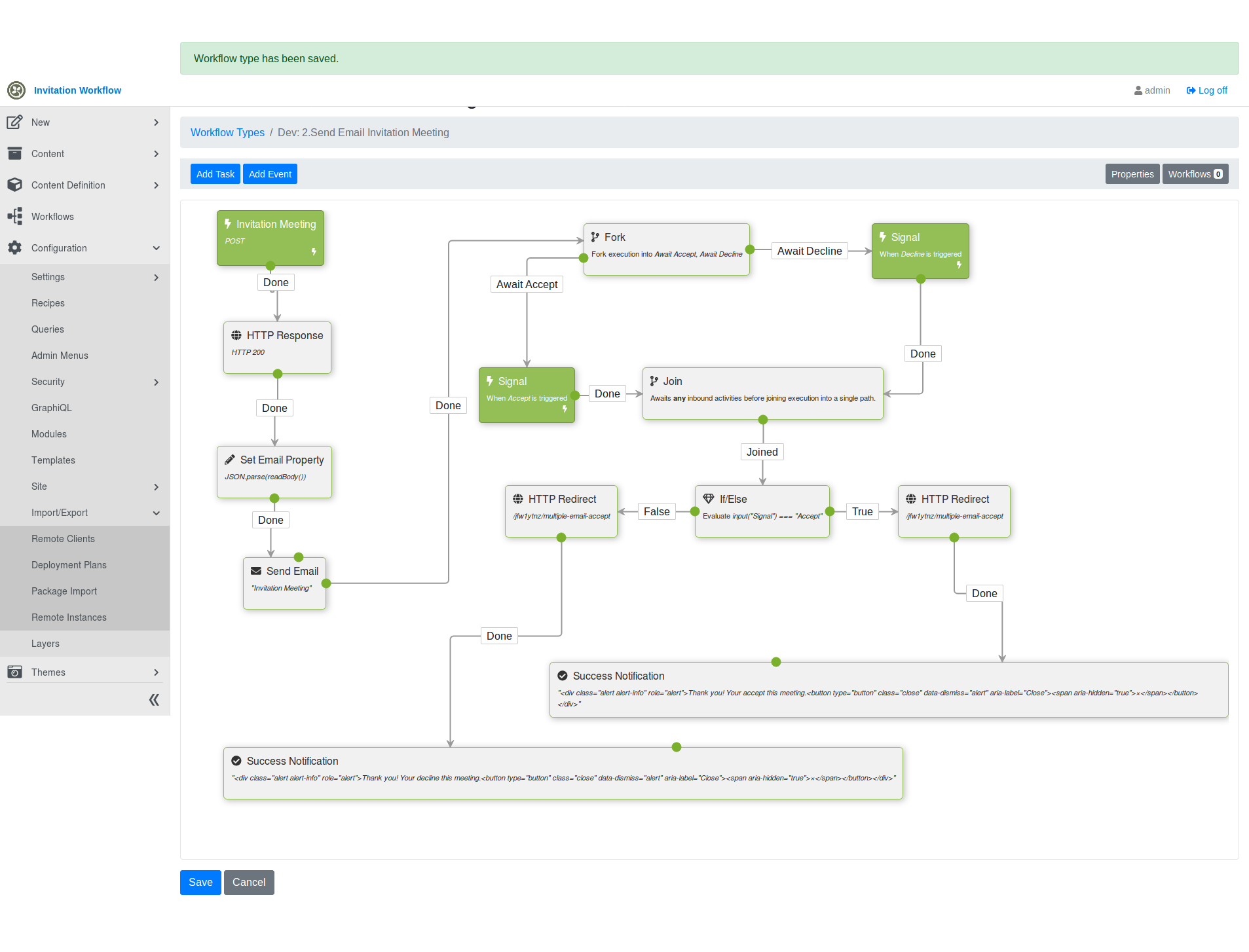
With the attached recipe, we can reproduce this at https://try.orchardproject.net/ , but we can’t see a traceback.
Here’s a local traceback:
2019-09-11 15:44:03.2032|Default|80000021-0001-ff00-b63f-84710c7967bb||OrchardCore.Workflows.Services.WorkflowStore|ERROR|IWorkflowHandler thrown from OrchardCore.Workflows.Http.Handlers.WorkflowRoutesHandler by SqliteException Microsoft.Data.Sqlite.SqliteException (0x80004005): SQLite Error 6: 'database table is locked'.
   at Microsoft.Data.Sqlite.SqliteException.ThrowExceptionForRC(Int32 rc, sqlite3 db)
   at Microsoft.Data.Sqlite.SqliteCommand.ExecuteReader(CommandBehavior behavior)
   at Microsoft.Data.Sqlite.SqliteCommand.ExecuteScalar()
   at System.Data.Common.DbCommand.ExecuteScalarAsync(CancellationToken cancellationToken)
--- End of stack trace from previous location where exception was thrown ---
   at Dapper.SqlMapper.ExecuteScalarImplAsync[T](IDbConnection cnn, CommandDefinition command) in C:\projects\dapper\Dapper\SqlMapper.Async.cs:line 1217
   at YesSql.Session.SaveEntityAsync(Object entity) in C:\projects\yessql-un1yf\src\YesSql.Core\Session.cs:line 189
   at YesSql.Session.FlushAsync() in C:\projects\yessql-un1yf\src\YesSql.Core\Session.cs:line 621
   at YesSql.Services.DefaultQuery.Query`1.FirstOrDefaultImpl() in C:\projects\yessql-un1yf\src\YesSql.Core\Services\DefaultQuery.cs:line 950
   at OrchardCore.Workflows.Http.Handlers.WorkflowRoutesHandler.UpdateRouteEntriesAsync(WorkflowContext context) in C:\Users\Patchareeya\Documents\Projects\htfn\OrchardCore\src\OrchardCore.Modules\OrchardCore.Workflows\Http\Handlers\WorkflowInstanceRoutesHandler.cs:line 44


   at OrchardCore.Workflows.Http.Handlers.WorkflowRoutesHandler.CreatedAsync(WorkflowCreatedContext context) in C:\Users\Patchareeya\Documents\Projects\htfn\OrchardCore\src\OrchardCore.Modules\OrchardCore.Workflows\Http\Handlers\WorkflowInstanceRoutesHandler.cs:line 27
   at OrchardCore.Modules.InvokeExtensions.InvokeAsync[TEvents](IEnumerable`1 events, Func`2 dispatch, ILogger logger) in C:\Users\Patchareeya\Documents\Projects\htfn\OrchardCore\src\OrchardCore\OrchardCore.Abstractions\Modules\Extensions\InvokeExtensions.cs:line 78    at Microsoft.Data.Sqlite.SqliteException.ThrowExceptionForRC(Int32 rc, sqlite3 db)
   at Microsoft.Data.Sqlite.SqliteCommand.ExecuteReader(CommandBehavior behavior)
   at Microsoft.Data.Sqlite.SqliteCommand.ExecuteScalar()
   at System.Data.Common.DbCommand.ExecuteScalarAsync(CancellationToken cancellationToken)
--- End of stack trace from previous location where exception was thrown ---
   at Dapper.SqlMapper.ExecuteScalarImplAsync[T](IDbConnection cnn, CommandDefinition command) in C:\projects\dapper\Dapper\SqlMapper.Async.cs:line 1217
   at YesSql.Session.SaveEntityAsync(Object entity) in C:\projects\yessql-un1yf\src\YesSql.Core\Session.cs:line 189
   at YesSql.Session.FlushAsync() in C:\projects\yessql-un1yf\src\YesSql.Core\Session.cs:line 621
   at YesSql.Services.DefaultQuery.Query`1.FirstOrDefaultImpl() in C:\projects\yessql-un1yf\src\YesSql.Core\Services\DefaultQuery.cs:line 950
   at OrchardCore.Workflows.Http.Handlers.WorkflowRoutesHandler.UpdateRouteEntriesAsync(WorkflowContext context) in C:\Users\Patchareeya\Documents\Projects\htfn\OrchardCore\src\OrchardCore.Modules\OrchardCore.Workflows\Http\Handlers\WorkflowInstanceRoutesHandler.cs:line 44
   at OrchardCore.Workflows.Http.Handlers.WorkflowRoutesHandler.CreatedAsync(WorkflowCreatedContext context) in C:\Users\Patchareeya\Documents\Projects\htfn\OrchardCore\src\OrchardCore.Modules\OrchardCore.Workflows\Http\Handlers\WorkflowInstanceRoutesHandler.cs:line 27
   at OrchardCore.Modules.InvokeExtensions.InvokeAsync[TEvents](IEnumerable`1 events, Func`2 dispatch, ILogger logger) in C:\Users\Patchareeya\Documents\Projects\htfn\OrchardCore\src\OrchardCore\OrchardCore.Abstractions\Modules\Extensions\InvokeExtensions.cs:line 78
2019-09-11 15:44:46.9944|Default|0HLPMGN2542Q2||OrchardCore.Modules.ModularBackgroundService|ERROR|Error while processing background task 'OrchardCore.Workflows.Timers.TimerBackgroundTask' on tenant 'Default'. System.NullReferenceException: Object reference not set to an instance of an object.
   at OrchardCore.Workflows.Services.WorkflowManager.ResumeWorkflowAsync(Workflow workflow, BlockingActivity awaitingActivity, IDictionary`2 input) in C:\Users\Patchareeya\Documents\Projects\htfn\OrchardCore\src\OrchardCore.Modules\OrchardCore.Workflows\Services\WorkflowManager.cs:line 184
   at OrchardCore.Workflows.Services.WorkflowManager.TriggerEventAsync(String name, IDictionary`2 input, String correlationId) in C:\Users\Patchareeya\Documents\Projects\htfn\OrchardCore\src\OrchardCore.Modules\OrchardCore.Workflows\Services\WorkflowManager.cs:line 157
   at OrchardCore.Modules.ModularBackgroundService.<>c__DisplayClass12_2.<<RunAsync>b__1>d.MoveNext() in C:\Users\Patchareeya\Documents\Projects\htfn\OrchardCore\src\OrchardCore\OrchardCore\Modules\ModularBackgroundService.cs:line 128    at OrchardCore.Workflows.Services.WorkflowManager.ResumeWorkflowAsync(Workflow workflow, BlockingActivity awaitingActivity, IDictionary`2 input) in C:\Users\Patchareeya\Documents\Projects\htfn\OrchardCore\src\OrchardCore.Modules\OrchardCore.Workflows\Services\WorkflowManager.cs:line 184
   at OrchardCore.Workflows.Services.WorkflowManager.TriggerEventAsync(String name, IDictionary`2 input, String correlationId) in C:\Users\Patchareeya\Documents\Projects\htfn\OrchardCore\src\OrchardCore.Modules\OrchardCore.Workflows\Services\WorkflowManager.cs:line 157
   at OrchardCore.Modules.ModularBackgroundService.<>c__DisplayClass12_2.<<RunAsync>b__1>d.MoveNext() in C:\Users\Patchareeya\Documents\Projects\htfn\OrchardCore\src\OrchardCore\OrchardCore\Modules\ModularBackgroundService.cs:line 128
About this issue
- Original URL
- State: closed
- Created 5 years ago
- Comments: 21 (17 by maintainers)
Okay, i could repro the same exception by using your recipe and i could fix it.
Here the parent worflow creates an item in a given scope and, before this scope ends and commit the session, it does an
HttpRequestTaskthat triggers a nested workflow that also create an item (here it is just when it ends and save its finished workflow instance). The problem is that the nested workflow, to be able to save its finished instance, it is waiting for the parent scope to finish, but the parent workflow is waiting for the nested workflow to finish to continue the execution flow, and so on.With SQLite we can create items in 2 different scopes and, when it is done at the same time, a given scope 2 wait for the other scope 1 to finish. But if for another reason the scope 1 also wait for the scope 2 to finish, there is a dead lock. Here the other reason is a blocking activity.
That’s why, in a given request scope, a nested scope can’t create an item if its parent scope already did it, here the other reason is the code execution flow. When in 2 different request scopes that’s ok, but here the other reason is the execution flow of the workflow. So, in both case, the parent needs to create its item by using another child scope.
First, a quick workaround in your case is to check, in the nested workflow, the
Delete successfully completed workflowsso that the nested workflow doesn’t create an item to save its finished instance. But if in the nested worflow you want to create another item you would have the same issue.But i found a fix, as said in an above comment
This is what i tried in
CreateContentTask.ExecuteAsync()and that fixed it.In place of using the
ContentManagerof the current scope.I created a child scope from which i resolved and used another instance so that when the child scope is released its session is commited. Here my testing code
Another workaround is to create another nested workflow to create the item that would be triggered by the parent by another http request activity. Here the idea is that the parent doesn’t create any item (unless at the end to save its finished instance), and all items are created in nested workflows but that are non nested from each other.
So, e.g with SQLite, seems that all activities that mutate the database would need to do their operations in an isolated child scope. As i tried here and that seems to fix the issue
Yes exactly and you can use it more than once.
But better to not use it when it is possible by reorganizing the flow, so that the related scoped session doesn’t have to create new transactions. Hmm, but if after a only one commit task you don’t do any other database operation, there is no problem.
Good catch, we can’t read the request body synchronously anymore, unless by setting an option, we changed it in some places e.g for GraphQL, but i missed this one, i will do a PR to fix it.