oqtane.framework: Installing Oqtane on IIS fail
I followed the instructions in Oqtane Blog on how to install Oqtane on IIS step by step with Oqtane 2.0.0 (except step 4 LocalDB).
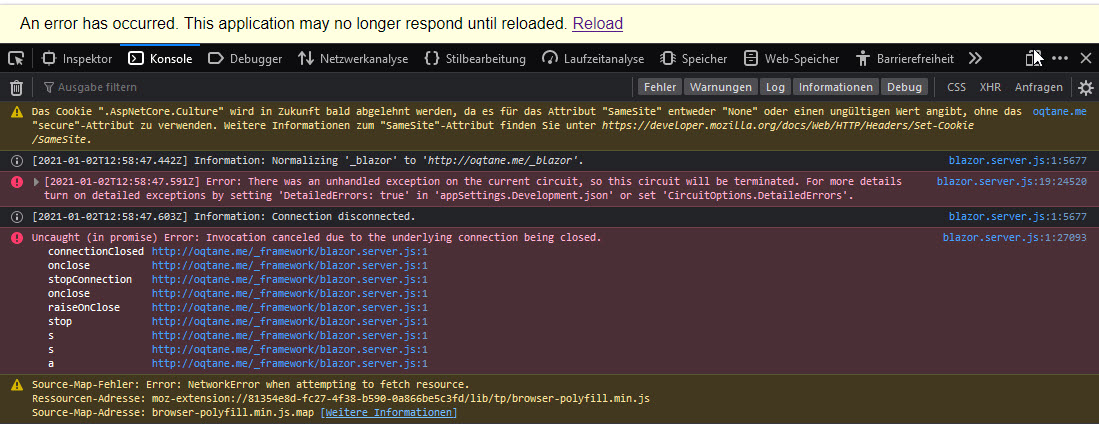
Starting the website fails with the error An error has occurred. This application may no longer respond until reloaded. Reload.
Browser Console content:
Error: There was an unhandled exception on the current circuit, so this circuit will be terminated. For more details turn on detailed exceptions by setting 'DetailedErrors: true' in 'appSettings.Development.json' or set 'CircuitOptions.DetailedErrors'.

Uncaught (in promise) Error: Invocation canceled due to the underlying connection being closed.

I have added 'appSettings.Development.json' file with 'DetailedErrors: true' into installation folder. Still same error message.
Operating System Event Viewer content:
Application 'MACHINE/WEBROOT/APPHOST/OQTANE.ME' has shutdown.
oqtane.me is the hosts file entry: 127.0.0.1 oqtane.me
Having some experience with IIS, Application Pools, hosts file and so on from experimenting with DNN i don’t thing i made a basic error during setup. What could be wrong here? Could someone setup Oqtane 2.0.0 according to the instructions within the blog?
–
Edited: add further info:
About this issue
- Original URL
- State: closed
- Created 3 years ago
- Comments: 16 (16 by maintainers)
Ok the solution is simple. Change your tld to .local and the setup page loads. I am guessing some kind of check is going on in the browser or IIS and with .dev being available producing and issue. https://icannwiki.org/.dev
Suggest updating the blog post