openvino: [Bug]inference speed of OCR recognition with OpenVINO slower than onnxruntime

System information (version)
  • OpenVINO=> 2022.1
  • Operating System / Platform => ubuntu 22.04 image
Detailed description

https://github.com/PaddlePaddle/PaddleOCR/blob/release/2.6/doc/doc_ch/models_list.md image
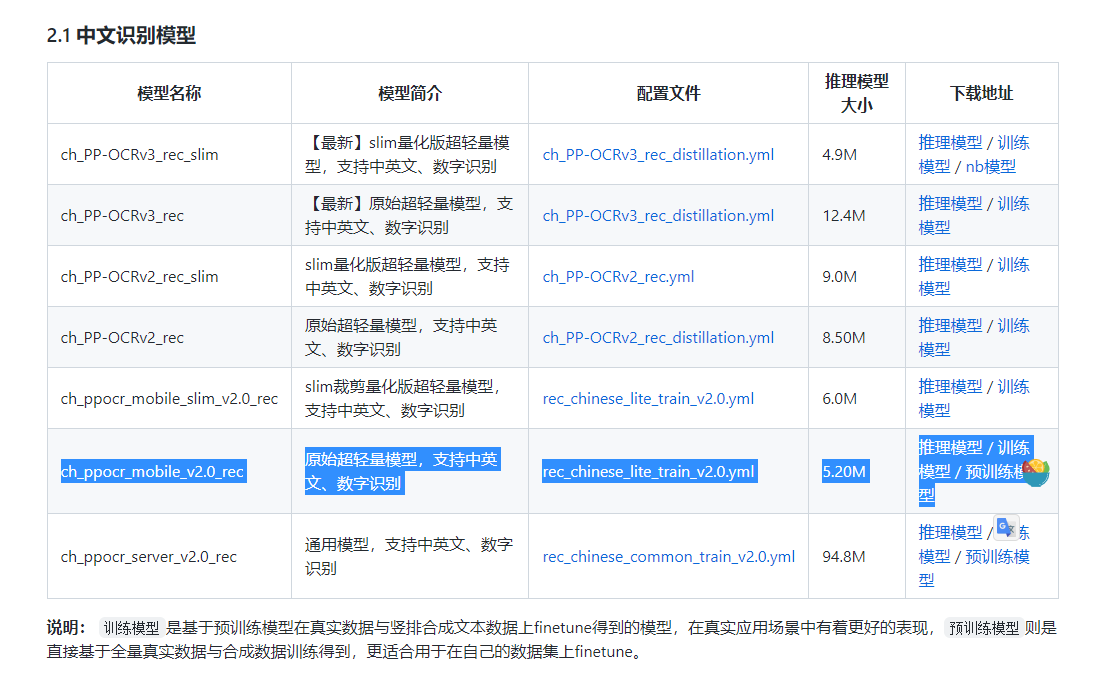
I am using this ocr model of paddle, here is the download address:

https://paddleocr.bj.bcebos.com/dygraph_v2.0/ch/ch_ppocr_mobile_v2.0_rec_infer.tar

Steps to reproduce

This is my configuration, I loaded the paddle model directly, and converted it to the onnx model with paddle2onnx, without any modification.

image

But I found that when I use openvino inference, it takes at least 2.5ms, although there are fluctuations, it is always above 2ms

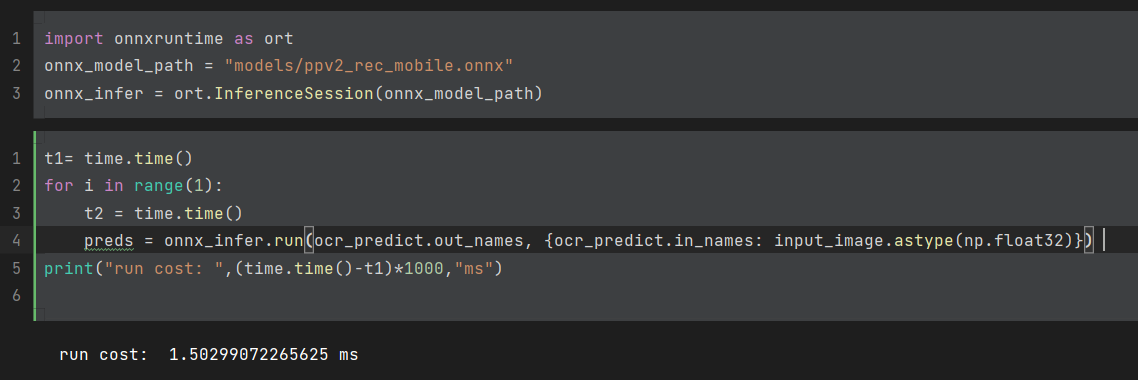
image

image

However, the inference time under onnxruntime only needs to be within 2ms, and even 1.6ms , compared with openvino is much faster.

I have also tried to read the converted onnx file directly with openvino, the phenomenon is still unchanged.

I want to know what is the reason for this? How can I fix it, thanks!

About this issue

  • Original URL
  • State: closed
  • Created a year ago
  • Comments: 15 (7 by maintainers)

Most upvoted comments

@sanbuphy I am happy to see AsyncInferQueue being integrated!

There are several techniques that can help. I will show two of them (I tested them out on my Xeon CPU, you might need to adjust them to your device).

  • Dynamic inputs are supported, yet OpenVINO shines when shapes are known before inference. First you can make your inputs static:
# ... code ...
det_net = core.read_model(ONNX_MODEL_PATH)

det_net.reshape(input_image.shape)  # if you know shapes of your images, you can reshape model in advance

compiled_model = core.compile_model(det_net, "CPU")
# ... code ...
  • Additional configs can help as well. One simple key you can use:
# ... code ...
det_net = core.read_model(ONNX_MODEL_PATH)
det_net.reshape(input_image.shape)

config = {
    ov.properties.hint.performance_mode(): ov.properties.hint.PerformanceMode.THROUGHPUT,
    # you can experiment with different keys as well
}

compiled_model = core.compile_model(det_net, "CPU", config)
# ... code ...

If I ran it all together OV is now faster on my machine. Once again this is very specific case and I advise to experiment on your own. More reading can be found in sections like “Optimize Inference” and “High-level Performance Hints”.

gh_issue$ python recognition_test.py 
Images:  1000
Workers:  10
Configs:
PerformanceMode.THROUGHPUT
OpenVINO:  1.2424111366271973
ONNX:      1.6262636184692383

Also adding @maxnick for further investigation of this case. Cheers!

Hello @jiwaszki , I totally found the problem, the key is :

  • first, we should set PerformanceMode.THROUGHPUT ( the other Performance option seems not work)
  • second, we should set det_net.reshape(input_image.shape), the static graph mode will run faster.

But for OCR task, we can’t set the shape completely static, because the length may be different, so the last parameter can’t be fixed: det_net.reshape([1,3,32,-1]) That way it’s not as fast, but still faster than onnx.

Overall I’ve completely solved this problem, cheers to openvino 😄

Thanks again for your serious help.

Hi @sanbuphy !

First, I would recommend to switch from 2022.1 to 2022.3, it brings a lot of improvements! If this is not possible, let me know. I will prepare similar examples for the older version:)

Here are inference scenarios that might be interesting to you:

  • You do not have to add C++ aligned methods to your code. Python API provides shortcut methods and extensions that simplify the code and makes it more pythonic. Documentation for InferReuqest’s infer() is here. So let’s assume you have one-input model:
# Data in numpy format
arr = numpy.array(...)

infer_request = compiled_model.create_infer_request()

# Case 1: use index of your input
result = infer_request.infer({0: arr})
# Case 2: use name of your input
result = infer_request.infer({"name_of_input": arr})
# Case 3: use Output port of your input
result = infer_request.infer({compiled_model.input(0): arr})
# Case 4: if model is only one-input, you can pass numpy array directly
result = infer_request.infer(arr)

What are the benefits? Firstly, short compact code. Secondly, it provides transparent mechanism that handles most cases where data is misaligned or there is a mismatch of inputs types.

# Data in numpy format
arr = numpy.array(...)

# Create Tensor with shared memory
tensor = ov.Tensor(arr, shared_memory=True)
# And let's use case 4 from previous example
result = infer_request.infer(arr)

Where is the catch? Shared memory Tensor should match input type, shape and follow “C-style” of memory alignment. Python memory (numpy arrays/lists) are not required to follow “C-style”! It really depends on different variables like: data source, libraries, system preferences. Thus if one or more conditions do not apply, conversion should be done:

import numpy as np
import openvino.runtime as ov

arr = np.ones((4, 64), dtype=np.float32)
# You can obtain OV types from inputs/outputs as well:
# ov_dtype = infer_request.inputs[0].get_element_type().to_dtype()
ov_type = ov.Type.i8
ov_dtype = ov_type.to_dtype()
# Check conditions if there is a chance of array to be either misaligned or in different type
# I left out shape differences as these might include custom handling like padding or resizing
adjusted_arr = arr if arr.flags['C_CONTIGUOUS'] and ov_dtype == arr.dtype else np.ascontiguousarray(arr, dtype=ov_dtype)
tensor = ov.Tensor(adjusted_arr, shared_memory=True)

Remember that user/developer is responsible for upkeeping shared memory lifetime in this scenario. If arr gets garbage collected, Tensor’s memory is also removed (this is a cost of “zero-copy” approach).

More reading can be found here: https://docs.openvino.ai/latest/openvino_docs_OV_UG_Python_API_exclusives.html https://numpy.org/doc/stable/reference/generated/numpy.ndarray.flags.html#numpy.ndarray.flags

Looking forward to your response, cheers!

You completely answered my doubts, thank you very much for your serious reply! 👍

I have one final question, where can I get the latest async API? The api manuals on the documentation seem to be aligned with the c++ version, i want to see the python code.