openvino: [Bug] Decoding Semantic Segmentation output blob
System information (version)
- OpenVINO => 2021.3.394
- Operating System / Platform => Ubuntu 18.04 64Bit
- Compiler => g++ 7.5.0
- Problem classification: Inference, model optimization
- Framework: Pytorch -> ONNX -> IR
- Model name: BiseNet
Detailed description
I have been working on a semantic segmentation model for a custom industrial application. The results from the Openvino framework is very different from the results i get from Pytorch. Please refer to the images, the first image is the segmentation result of Pytorch and the second is the segmentation results from OpenVino C++ API:


Please refer to the usage of Model Optimizer as shown below:
 python3 /opt/intel/openvino_2021/deployment_tools/model_optimizer/mo.py -m ~/openvino_models/onnx/bisenet_v1.onnx\
 -o ~/openvino_models/ir --input_shape [1,3,480,640] --data_type FP16 --output preds\
 --input input_image --mean_values [123.675,116.28,103.52] --scale_values [58.395,57.12,57.375]
I perform a normalization of image during training and hence I have used the same parameters(mean and variance/scale). I did a quick analysis of the onnx model and IR model from Openvino. I found one striking difference which is a bit weird. The ONNX model has only one output as in the original model while the IR format has 2 outputs.
My Inference Engine integration code:
    InferenceEngine::Core core;
    InferenceEngine::CNNNetwork network;
    InferenceEngine::ExecutableNetwork executable_network;
    network = core.ReadNetwork(input_model); /// input_model is a string path to the .xml file
Input Settings: Since my network work on RGB colour format, I perform a conversion from BGR -> RGB
    InferenceEngine::InputInfo::Ptr input_info = network.getInputsInfo().begin()->second;
    std::string input_name = network.getInputsInfo().begin()->first;

    input_info->setPrecision(InferenceEngine::Precision::U8);
    input_info->setLayout(InferenceEngine::Layout::NCHW);
    input_info->getPreProcess().setColorFormat(InferenceEngine::ColorFormat::RGB);
Output Settings: I use the rbegin() function instead of begin() to access the second output of the network as it is the desired output and the first output is just created during the model optimization step which I don’t understand 😦. The model has a 64 bit integer output but I set it to 32-bit int. The ouput layout is CHW with C always one and the values of the H x W represent the corresponding class of the that pixel.
    InferenceEngine::DataPtr output_info = network.getOutputsInfo().rbegin()->second;
    std::string output_name = network.getOutputsInfo().rbegin()->first;
    output_info->setPrecision(InferenceEngine::Precision::I32); ///The model has a 64 bit integer output but I set it to 32-bit int
    output_info->setLayout(InferenceEngine::Layout::CHW);
Creation of Infer-request and input blob and inference
    InferenceEngine::InferRequest infer_request = executable_network.CreateInferRequest();
    cv::Mat image = cv::imread(input_image_path);

    InferenceEngine::TensorDesc tDesc(
            InferenceEngine::Precision::U8, input_info->getTensorDesc().getDims(), input_info->getTensorDesc().getLayout()
        );

    InferenceEngine::Blob::Ptr imgBlob = InferenceEngine::make_shared_blob<unsigned char>(tDesc, image.data);
    infer_request.SetBlob(input_name, imgBlob);
    infer_request.Infer();
Random Color palette for visualization of the result
std::vector<std::vector<uint8_t>> get_color_map()
{
    std::vector<std::vector<uint8_t>> color_map(256, std::vector<uint8_t>(3));
    std::minstd_rand rand_engg(123);
    std::uniform_int_distribution<uint8_t> u(0, 255);
    for (int i{0}; i < 256; ++i) {
        for (int j{0}; j < 3; j++) {
            color_map[i][j] = u(rand_engg);
        }
    }
    return color_map;
}
Decoding of the output blob
    InferenceEngine::Blob::Ptr output = infer_request.GetBlob(output_name);
    auto const memLocker = output->cbuffer();
    const auto *res = memLocker.as<const int *>();
    auto oH = output_info->getTensorDesc().getDims()[1];
    auto oW = output_info->getTensorDesc().getDims()[2];
    cv::Mat pred(cv::Size(oW, oH), CV_8UC3);
    std::vector<std::vector<uint8_t>> color_map = get_color_map();
     int idx{0};
    for (int i = 0; i < oH; ++i)
    {
        auto *ptr = pred.ptr<uint8_t>(i);
        for (int j = 0; j < oW; ++j)
        {
            ptr[0] = color_map[res[idx]][0];
            ptr[1] = color_map[res[idx]][1];
            ptr[2] = color_map[res[idx]][2];
            ptr += 3;
            ++idx;
        }
     }
     cv::imwrite(save_pth, pred);
Could you please tell me if I am doing something wrong? Please feel free to ask for more details.
About this issue
- Original URL
- State: closed
- Created 3 years ago
- Comments: 15 (4 by maintainers)
Links to this issue
- Re: Decoding Semantic Segmentation output blob - Intel Community
- Re: Decoding Semantic Segmentation output blob - Intel Community
- Re: Decoding Semantic Segmentation output blob - Intel Community
- Re:Decoding Semantic Segmentation output blob - Intel Community
- Decoding Semantic Segmentation output blob - Intel Community
@vladimir-dudnik I have tested it in my application and it works fine. Thank you for your support. I am closing the issue. I’m also posting a very simple segmentation example in-case if anyone needs a very simple example.
@vladimir-dudnik I think this looks promising, 2 represents class ‘person’ but with specific uniforms and 1 represents our object of interest which is not very common and 0 is the background class. Technically its a 3 class problem, sorry that I mentioned it as a 2 class problem earlier. Thanks once again.
@Eashwar93 sure, that is OMZ Python segmentation demo output for some random “industrial” picture (we do understand that this is not a target scene, but at least model detected class 0 and class 2 on it)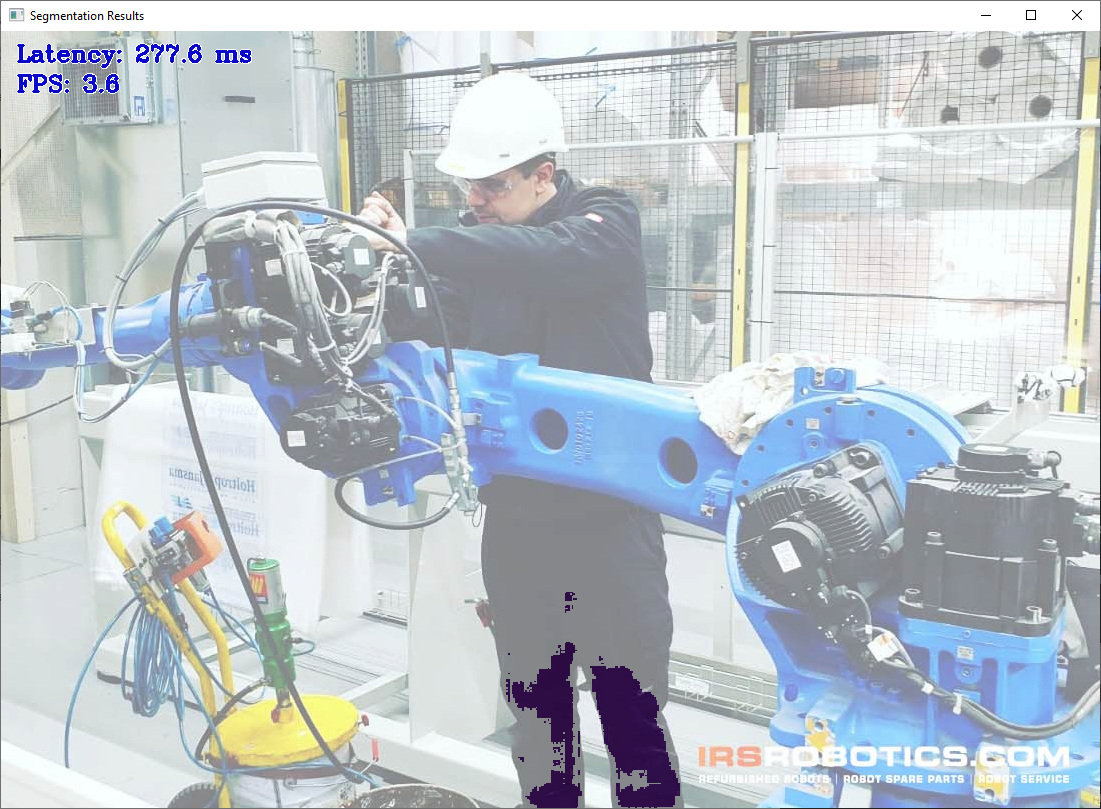
@Eashwar93 thanks, there was an issue with MO in OpenVINO 2021.3 which cause generating IR with two outputs. This was fixed in the latest OpenVINO 2021.4 release, which you can try. On our side, we tried to convert your ONNX model to IR with 2021.4 release and IR contain single output, which allow to run inference with OMZ demo (although, I do not know what object classes it was trained for, it seems for generic street scene it does not detect anything meaningful). By the way, as you probably know, OpenVINO Inference Engine also support ONNX directly (again, starting from 2021.4 release OMZ segmentation demo is able to accept ONNX file instead of XML, although this support in demo should be improved. We provided such support in object_detection_demo, so when you use ONNX instead of XML, it also allow you to specify mean/scale values, required for data preprocessing. This step not implemented yet in segmentation demo, but it should be easy to add)