opentrons: Linux Ubuntu 22.04 - App is unable to open
Dear all, I am facing issues opening and using the opentron app on my linux machine (Ubuntu 22.04 LTS) the icon does not work “Opentrons.AppImage”, opening is via cmd line ./Opentrons.AppImage results in the error messages below, opening via sudo --no-sandbox mode manages to open the GUI but with error messages too. I have also attached the error logs, hopefully someone can advice on what to do please.
xx@xx:~/Desktop$ ./Opentrons.AppImage
13:31:56.888 [log] info: Level "error" and higher logging to /home/dlsw3/.config/Opentrons/logs/error.log
13:31:56.908 [log] info: Level "debug" and higher logging to /home/dlsw3/.config/Opentrons/logs/combined.log
13:31:56.909 [log] info: Level "info" and higher logging to console
(node:43690) MaxListenersExceededWarning: Possible EventEmitter memory leak detected. 11 unpipe listeners added to [File]. Use emitter.setMaxListeners() to increase limit
(Use `opentrons --trace-warnings ...` to show where the warning was created)
(node:43690) MaxListenersExceededWarning: Possible EventEmitter memory leak detected. 11 error listeners added to [File]. Use emitter.setMaxListeners() to increase limit
(node:43690) MaxListenersExceededWarning: Possible EventEmitter memory leak detected. 11 unpipe listeners added to [File]. Use emitter.setMaxListeners() to increase limit
(node:43690) MaxListenersExceededWarning: Possible EventEmitter memory leak detected. 11 error listeners added to [File]. Use emitter.setMaxListeners() to increase limit
(node:43690) MaxListenersExceededWarning: Possible EventEmitter memory leak detected. 11 unpipe listeners added to
[combined.log](https://github.com/Opentrons/opentrons/files/9580992/combined.log)
 [Console]. Use emitter.setMaxListeners(
[error.log](https://github.com/Opentrons/opentrons/files/9580993/error.log)
) to increase limit
(node:43690) MaxListenersExceededWarning: Possible EventEmitter memory leak detected. 11 error listeners added to [Console]. Use emitter.setMaxListeners() to increase limit
(node:43690) MaxListenersExceededWarning: Possible EventEmitter memory leak detected. 11 drain listeners added to [File]. Use emitter.setMaxListeners() to increase limit
(node:43690) MaxListenersExceededWarning: Possible EventEmitter memory leak detected. 11 close listeners added to [File]. Use emitter.setMaxListeners() to increase limit
(node:43690) MaxListenersExceededWarning: Possible EventEmitter memory leak detected. 11 finish listeners added to [File]. Use emitter.setMaxListeners() to increase limit
(node:43690) MaxListenersExceededWarning: Possible EventEmitter memory leak detected. 11 drain listeners added to [File]. Use emitter.setMaxListeners() to increase limit
(node:43690) MaxListenersExceededWarning: Possible EventEmitter memory leak detected. 11 close listeners added to [File]. Use emitter.setMaxListeners() to increase limit
(node:43690) MaxListenersExceededWarning: Possible EventEmitter memory leak detected. 11 finish listeners added to [File]. Use emitter.setMaxListeners() to increase limit
(node:43690) MaxListenersExceededWarning: Possible EventEmitter memory leak detected. 11 drain listeners added to [Console]. Use emitter.setMaxListeners() to increase limit
(node:43690) MaxListenersExceededWarning: Possible EventEmitter memory leak detected. 11 close listeners added to [Console]. Use emitter.setMaxListeners() to increase limit
(node:43690) MaxListenersExceededWarning: Possible EventEmitter memory leak detected. 11 finish listeners added to [Console]. Use emitter.setMaxListeners() to increase limit
13:31:58.363 [main] info: Starting App
13:31:58.746 [ui] info: Loading file:///tmp/.mount_OpentrEwqiI7/resources/app.asar/ui/index.html
13:31:58.790 [main] info: Creating renderer logger
13:31:58.866 [protocol-analysis/getPythonPath] info: Python environment selected { pythonPath: '/tmp/.mount_OpentrEwqiI7/resources/python/bin/python3' }
(node:43690) [DEP0005] DeprecationWarning: Buffer() is deprecated due to security and usability issues. Please use the Buffer.alloc(), Buffer.allocUnsafe(), or Buffer.from() methods instead.
[43690:0916/133202.628311:FATAL:gpu_data_manager_impl_private.cc(415)] GPU process isn't usable. Goodbye.
Trace/breakpoint trap (core dumped)
About this issue
- Original URL
- State: closed
- Created 2 years ago
- Comments: 21 (12 by maintainers)
What happens if you add “–disable-gpu-sandbox”?
@koji Architecture: x86_64 CPU op-mode(s): 32-bit, 64-bit Address sizes: 46 bits physical, 48 bits virtual Byte Order: Little Endian CPU(s): 12 On-line CPU(s) list: 0-11 Vendor ID: GenuineIntel Model name: Intel® Xeon® CPU E5-2620 0 @ 2.00GHz CPU family: 6 Model: 45 Thread(s) per core: 2 Core(s) per socket: 6 Socket(s): 1 Stepping: 7 CPU max MHz: 2500.0000 CPU min MHz: 1200.0000 BogoMIPS: 3990.63
@koji The response time of the GUI interface is ~10 mins when I open from the app icon and it takes ~5 minutes for the connection to the OT-2, error.log combined.log
@chewyalvin @Javier1704 The download page has been updated. https://opentrons.com/ot-app/ https://github.com/Opentrons/opentrons/releases/tag/v6.1.0
Yes I have done chmod to all permissions: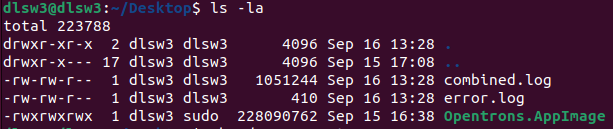
I have also used the GUI to enable the execute permission “Allow executing file as a program”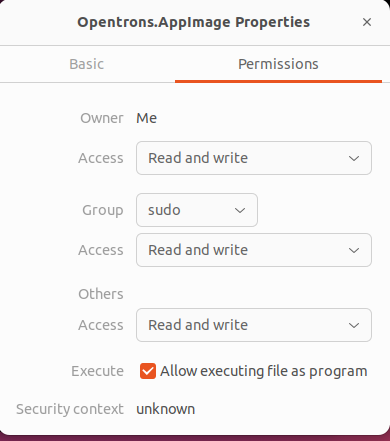
double-click (+ update permission) does not work, nothing happens upon double-click.
uname -a Linux dlsw3 5.15.0-47-generic #51-Ubuntu SMP Thu Aug 11 07:51:15 UTC 2022 x86_64 x86_64 x86_64 GNU/Linux
Yes it is, Model name: Intel® Xeon® CPU E5-2630 v4 @ 2.20GHz, any other sysinfo that will be helpful?