OpenRefine: Unable to create a project from a URL on Windows if the URL path contains ":" character
On Windows, creating a project from a URL that contains the colon “:” character in the URL path throws an error related to the naming of a temporary directory/file.
To Reproduce
Steps to reproduce the behavior:
- Create a new project from a URL as
protocol://domain/foo/:bar/foo - Click on the Next button
- An error message is displayed that states “Error uploading data illegal char <:> at index […]” (see screenshot below)
Current Results
An error message is displayed that states “Error uploading data illegal char <:> at index […]”. The project creation fails.
Expected Behavior
The project should be created from a URL that contains a colon character or any other character that is valid in a URL.
Screenshots
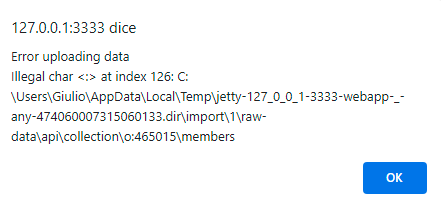
Versions
- Operating System: Windows 10
- Browser Version: Chrome 99
- JRE or JDK Version: JRE 1.8.0_301
- OpenRefine: 3.5.2 [e3efd4e]
Additional context
Creating a project from a URL containing a colon character seems to work fine on Linux and macOS.
About this issue
- Original URL
- State: closed
- Created 2 years ago
- Comments: 16 (13 by maintainers)
We could first ask @zkl-ai how they are progressing on this. Also, I am not sure your screenshot really demonstrates the problem - I think it would be good to reproduce it with a valid URL (with a colon, similarly to the template given above).
Hi @yeungven, @hniswand,
I’m the OP of the issue. Could you please do tests using this URL https://phaidra.cab.unipd.it/api/collection/o:269936/members? Please, do not throw too many calls to the API endpoint I provided.