OpenRefine: fetching URLs: Received fatal alert: handshake failure
OpenRefine 2.7 (1) on Mac OSX 10.11.6 with Google Chrome 61.0.3163.100 (Official Build) (64-bit).
Attempting to “Edit column” -> “Add column by fetching URLs …” one gets: “Received fatal alert: handshake failure” for all URLs tried in the https://pleiades.stoa.org/ domain.
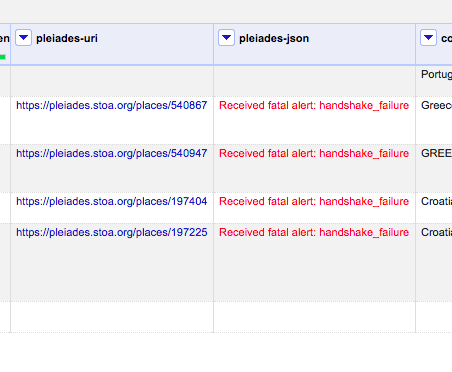
but curling the urls on same platform has no problems, e.g.:
$ curl -I https://pleiades.stoa.org/places/540867/json
HTTP/1.1 200 OK
Date: Thu, 12 Oct 2017 20:48:30 GMT
Server: Zope/(2.13.24, python 2.7.11, linux2) ZServer/1.1
Content-Length: 16430
Vary: Accept
Access-Control-Allow-Origin: *
Content-Type: application/json; charset=utf-8
X-Frame-Options: SAMEORIGIN
X-Varnish: 794267
Age: 0
Via: 1.1 varnish-v4
X-Varnish-Cache: MISS
Accept-Ranges: bytes
Cache-Control: max-age=86400, s-maxage=11988
Expires: Fri, 13 Oct 2017 20:48:30 GMT
About this issue
- Original URL
- State: closed
- Created 7 years ago
- Comments: 28 (20 by maintainers)
Commits related to this issue
- stop returning 403 to Java-default user agents This restriction was causing problems with OpenRefine (see https://github.com/OpenRefine/OpenRefine/issues/1265) — committed to isawnyu/pleiades-ansible by paregorios 7 years ago
- stop returning 403 to Java-default user agents This restriction was causing problems with OpenRefine (see https://github.com/OpenRefine/OpenRefine/issues/1265) — committed to isawnyu/pleiades-ansible by paregorios 7 years ago
I’ve now added a new page on troubleshooting problems fetching data from URLs, putting in the problems noted in this issue and the solutions at https://github.com/OpenRefine/OpenRefine/wiki/Troubleshooting:-Fetching-data-from-URLs
As noted by @paregorios some of the solutions are technical, and will be challenging for a user without experience of using the command line or similar level of technical knowledge.
I’ve also confirmed through testing that if you use OpenRefine for Mac, the Java cacerts and encryption policy files that are important are the ones that are in the JRE included in the distribution (e.g. in my current install of OR2.8, this is /Applications/OpenRefine.app/Contents/PlugIns/jdk1.8.0_60.jdk/Contents/Home/jre/lib/security/ although the path can obviously vary across installs and versions)
This is as far as I’m able to take it in terms of the security certs - we haven’t identified a good/easy solution for ensuring that users don’t encounter problems here. I think @thadguidry’s suggestion of a separate script to do the necessary updates is probably the right approach, but I don’t know how to start approaching this.
It would be good to update the Java version which is included in the Mac version at some point, but I think that’s a connected but separate issue.
Finally #1217 is also related and outstanding - and I think is something we can do something about - I’m planning on having a look at how we might allow the user to specify request headers including user-agent soon.
Closing this specific issue now.
@ettorerizza The problem still might exist. Users in constrained IT environments might not see OpenRefine being allowed to start because JRE or JDK is caught as suspicious by a corporate security program running on their computer. We cannot help that however, so its a non-issue for us.
I think I would be OK with a bundled JRE, and allowing folks to still override the bundled JRE to that of their $JAVA_HOME
The problem that I don’t know about on OSX is about Signing ? Is it a requirement at the OSX level or is it just a requirement for Apple Store ? In other words, does the OpenRefine+JRE bundled app on OSX need to be signed somehow or not ?
@ostephens At the end of the day, I’d like you to just close this issue and then provide some good documentation, avoidance, best practice, etc… on our Wiki to help navigate this kind of problem with Server side security when using our Fetch URLs function against a server using HTTPS. We can then point folks to that page to try different options, and advise of security concerns as well. A Wiki page is a much better way to deal with this very niche “area” (its not an issue) in particular. Which really OpenRefine dev / support team should not be getting into the weeds with. Let’s call that Wiki page “Fetching URLs with HTTPS” or whatever.
Thanks All.
According to this, the “DST Root CA X3” certificate, which is the parent to the “Let’s Encrypt” certificate was only added to the default JDK/JRE keystore with versions 7u111 and 8u101. So, bundling jdk 1.8.0_101 or later might take care at least of the certificate problem (and not just for Pleiades).
@paregorios OK - success. It looks like if you run the Mac version it uses the Java cacerts from /Applications/OpenRefine.app/Contents/PlugIns/jdk1.8.0_60.jdk/Contents/Home/jre/lib/security
(this is mentioned in https://groups.google.com/forum/#!msg/openrefine/6adewVTQh4Y/gsJdepAmAAAJ;context-place=forum/openrefine, although I definitely have $JAVA_HOME set, so I wonder if there is an issue with the Mac build in this respect).
Anyway, so I copied the JCE local_policy.jar and US_export_policy.jar into this directory, but then got the “sun.security.validator.ValidatorException: PKIX path building failed” error, which means that it is missing a certificate.
So I then installed the cert pleiadesstoaorg.crt I got from my browser by visiting pleiades.stoa.org - but that still didn’t resolve the issue.
So then I installed the root cert from Lets Encrypt (obtained from https://letsencrypt.org/certificates/) using:
keytool -import -alias isrgrootx1 -keystore /Applications/OpenRefine.app/Contents/PlugIns/jdk1.8.0_60.jdk/Contents/Home/jre/lib/security/cacerts -file /Path/to/isrgrootx1.pemAnd Success!