OpenRefine: Behaviour of date, number and boolean values in a test/list facet is inconsistent
Version of OpenRefine used (Google Refine 2.6, OpenRefine2.8, an other distribution?):
Tested on OpenRefine 2.8 & 3.0 beta, but suspect the same behaviour is in earlier versions of OR as well
Current behaviour
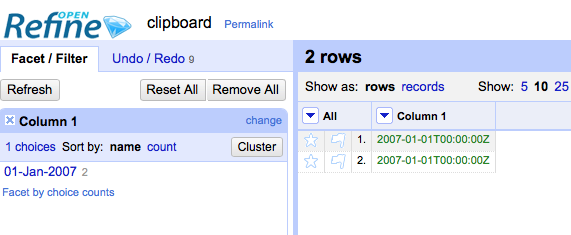
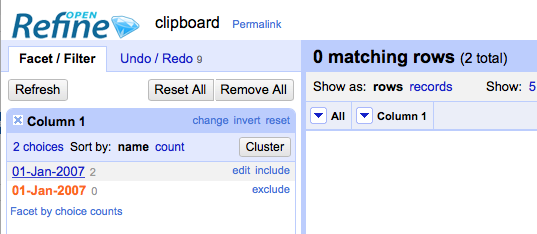
There are a variety of scenarios - some described here: Create a ‘text facet’ on a column that contains date values (i.e. as dates, not strings) Try selecting rows by clicking the date value in the facet See that no rows are selected (and in 2.8 at least an additional value appears in the facet)
Create a column containing non-string values and strings that have the same visible value - e.g.:
true -> boolean
"true" -> string
Look at the facet and see the “count” is the number you would expect if you treated the string and non-string values as being equivalent.
Try selecting the value in the facet - see only the rows containing either the non-string, or only the string values are selected (which set are selected depends on the order of the cells in the project)
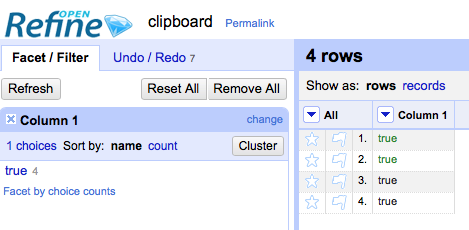
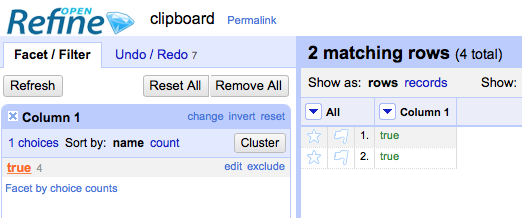
This latter behaviour also effects numbers and dates
If you are allowed and are OK with making your data public, it would be awesome if you can include the data causing the issue or a URL pointing to where the data is (if your concerned about keeping your data private, ping us on our mailing list):
Expected Behaviour:
There is a fundamental question here of how date, number and boolean values should be treated in text/list facets. They are currently counted as if they are equivalent to strings, and also if you try to use ‘mass edit’ they are treated as if they are the same as the equivalent string (e.g. in the example above do an edit from the facet and the boolean true and the string “true” would both be changed in the project.
I think trying to treat objects as equivalent to some strings in this situation is probably a bad idea. I can see two options
-
Similarly to how timeline/number facets treat other values OR could simply not include the non-string values in the facet and have a checkbox as to whether they are included in the filter or not - see
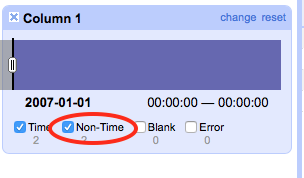
-
Similar to how nulls/empty strings are handled in text facets, we could have a bucket facet value for “dates”, “numbers”, “booleans” which would allow the user to select the set of boolean values but not see counts of
truevsfalse(a further boolean facet would be needed to see that) -
Dates, Booleans and Numbers could be included in the facet but as separate values in the facet - so all boolean
trueare grouped and counted separately to all string “true”
These are not necessarily exclusive options - we could implement them in combination
These are my views - please make suggestions for other behaviours or indicate which of the 3 I’ve listed individually or in combination would make most sense to you @thadguidry @ettorerizza (feel free to ping others to get feedback)
About this issue
- Original URL
- State: closed
- Created 6 years ago
- Comments: 26 (25 by maintainers)
Agree with @wetneb
The previous behaviour of the text facet was problematic (as documented above). For example in the previous behaviour a cell with the text string ‘true’ and a boolean cell or result of ‘true’ would cluster together but selection did not work (documented above). Not to mention the issues with dates (above).
I think a “type” facet would be helpful, but this isn’t what the OpenRefine 3.1 behaviour delivers.
The OpenRefine 3.1 behaviour delivers a “text” (or string) facet - and as with “number” and “date” facets, it doesn’t try to blindly convert non-text values into text values - that is left as something the user can choose to do if they want. I feel this brings to consistency to the facet behaviour, although I absolutely acknowledge that this change to behaviour is a breaking change and needs users to amend their previous practices.
We must find a solution at least for Booleans. The current behavior of OR 3.1 does not allow anymore to use text facet “true vs false”, for example to select the first 100 rows of a dataset with
row.index < 100. Big breaking change.OR 3.1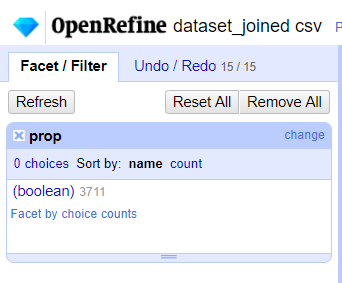
OR 3 and previous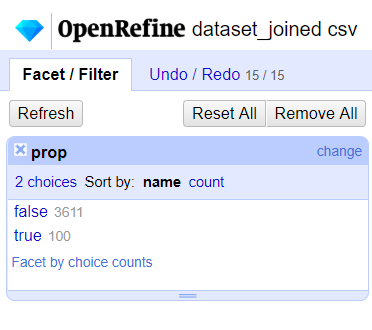
Thanks @thadguidry that’s very clear. What you are suggesting:
This definitely makes sense to me and was the approach I was trying to describe in my Number 2 above:
So with this method
Would give the facet
I still wonder if there is a role for a mixed type ‘list’ facet (which is what I was suggesting in (3) above) where
Would give the facet
but I think you are probably right that we should keep the Text facet as Text, and then if there should be a mixed type List facet we can look at that as a separate issue
Thanks
@thadguidry I’m trying to understand what is the most sensible consistent behaviour here that we should aim for. It seems from what you say, you would like to see the values treated consistently as strings within the context of a text facet? So if we have data:
Then this should result in a facet:
And selecting the value in the facet would filter to both rows. Is that correct? Have I understood your preference for how it should work?