onlyoffice-owncloud: I cannot Edit files with Onlyoffice and Nextcloud 12 and Onlyoffice App 1.0.5
Hi
Since many hours, im trying to get onlyoffice working with nextcloud. I have onlyoffice running as a docker container on port -p 444:443
I also run an apache as reverse proxy.
here is my configuration:
` <VirtualHost *:443>
    LoadModule setenvif_module modules/mod_setenvif.so

    ServerName abc.domain.com
    SSLEngine On
    SSLProxyEngine On
    ProxyPreserveHost On
    ProxyRequests Off
    SSLProxyCheckPeerCN off
    SSLProxyCheckPeerExpire off
    SSLInsecureRenegotiation on
    SSLProxyVerify none
    SSLVerifyClient none

    SSLProtocol all -SSLv2

    SSLCipherSuite ALL:!ADH:!EXPORT:!SSLv2:RC4+RSA:+HIGH:+MEDIUM

    SSLCertificateFile      /etc/letsencrypt/live/abc.domain.com/fullchain.pem
    SSLCertificateChainFile /etc/letsencrypt/live/abc.domain.com/fullchain.pem
    SSLCertificateKeyFile   /etc/letsencrypt/live/abc.domain.com/privkey.pem

    SSLProxyCheckPeerName off
    #RequestHeader unset Accept-Encoding
    #ProxyPass / https://192.168.50.20:444/
    #ProxyPassReverse / https://192.168.50.20:444/

    RequestHeader setifempty X-Forwarded-Proto https
    ProxyAddHeaders Off

    ProxyPassMatch (.*)(\/websocket)$ "wss://192.168.50.20/$1$2"

    RequestHeader unset Accept-Encoding
    ProxyPass / https://192.168.50.20:444/
    ProxyPassReverse / https://192.168.50.20:444/
    #ProxyPass "/websocket" "ws://192.168.50.20:444/websocket"
    #ProxyPassReverse "/websocket" "ws://192.168.50.20:444/websocket"

    <proxy *>
            AddDefaultCharset off
            Order Allow,Deny
            Allow from all
    </proxy>
Unfortunately, i alway get the following image:
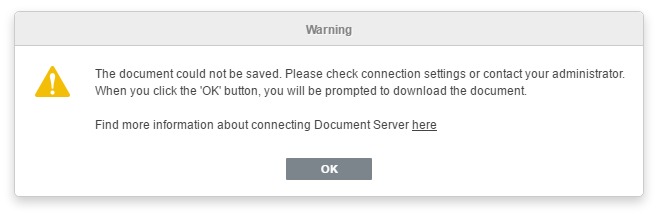
I defenitley dont havy any more ideas. I would be very happy if someone could help me.
Thank you.
About this issue
- Original URL
- State: closed
- Created 7 years ago
- Reactions: 4
- Comments: 20 (8 by maintainers)
If I set the secret to default (“secret” in default.json and empty in the Nextcloud app), then everything works well. After inserting my own secret again the error shown above comes back.
As a workaround I removed the secret key and put an ipfilter for my domain into the default.json file to protect the documentserver from unautorized use. This works, but it is just a workaround.