Kingfisher: AnimatedImageView crash
Check List
Thanks for considering to open an issue. Before you submit your issue, please confirm these boxes are checked.
- I have read the wiki page and cheat sheet, but there is no information I need.
- I have searched in existing issues, but did not find a same one.
- I want to report a problem instead of asking a question. It’d better to use kingfisher tag in Stack Overflow to ask a question.
Issue Description
What
Since the update to Kingfisher 7.0.0 users have been reporting several crashes inside our app. Our crash reporting software captured the stack traces and it seems to be inside the Kingfisher iOS SDK.
- AnimatedImageView.Animator.loadFrame(at:) Stack Trace:
Crashed: com.onevcat.Kingfisher.Animator.preloadQueue 0 libsystem_platform.dylib 0x1a44 _platform_memmove + 548 1 CoreFoundation 0xb32f8 CFDataGetBytes + 328 2 ImageIO 0x1500 CGImageGetImageSource + 152 3 UIKitCore 0x203024 -[_UIImageCGImageContent initWithCGImage:scale:] + 36 4 UIKitCore 0x18c3ec -[UIImage initWithCGImage:scale:orientation:] + 72 5 Woebot 0x266520 AnimatedImageView.Animator.loadFrame(at:) + 4336739616 (<compiler-generated>:4336739616) 6 Woebot 0x2667b8 AnimatedImageView.Animator.updatePreloadedFrames() + 575 (AnimatedImageView.swift:575) 7 Woebot 0x1d51f0 thunk for @escaping @callee_guaranteed () -> () + 4336144880 (<compiler-generated>:4336144880) 8 libdispatch.dylib 0x632ec _dispatch_call_block_and_release + 24 9 libdispatch.dylib 0x642f0 _dispatch_client_callout + 16 10 libdispatch.dylib 0x3f410 _dispatch_lane_serial_drain$VARIANT$armv81 + 596 11 libdispatch.dylib 0x3feb8 _dispatch_lane_invoke$VARIANT$armv81 + 388 12 libdispatch.dylib 0x4976c _dispatch_workloop_worker_thread + 616 13 libsystem_pthread.dylib 0xf38 _pthread_wqthread + 284 14 libsystem_pthread.dylib 0xaa4 start_wqthread + 8
- AnimatedImageView.Animator.updatePreloadedFrames() Stack Trace:
Crashed: com.onevcat.Kingfisher.Animator.preloadQueue 0 CoreFoundation 0xbc124 CFDataGetBytes + 156 1 ImageIO 0x2700 CGImageGetImageSource + 156 2 UIKitCore 0x215c74 -[_UIImageCGImageContent initWithCGImage:scale:] + 40 3 UIKitCore 0x19cee0 -[UIImage initWithCGImage:scale:orientation:] + 76 4 Woebot 0x266520 (Missing) 5 Woebot 0x2667b8 AnimatedImageView.Animator.updatePreloadedFrames() + 575 (AnimatedImageView.swift:575) 6 Woebot 0x1d51f0 thunk for @escaping @callee_guaranteed () -> () + 4309012976 (<compiler-generated>:4309012976) 7 libdispatch.dylib 0x1c04 _dispatch_call_block_and_release + 32 8 libdispatch.dylib 0x3950 _dispatch_client_callout + 20 9 libdispatch.dylib 0xb0ac _dispatch_lane_serial_drain + 664 10 libdispatch.dylib 0xbc10 _dispatch_lane_invoke + 392 11 libdispatch.dylib 0x16318 _dispatch_workloop_worker_thread + 656 12 libsystem_pthread.dylib 0x11b0 _pthread_wqthread + 288 13 libsystem_pthread.dylib 0xf50 start_wqthread + 8
AnimatedImageView is used inside the app to display an image full screen.
Reproduce
class FullScreenImageViewController: UIViewController {
    private var imageView: AnimatedImageView!
    private var scrollView: UIScrollView!

    private static let animationDuration: TimeInterval = 0.15

    func showFullScreen(animatedImageView: AnimatedImageView) {
        self.setupScrollView()

        self.imageView = AnimatedImageView(image: animatedImageView.image)
        self.imageView.contentMode = .scaleAspectFit

        guard let delegate = UIApplication.shared.delegate,
            let wrappedWindow = delegate.window,
            let window = wrappedWindow,
            let rootViewController = window.rootViewController,
            let imageSize = animatedImageView.image?.size
        else { return }

        self.scrollView.addSubview(self.imageView)
        rootViewController.view.addSubview(self.scrollView)

        self.imageView.translatesAutoresizingMaskIntoConstraints = false
        self.imageView.widthAnchor.constraint(lessThanOrEqualTo: self.scrollView.widthAnchor).isActive = true
        self.imageView.heightAnchor.constraint(equalTo: self.imageView.widthAnchor, multiplier: imageSize.height / imageSize.width).isActive = true
        self.imageView.heightAnchor.constraint(lessThanOrEqualTo: self.scrollView.heightAnchor).isActive = true
        self.imageView.centerXAnchor.constraint(equalTo: self.scrollView.centerXAnchor).isActive = true
        self.imageView.centerYAnchor.constraint(equalTo: self.scrollView.centerYAnchor).isActive = true

        UIView.animate(withDuration: FullScreenImageViewController.animationDuration) {
            self.scrollView.alpha = 1
        }
    }

    private func setupScrollView() {
        self.scrollView = UIScrollView(frame: UIScreen.main.bounds)
        self.scrollView.maximumZoomScale = 2.0
        self.scrollView.delegate = self
        self.scrollView.backgroundColor = .black
        self.scrollView.alpha = 0
        self.scrollView.showsVerticalScrollIndicator = false
        self.scrollView.showsHorizontalScrollIndicator = false

        let tapGestureRecognizer = UITapGestureRecognizer(target: self, action: #selector(self.dismissFullscreenImage))
        self.scrollView.addGestureRecognizer(tapGestureRecognizer)
        let swipeGestureRecognizer = UISwipeGestureRecognizer(target: self, action: #selector(self.dismissFullscreenImage))
        swipeGestureRecognizer.direction = .down
        self.scrollView.addGestureRecognizer(swipeGestureRecognizer)
        let doubleTapGestureRecognizer = UITapGestureRecognizer(target: self, action: #selector(self.didDoubleTap))
        doubleTapGestureRecognizer.numberOfTapsRequired = 2
        self.scrollView.addGestureRecognizer(doubleTapGestureRecognizer)
        tapGestureRecognizer.require(toFail: doubleTapGestureRecognizer)
    }

    @objc private func dismissFullscreenImage(_ sender: UIGestureRecognizer) {
        UIView.animate(withDuration: FullScreenImageViewController.animationDuration, animations: {
            sender.view?.alpha = 0
        }, completion: { _ in
            sender.view?.removeFromSuperview()
            self.removeFromParent()
        })
    }

    @objc private func didDoubleTap(_ sender: UITapGestureRecognizer) {
        guard self.scrollView.zoomScale == 1 else {
            self.scrollView.setZoomScale(1, animated: true)
            return
        }
        let zoomRect = self.zoomRect(forScale: self.scrollView.maximumZoomScale, center: sender.location(in: sender.view))
        self.scrollView.zoom(to: zoomRect, animated: true)
    }

    private func zoomRect(forScale scale: CGFloat, center: CGPoint) -> CGRect {
        var zoomRect: CGRect = .zero
        zoomRect.size.height = imageView.frame.size.height / scale
        zoomRect.size.width = imageView.frame.size.width / scale
        let newCenter = self.scrollView.convert(center, from: imageView)
        zoomRect.origin.x = newCenter.x - (zoomRect.size.width / 2.0)
        zoomRect.origin.y = newCenter.y - (zoomRect.size.height / 2.0)
        return zoomRect
    }
}
Other Comment
About this issue
- Original URL
- State: closed
- Created 3 years ago
- Comments: 45 (10 by maintainers)
Any news for this?
This is the same issue as https://github.com/SDWebImage/SDWebImage/issues/3273#issuecomment-1203696655
From iOS 15+,
CGImagekeep a strong reference to theCGImageSourcewhich produce it.So, if you create CGImage in one thread, and do not release that CGImageSource, once
UIKit.UIImageViewrender the CGImage on the main queue, this may cause thread safe conflict.I think it’s a wrong design from Apple’s ImageIO team, but my radar didn’t get any feedback.
One possible solution is to call private API
CGImageSetImageSourceto strip out, or have to workaround this by using CoreGraphics to redraw and copy the CGImage.Any news on this ?
我也发现了这个问题,崩溃发生在 let image = KFCrossPlatformImage(cgImage: cgImage) 提示是坏指针,不知道怎么复现,每次都是放着不动很久了才出现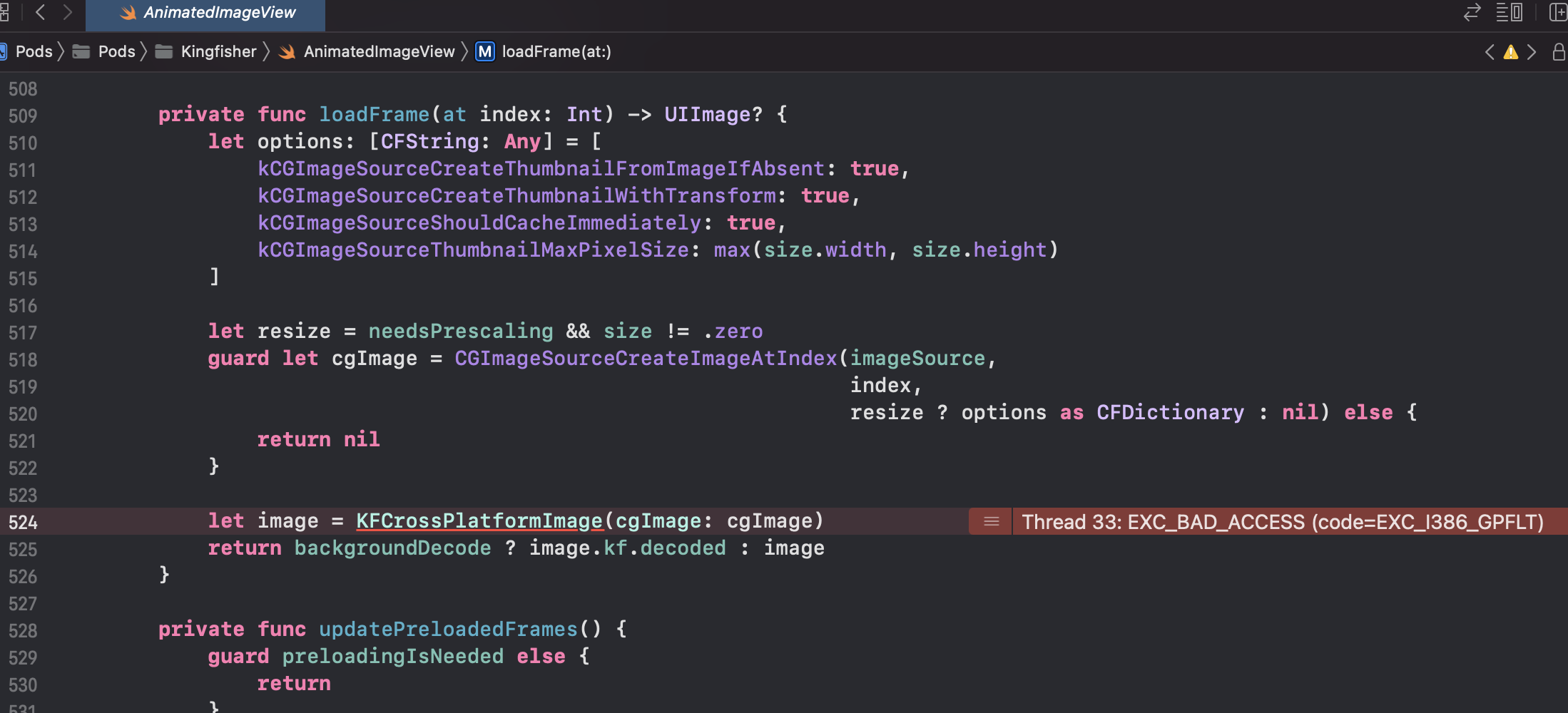
I found the actual issue and applied a fix in the latest version 7.10.2. Please try to upgrade to get the crash gone.
The fix itself is not yet ideal and brings some performance regression. But at least it won’t crash anymore. I will see if there is a better way later.
@onevcat Sorry about the limit crash report, that’s all the info crashlytics provides. I have not been able to replicate it on my end.
I can say that its on iOS 15 and iPad OS 15.
There will be 2
AnimatedImageViewwhen it comes to full screen. The full screen version gets display ontop of the tableview that holds the original in a TableViewCell .Note that its Gifs not static images