ha-smartthinq-sensors: Authorization does not go through
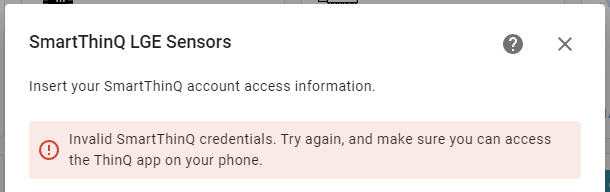
It is impossible to enter After updating Home Assistant 2022.6.7> 2022.7.0 demanded to authorize in “SmartThinQ LGE Sensors”. After removing “Smartthinq Lge Sensors” and re -adding integration, authorization does not go through any way (standard, through form and “url redirect authentication method”)
Screenshots
Details of the environment:
- Environment: Home Assistant OS
- The version of the home assistant was installed: 2022.7.0
- The component version has been installed: 0.23.3
- The last to know the working version: 0.23.3
Conclusion of HA magazines
2022-07-07 13:26:21 ERROR (MainThread) [custom_components.smartthinq_sensors.config_flow] Error connecting to ThinQ
Traceback (most recent call last):
  File "/usr/local/lib/python3.10/site-packages/aiohttp/connector.py", line 986, in _wrap_create_connection
    return await self._loop.create_connection(*args, **kwargs)  # type: ignore[return-value]  # noqa
  File "/usr/local/lib/python3.10/asyncio/base_events.py", line 1089, in create_connection
    transport, protocol = await self._create_connection_transport(
  File "/usr/local/lib/python3.10/asyncio/base_events.py", line 1119, in _create_connection_transport
    await waiter
  File "/usr/local/lib/python3.10/asyncio/sslproto.py", line 534, in data_received
    ssldata, appdata = self._sslpipe.feed_ssldata(data)
  File "/usr/local/lib/python3.10/asyncio/sslproto.py", line 188, in feed_ssldata
    self._sslobj.do_handshake()
  File "/usr/local/lib/python3.10/ssl.py", line 975, in do_handshake
    self._sslobj.do_handshake()
ssl.SSLError: [SSL: SSLV3_ALERT_HANDSHAKE_FAILURE] sslv3 alert handshake failure (_ssl.c:997)

The above exception was the direct cause of the following exception:

Traceback (most recent call last):
  File "/config/custom_components/smartthinq_sensors/wideq/core_async.py", line 708, in from_user_login
    token_info = await gateway.core.auth_user_login(
  File "/config/custom_components/smartthinq_sensors/wideq/core_async.py", line 383, in auth_user_login
    async with self._session.post(
  File "/usr/local/lib/python3.10/site-packages/aiohttp/client.py", line 1138, in __aenter__
    self._resp = await self._coro
  File "/usr/local/lib/python3.10/site-packages/aiohttp/client.py", line 535, in _request
    conn = await self._connector.connect(
  File "/usr/local/lib/python3.10/site-packages/aiohttp/connector.py", line 542, in connect
    proto = await self._create_connection(req, traces, timeout)
  File "/usr/local/lib/python3.10/site-packages/aiohttp/connector.py", line 907, in _create_connection
    _, proto = await self._create_direct_connection(req, traces, timeout)
  File "/usr/local/lib/python3.10/site-packages/aiohttp/connector.py", line 1206, in _create_direct_connection
    raise last_exc
  File "/usr/local/lib/python3.10/site-packages/aiohttp/connector.py", line 1175, in _create_direct_connection
    transp, proto = await self._wrap_create_connection(
  File "/usr/local/lib/python3.10/site-packages/aiohttp/connector.py", line 990, in _wrap_create_connection
    raise ClientConnectorSSLError(req.connection_key, exc) from exc
aiohttp.client_exceptions.ClientConnectorSSLError: Cannot connect to host ru.emp.lgsmartplatform.com:443 ssl:default [[SSL: SSLV3_ALERT_HANDSHAKE_FAILURE] sslv3 alert handshake failure (_ssl.c:997)]

The above exception was the direct cause of the following exception:

Traceback (most recent call last):
  File "/config/custom_components/smartthinq_sensors/config_flow.py", line 184, in _check_connection
    client = await lge_auth.create_client_from_login(
  File "/config/custom_components/smartthinq_sensors/__init__.py", line 105, in create_client_from_login
    return await ClientAsync.from_login(
  File "/config/custom_components/smartthinq_sensors/wideq/core_async.py", line 1198, in from_login
    auth = await Auth.from_user_login(gateway, username, password)
  File "/config/custom_components/smartthinq_sensors/wideq/core_async.py", line 715, in from_user_login
    raise exc.AuthenticationError() from ex
custom_components.smartthinq_sensors.wideq.core_exceptions.AuthenticationError: Authentication Error
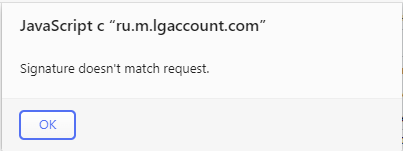
Additional context Through the “LG ThinQ” application, authorization is successful. With standard authorization (through the form), an error “Invalid SmartThinQ credentials. Try again, and make sure you can access the ThinQ app on your phone.” (see Screenshots) and the log (see “Conclusion of HA magazines”). When authorizing “URL redirect authentication method” and the transition to the generated link in the browser there is an error (see Screenshots): URL - https://emp-oauth.lgecloud.com/emp/oauth2/token/empsession RESPONSE - {“status”:2,“lgoauth_error_code”:“LG.OAUTH.EC.2105”,“message”:“Signature doesn’t match request.”}
About this issue
- Original URL
- State: closed
- Created 2 years ago
- Reactions: 2
- Comments: 35 (11 by maintainers)
Commits related to this issue
- Fix SSL context issue with python 3.10 (issue #351) — committed to ollo69/ha-smartthinq-sensors by ollo69 2 years ago
@tayanov,
I was able to authenticate with your account using Python 3.9 and everything woks fine (I see both washer and refrigerator). I will make some tests with python 3.10 this w.e. to try to found a fix for this issue, in the meantime please do not change your account configuration.
Thanks,👍
I close this issue, seems it is solved for everybody.
@dtmaiale thanks for that info! My issue turned out to be just the Terms of Service needed accepting in the LG app (oops!), and then it worked fine after a restart of HA. Didn’t need to change anything with Python.
I had the same issue. I was able to resolve it by removing python2.x (I had 2 and 3 installed) on the host machine and restarted HA. After I did that, it got a different error that was resolved by logging into the SmartThinQ app and accepting their updated terms of service.