tabulator: Progressbar breaks the height
Describe the bug Adding “progress” as a formatter breaks complete the height!
Tabulator Info 4.2
Working Example I used just the example from your documentation.
<script
  src="https://code.jquery.com/jquery-3.4.1.js"
  integrity="sha256-WpOohJOqMqqyKL9FccASB9O0KwACQJpFTUBLTYOVvVU="
  crossorigin="anonymous"></script>

<link href="https://unpkg.com/tabulator-tables@4.2.7/dist/css/tabulator.min.css" rel="stylesheet">
<script type="text/javascript" src="https://unpkg.com/tabulator-tables@4.2.7/dist/js/tabulator.min.js"></script>

<div id="example-table"></div>


<script>
  //define some sample data
 var tabledata = [
 	{id:1, name:"Oli Bob", age:"12", col:"red", dob:""},
 	{id:2, name:"Mary May", age:"1", col:"blue", dob:"14/05/1982"},
 	{id:3, name:"Christine Lobowski", age:"42", col:"green", dob:"22/05/1982"},
 	{id:4, name:"Brendon Philips", age:"125", col:"orange", dob:"01/08/1980"},
 	{id:5, name:"Margret Marmajuke", age:"16", col:"yellow", dob:"31/01/1999"},
 ];
  //create Tabulator on DOM element with id "example-table"
  var table = new Tabulator("#example-table", {
   	height:205, // set height of table (in CSS or here), this enables the Virtual DOM and improves render speed dramatically (can be any valid css height value)
   	data:tabledata, //assign data to table
   	layout:"fitColumns", //fit columns to width of table (optional)
   	columns:[ //Define Table Columns
  	 	{title:"Name", field:"name", width:150},
  	 	{title:"Age", field:"age", align:"left", formatter:"progress"},
  	 	{title:"Favourite Color", field:"col"},
  	 	{title:"Date Of Birth", field:"dob", sorter:"date", align:"center"},
   	],
   	rowClick:function(e, row){ //trigger an alert message when the row is clicked
   		alert("Row " + row.getData().id + " Clicked!!!!");
   	},
  });
</script>
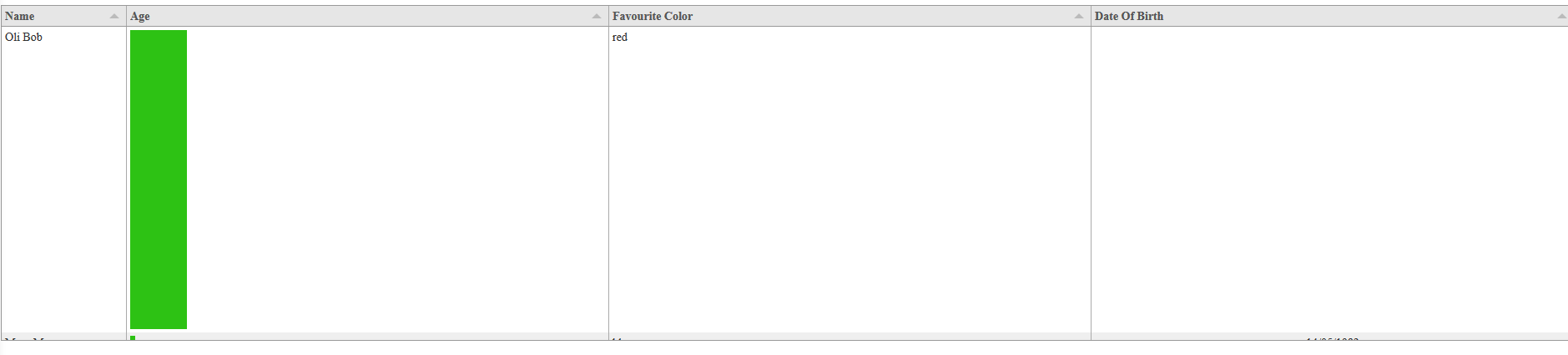
About this issue
- Original URL
- State: closed
- Created 5 years ago
- Comments: 37 (15 by maintainers)
@abrownsword
Perfect! I know exactly what your issue is, Thanks for sending that over!
The problem is you are missing the doctype declaration at the top of your file so the browser isn’t interpreting the page contents as HTML5.
You need to add the following as the first line in your file:
As a rule that should always be the first line in any HTML file you produce. This Article explains a bit more about doctype and why it is needed. Essentially if you don’t define the doctype, the browser enters quirks mode and tries to interpret it as a bit of HTML from the early 90’s which can result in all sorts of random behaviour.
I hope that helps,
Cheers
Oli 😃
Thanks for the tips.
Oh hallelujah! Thank you! Works like a charm. Super-irritating that this can’t be detected and warned about.
Hey @abrownsword
While the proposed fix does indeed work under certain circumstances it imposes a height on the parent cell which will cause issues in certain circumstances.
The actual issue is that the firefox layout engine cannot calculate percentage height of a child element if the parent had no height set at the point the child was added to the DOM. The correct fix is to use the onRendered callback in the formattter to append the bar element once the row has been drawn and thus has height.
I have pushed a more comprehensive fix to the 4.5 branch which will be released in a few weeks.
Cheers
Oli 😃
Use JS Fiddle or Code Pen. They are both sites that let you build a functional JavaScrip and HTML example
Just post a link to the fiddle or pen when you are done
Cheers
Oli
On Tue, 23 Jul 2019, 21:10 Andrew Brownsword, notifications@github.com wrote:
I see the same thing. Run the demo from http://tabulator.info/basic/4.2 and it works. When I use the same code on my server with the latest npm downloaded module (tabulator-tables@4.2.7) it’s broken as described above. If remove formatter:“progress” from the age field the row height is correct.