cs-script: Cannot cast to Assembly type
Hi,
so I am doing a huge step in our solution, which contains 12 projects… The CS-Script library is great, but the version we are currently using is very outdated.
As for now, we are on: 3.27.2.0 and I am trying to upgrade the version to 4.4.6.0 (latest available via nuget manager in VS).
We had a wrapper of LoadCode in our Tests project and it loaded code as follows:
private Assembly LoadCode(string script)
{
    return CSScript.LoadCode(script, _allDlls);
}
In version 4.4.6.0 I have tried doing this instead:
private Assembly LoadCode(string script)
{
    return CSScript.Evaluator.LoadCode<Assembly>(script, _allDlls);
}
but it throws out on me Object reference[…].
Q: What do I need to do, to return Assembly of the LoadCode ? Cast does not seem to work. Unless I’m doing something wrong, then please, point me in the right direction…
Thanks!
P.S Our scripts are loaded from the database itself. People put scripts in input fields in the application UI, save it and then scripts are loading whenever user enters certain web page.
About this issue
- Original URL
- State: closed
- Created 2 years ago
- Comments: 62 (20 by maintainers)
Commits related to this issue
- - Added test case for #318 — committed to oleg-shilo/cs-script by oleg-shilo 2 years ago
- - Updated the Issue #318 sample — committed to oleg-shilo/cs-script by oleg-shilo 2 years ago
- - Added `CodeDomEvaluator.CscTimeout` to allow auto-termination of the `csc.exe` when it hangs. Triggered by #318 — committed to oleg-shilo/cs-script by oleg-shilo a year ago
- Release v4.6.5 --- ## Changes ### CLI - Issue #327: CS-Script file with async calls suddenly terminates - Updated Linux distro with `css` executable replaced with Linux `alias` functionality. ###... — committed to oleg-shilo/cs-script by oleg-shilo a year ago
Not a problem. Then I am closing this issue. We can reopen it if you hit the wall.
Just to go even further. I have installed CS-Script CLI and it works just fine:
This code:
edit:// does not compile from the Visual Studio. But it does in my PowerShell.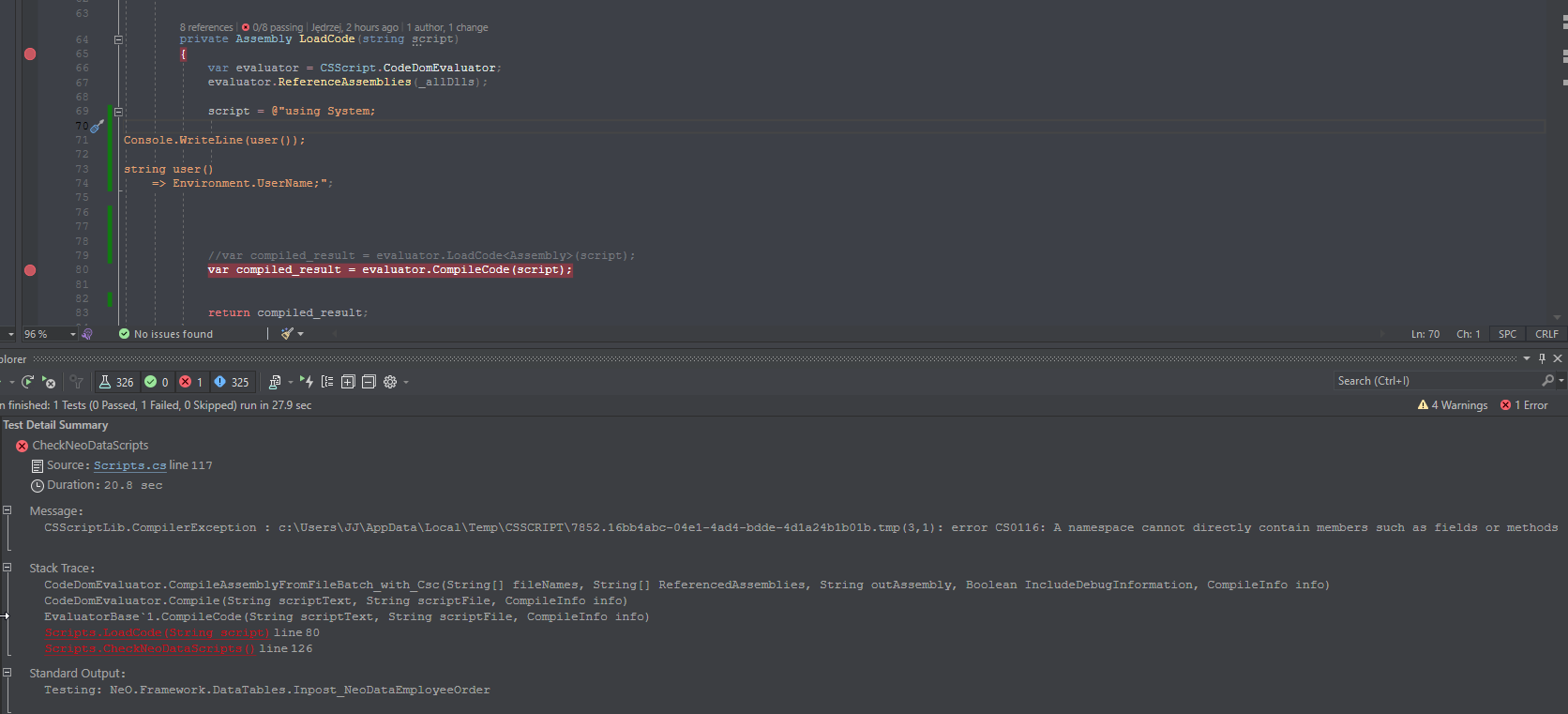
edit:// When I give a
script.csmy personal script written (not a generic test case) it compiles, and at least gives me proper information.So this must be some CodeDom issue in Visual Studio itselfI just checked yesterday. In version
3.27.2.0(https://www.nuget.org/packages/CS-Script.bin/3.27.2) we were usingCodeDomEvaluator. And is still being used.There’s actually no way for me to send you the scripts, since those are integrated with our ERP system. Meaning, you won’t be even able to compile it.
The delay is not on 1600 scripts. I’ve been running the application (solution) on my localhost, from Tests project, trying to compile the code there (because of the unit-tests we have)
This code from my 1st post:
is from our unit-tests for the scripts.
Anyway. I am giving myself a difficult task here, which I am determined to accomplish. In order to do that, I am going to use the latest version available via nuget (https://www.nuget.org/packages/CS-Script/685) which is currently installed in our solution and I will grab each
string scriptin thatLoadCodewrapper method we have (above code) and I will deletenamespacefrom the code itself, generate necessaryusingfor the script compilation with some logic written (to replace strings & insert them at the top).I will then replace in DB the script itself with a new fixed version (without
namespaceand with correctedusingat the top). I have noticed that we were ALWAYS loading ALL the assemblies (*.dll). Not just the required ones. I guess this is because we wanted to be sure, that anything is needed - is there - for the compiler (cs-script) process. It takes a bit more time to load ~250 assemblies, but it’s not that long anyways.So I think, at this point my questions been answered, and my issue is quite resolved…
Unless you have any questions for me, then hit me.
CodeDom is actually fast. When the build server is running then it is arguably as fast as Roslyn. This is how I did the profiling:
When the server is not running then the first call “evaluator.Load*” will have a significant overhead for starting the server process. But the next call will communicate with the build server over the socket and is very fast. The only price for that you will need to distribute CS-Script build server with your solution or just install cs-script on the target system.
I suggest you experiment with it on the system where cs-script is installed and see if these extra steps provide enough benefits to justify the effort.
thanks i was wondering why code completion was strugling with my own types. Now i know… yikes… i dont wanna use CodeDom because its slow tho… 😦 also I leanred that putting explicit ypes declaratoin in your script, and then not expecting base class types to be known helps… Example XXX Class parent = base.Parent as XXX ; then you can use parent as a local reference, and code completion if juse to Parent… on templated class it doesnt konw what it iss… …lots of stuff worked better but im not going back to GAC… might be wise to rethink how big your scripts are… how much really needs to be scripted… and use more interfacing… consider a broader view rather than just expect our legacy stuff to just port over to Net 7 land. broken things aside Net foundatoin seems togoing in the right direction wrt as portability and performance but yes these are all huge shifts… we are lucky c# is still alive 😃 so so fast now.
OK, your questions one by one:
“Why do I have to ReferenceAssemblies[…] manually now?” Because in .NET Framework it was possible to resolve a namespace into assembly (.NET Fusion COM interface). .NET Core completely removed this mechanism without providing anything else instead.
“The ReferenceAssembliesFromCode doesn’t work that well at all. It recognized 2 assemblies only…”
It is because you can no longer rely on
using *;to be resolved into assembly soReferenceAssembliesFromCodeonly processes//css_ref *;. You can quickly parse the script forusing <namespace>;and then callevaluator.TryReferenceAssemblyByNamespace("<namespace>"). This will simply try to match the namespace to the any assembly in the shared assemblies (a remote equivalent of GAC but in .NET Core). But there is no warranty that you will be able to match as the deterministic mapping method is no longer available in .NET Core.“What is up with RoslynEvaluator.Compile(String scriptText, String scriptFile, CompileInfo info) not allowing namespace’s anymore? They worked before.” Actually, it never did. Roslyn had this limitation from the start of its life. You cannot use namespaces. It is a ridiculous limitation that has no technical reason behind 😦 Though you can
CodeDomEvaluatorengine can. But you will need to have SDK installed in this case (cscis part of SDK)