react-native-vector-icons: Icons are not showing up
I am using react native 0.52 and react-native-vector-icon 4.5.0 on Android device . I tried to display icons on my screen but It isn’t showing me any icon but a X box icon every time. I even tried other keys but still no solution. I also ran command react-native link.
My android/app/src/main/assets/fonts contains all the fonts.
import Icon from 'react-native-vector-icons/FontAwesome'; ... return <Icon name='rocket' size={30} color='#900' />

About this issue
- Original URL
- State: closed
- Created 6 years ago
- Reactions: 17
- Comments: 105 (3 by maintainers)
I solved my issue adding on /app/build.gradle apply from: “…/…/node_modules/react-native-vector-icons/fonts.gradle” and then I uninstall the app from my phone and reinstall again.
See https://github.com/oblador/react-native-vector-icons#android Please reopen if you have a way to reproduce in a project we can see.
Did you re-run-android? Otherwise fonts are not in the bundle, which lead to this problem…
@hpelitebook745G2 try to relink it with react-native link react-native-vector-icons, it worked for me.
apply from: “…/…/node_modules/react-native-vector-icons/fonts.gradle” 👍👍👍 is found
After following all the instruction in the github the icons was still like a box. I solved the problem by executing react-native link.
I solve issue using apply from: “…/…/node_modules/react-native-vector-icons/fonts.gradle” this line paste into android/app/build.gradle(app). then re-run android.
Yep that’s mobile dev for you. Problems are solved by restarting everything half of the time.
At this moment, auto linking for react-native-vector-icons in react native 0.60 isn’t working. You can move the fonts manually or here’s another solution that worked for me:
1.) Uninstall react-native-vector-icons using npm or yarn
2.) cd into your ios folder and rerun pod install
3.) Reinstall react-native-vector-icons using npm or yarn and link the icons manually
4.) Restart your simulators for good measure and rerun your app
Finally got it working properly by setting
org.gradle.configureondemand=falseingradle.propertiesof my android project. It’s becausefont.gradledoesn’t work properly with configuration on demand in gradle. The problem is described in hereEdit
android/app/build.gradle( NOT android/build.gradle ) and add the following:Then run:
This worked for me, even the documentation telling to not use react-native link.
For IOS there are two steps:-
Drag the folder Fonts from “node_modules/react-native-vector-icons” and paste it into Xcode project root also make sure your app is checked under “Add to targets” and that “Create groups” is checked if you add the whole folder.
Edit Info.plist(which is under <PROJECT NAME>) and add a property called Fonts provided by application and type in the files you just added. (in items column ) E.g:- Ionicons.ttf
apply from: "../../node_modules/react-native-vector-icons/fonts.gradle"somehow did not work for me … I copied the contents in the Fonts folder to android/app/src/main/assets/fonts (note lowercase font folder) manually.This one worked perfectly for me! Thanks.
worked for me doing: react-native link react-native-vector-icons
@MoOx thanks, this worked for me.
I cannot make the icomoon generated icon on android too, Im starting to get depressed
apply from: file(“…/…/node_modules/react-native-vector-icons/fonts.gradle”) for react 60
apply from: “…/…/node_modules/react-native-vector-icons/fonts.gradle” This Worked Perfectly
The react-native-vector-icons isn’t linking automatically. You have to link it manually by running the following command.
react-native link react-native-vector-iconsAfter doing this my icons started showing.Why this is still a thing in 2022 completely baffles me.
finally i solved the this icon problem steps: are given below make sure you ran the command “npm i react-native-vector-icons”
paste the below line inside your android/app/build.gradle apply from: “…/…/node_modules/react-native-vector-icons/fonts.gradle”
create a file with the name of “react-native.config.js” into your project root folder and add the following lines in it and save module.exports = { assets: [‘./assets/fonts/’], };
In my case there was no problem, i didn’t read the documentation properly and thought that it will work like
<Icon name="newIconName"></Icon>but it is mentioned that to use icons we need to do like this :@dragma same here I have to copy the files manually, I have updated my android/app/build.gradle and added
to the bottom
In my case, I found that the icon didn’t show up when I reference it (using import) that reference to node_modules folder like:
import Ionicons from 'react-native-vector-icons/Ionicons';however it did work when I reference it using relative path.
import Ionicons from '../node_modules/react-native-vector-icons/Ionicons';Once after installing the module, link it to the project.
react-native link react-native-vector-icons
For some reason
apply from: "../../node_modules/react-native-vector-icons/fonts.gradle"didn’t work for me, but copying fonts manually worked…Finally started working. I had to re-run the app once using USB cable rather than on wifi.
Edit android/app/build.gradle ( NOT android/build.gradle ) and add the following:
apply from: “…/…/node_modules/react-native-vector-icons/fonts.gradle”
This is working
Same for me. Even two years later, with RN v 0.61 & rnvi v7.1.0 Had to execute
cp node_modules/react-native-vector-icons/Fonts/* android/app/src/main/assets/fonts/to make it run. 😿I have to say that this happened after I removed
react-native-mapsfrom my dependencies. Maybe this is not linked at all either.Hi,
The proposed solution above works for me for react-native 0.61+ on Android device here are the steps:
<Icon name="md-menu" size={30} />somewhere in your code 4. Open dir “android/app/build.gradle” -> Paste following line somewhere in your file: apply from: file(“…/…/node_modules/react-native-vector-icons/fonts.gradle”); 5 npm run android
Br, Zhi
yarn remove react-native-vector-iconsthen in android/app/build.gradle add code below codeapply from: file("../../node_modules/react-native-vector-icons/fonts.gradle");above other ‘apply’ line code and then reinstall app by using USB.worked this: react-native link react-native-vector-icons
How to use react native vector icons without linking in react native 0.60. I Installed version 6.6.0 and executed without linking but Icons did not show up.
Just submitted #923 to fix this issue
This worked for me 💃💃💃
Thank you so much for this note “Edit android/app/build.gradle ( NOT android/build.gradle ) and add the following”. I kept searching for the file and couldn’t find it until I was your note, because there are two of them. Thank you, much appreciated 🙌
In my case, MaterialIcons.ttf was missing from
android/app/src/main/assets/fonts/You can try one thing delete node modules folder then again run
npm installandreact-native linkand please refer link. I hope this will help youreact-native link and rerun android worked for me
Resolvi seguindo o método:
Adicionar no final do arquivo \android\app\build.gradle
apply from: “…/…/node_modules/react-native-vector-icons/fonts.gradle”
rodar novamente o simulador
This worked for me, thanks
In my case what helped is setting Minify flag in Android for “false”: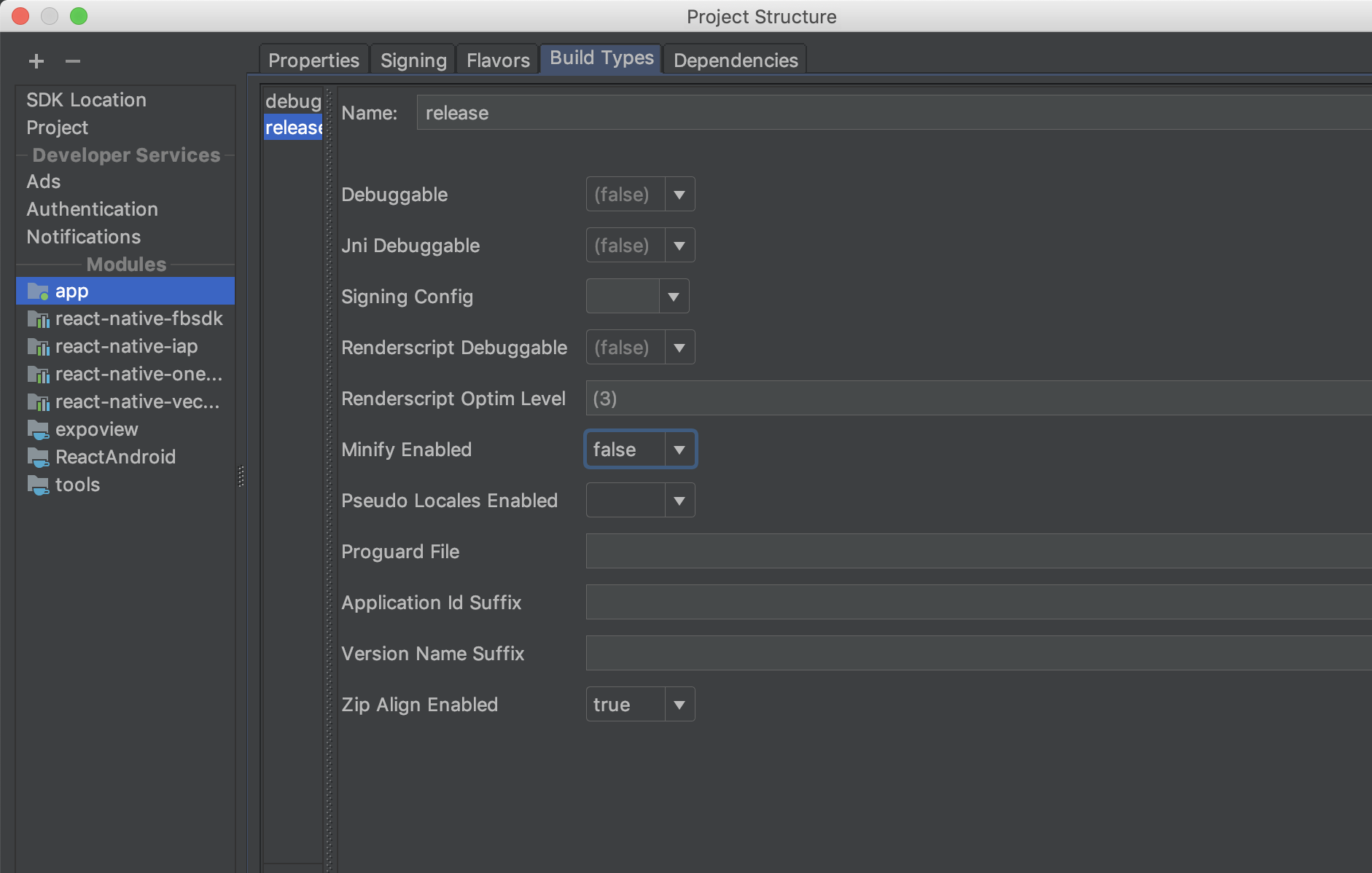
@ergb Im using customIcon with Icomoon not material 😢
@ergb hey mate, I have updated gradle to 4.4+, but still no icons
Ok this is weird, it apparently got linked twice … I had to manually fix some stuff and then clean and rebuild the project. Works for me now though.
Yeah I deleted old build files and re-run android. I also got this error which I resolved earlier #627 . Does this have to do something regarding the display of icons??