nuxt: Pinia not working
Environment
- Operating System:
Linux - Node Version:
v16.16.0 - Nuxt Version:
3.0.0-rc.8 - Package Manager:
npm@8.11.0 - Builder:
vite - User Config:
modules,buildModules,colorMode,typescript,experimental,vite - Runtime Modules:
@nuxtjs/tailwindcss@5.3.2,@nuxtjs/color-mode@3.1.4,@vueuse/nuxt@9.1.0 - Build Modules:
@pinia/nuxt@0.4.0
Reproduction
I installed the pinia, added it to buildModule and got an error when starting nuxt. It worked fine on the RC 6.
Describe the bug
 ERROR  Cannot start nuxt:  Cannot find module 'pinia/dist/pinia.mjs'                                                                                                                                                10:34:41
Require stack:
- /home/nuxt3/index.js

  Require stack:
  - index.js
  at Function.Module._resolveFilename (node:internal/modules/cjs/loader:933:15)
  at Function.resolve (node:internal/modules/cjs/helpers:108:19)
  at Function._resolve [as resolve] (node_modules/jiti/dist/jiti.js:1:108181)
  at resolveModule (node_modules/@pinia/nuxt/node_modules/@nuxt/kit/dist/index.mjs:276:29)
  at setup (node_modules/@pinia/nuxt/dist/module.mjs:22:32)
  at Object.normalizedModule (node_modules/@pinia/nuxt/node_modules/@nuxt/kit/dist/index.mjs:607:29)
  at async installModule (node_modules/@nuxt/kit/dist/index.mjs:448:3)
  at async initNuxt (node_modules/nuxt/dist/index.mjs:1495:7)
  at async load (node_modules/nuxi/dist/chunks/dev.mjs:6768:9)
  at async Object.invoke (node_modules/nuxi/dist/chunks/dev.mjs:6813:5)
Additional context
No response
Logs
No response
About this issue
- Original URL
- State: closed
- Created 2 years ago
- Reactions: 10
- Comments: 90 (16 by maintainers)
After running
npm install pinia @pinia/nuxt --legacy-peer-depsI removed pinia withnpm uninstall piniaand for some reason it is working great like magic 🧙♂️Here’s what worked for me:
@pinia/nuxtwith npm or yarnnuxt.config.tsfile:I can confirm fikurmiax’s stackoverflow link works. Installing pina itself (not just ‘@pinia/nuxt’ plus --legacy-peer-deps. However this is not a good fix. Just want to add my voice here that this is broken for me aswell as of 3 days ago.
Using nuxt rc.9 or rc.10 (doesnt work on both) and @pinia/nuxt with
modules: [ ‘@pinia/nuxt’ ]
in nuxt.config.ts
I follow this answer and run perfectly here’s the link
This helped in my case
Did not help. Still get
cannot find module pinia/dist/pinia.mjsin Nuxt 3…0.0 . Btw, I’ve been using Nuxt3 since RC 2 and I have to say that Pinia is the one module that has always given me problems.Only thing that works for me with latest Nuxt3 is to add the alias like was suggested earlier above:
I don’t like this method because it’s yet another custom config I have to remember for future projects (until this has been fixed).
Had the exact same issue
ERROR Cannot start nuxt: Cannot find module 'pinia/dist/pinia.mjs'on a newly created nuxt 3 app with just vuetify’s library installed.Trying to install pinia didn’t work so had to force it with:
npm i --force piniaThat solved my problem.
It was something related to the cache because it is working now.
Updating
@pinia/nuxtdoes not clean this cache asnpx nuxi-edge@latest upgrade --forcedoes, and I missed the information.Had the same issue with RC13. Solved it with this:
No alias, no transpile,
no, nonpm i pinia--legacy-peer-deps.Just
npm i pinia, add@pinia/nuxtin package.json andmodules: ['@pinia/nuxt']in nuxt.config.js.(edited to remove wrong suggestion)
Tried lots of other solutions, alias worked but then gave 500 errors in build preview when refreshing the page. Did this though and works like a charm
Same for me in RC10. The solution of @BayBreezy works for me. Even if I remove pinia after installing it. Strange.
No I have installed pinia/nuxt and not pinia because you can’t install pinia on nuxt 3 it gives error from npm
npx nuxi-edge@latest cleanupshould also do the trick to cleanup caches.Thank you @BenjaminOddou this solved the issue. It’s magic
I’ve also experienced the same issue when installing pinia on nuxt 3 (rc.10) -> Cannot start nuxt: Cannot find module ‘pinia/dist/pinia.mjs’. I tried all the solutions above and this only works for me. Thanks!
Was having the same issue. What worked for me was installing pinia by force lol
I did like you told but same error is coming.
Error: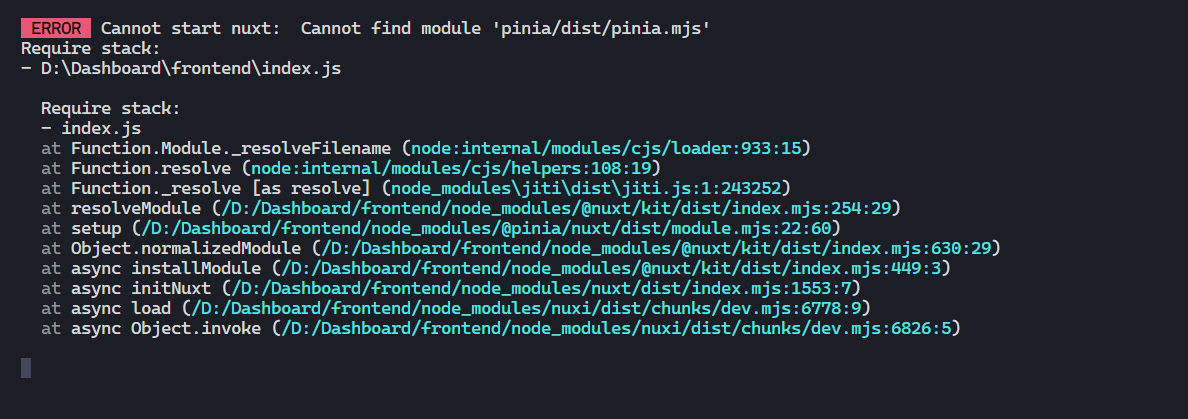
Package.json
I am not able to reporduce in the stackblitz, but it’s happening to me
Please add this into your nuxt.config.js/ts
alias: { pinia: "/node_modules/@pinia/nuxt/node_modules/pinia/dist/pinia.mjs", },It works for me 😃
Thanks. Wasn’t able to start Nuxt 3 rc 11 after installing, but this made it work.
Still the same problem for me, I am not able to fix the problem with above solutions.
Hey there, I’d suggest we can close this, not being a nuxt issue but an issue on how to properly configure pinia and or upgrade nuxt to the latest versions. Or this there anything in here that nuxt can fix I may have missed?
Update latest
It turns out that we need to install both package with the first and second method that I mentioned here.
I updated my comment. Also at some point had do
npm i pinia. Don’t remember why, but needed to be done.For those using autoImports option for @pinia/nuxt, take a look at this PR from the last rc14 version. This option is no longer supported.
Removing package-lock file causes this error for me…removing package-lock then installing using npm install casues pinia add as dependency of @pinia/nuxt which causes problem… Simply move out pinia from dependency tree of @pinia/nuxt to root dependency tree
@BenjaminOddou - sadly same issue. Runs fine in dev without autoimport, it builds fine, but when the build is run the store isn’t created / is “undefined”.
try to uninstalling pinia@2.0.22 only have @pinia/nuxt@0.4.2 @sebj54
idk anymore, now it’s working without doing the
aliasfor some reason 😅yeah, it’s working well for me in dev mode, but getting issue with build or deploy on vercel
After I tried many times solution worked steps: You need to remove “pinia” from package.json; (No “@pinia/nuxt”) After run : npm i pinia --force if you reinstall, you still need to remove “pinia” again;
I am getting the same error. - ERROR Cannot start nuxt: Cannot find module ‘@pinia/nuxt’
I tried all the above suggestions and still no fix.
I spotted the following change in
tsconfig.json: the path for pinia moved frompinia/dist/piniatonode_modules/pinia/dist/piniaYes, I am currently experiencing it. The server starts correctly though. I get a
router is undefinedwith a warning[Vue warn]: injection "Symbol(router)" not found.(maybe related to https://github.com/nuxt/nuxt.js/issues/14595)EDIT: after relaunching the server a third time, it works 🤔