nuxt: Nuxt SSR deployment on docker with pm2 has error.
Versions
- nuxt: v2.14.12
- node: v14.15.3
I did run nuxt build command then,
when i run pm2-runtime start ecosystem.yml on docker, i get this error:
Error: No build files found in
/var/www/ui/ecosystem.config.yaml/.nuxt/dist/server.
Use eithernuxt buildorbuilder.build()or start nuxt in development mode.
how i can solve that?
About this issue
- Original URL
- State: closed
- Created 3 years ago
- Comments: 29 (6 by maintainers)
ecosystem.json or ecosystem. yml
ecosystem.config.js
nuxt.config.js
Shall we re-open @danielroe ?
@dmorais8 @TheSycamore
Don’t use pm2 in docker. just run
nuxt startand setrestart: alwaysin your container.I have the same issue. I modified the @nuxt/config/dist/config.js code can run success.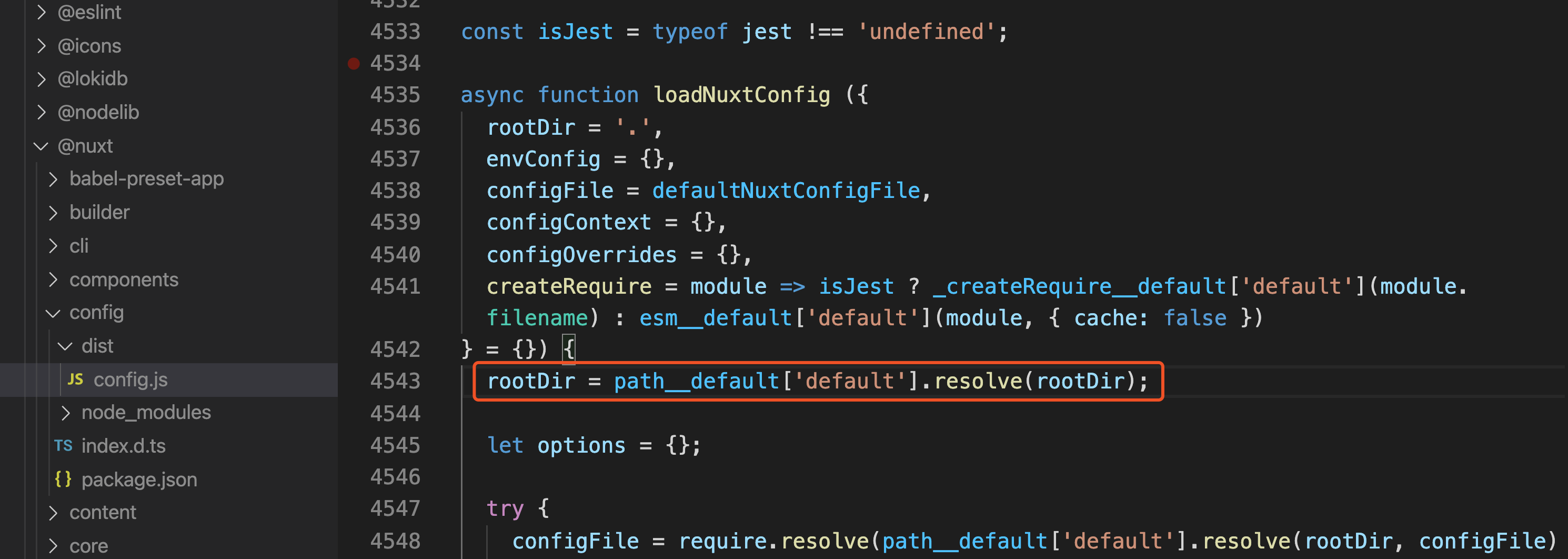 rootDir = path__default[‘default’].resolve(rootDir);
to
rootDir = process.cwd();
then rebuild and restart is OK~
rootDir = path__default[‘default’].resolve(rootDir);
to
rootDir = process.cwd();
then rebuild and restart is OK~
Although I don’t know why, before executing pm2-runtime, run pm2 list or pm2 update first, and pm2-runtime will work normally without error:‘xxxxxx/.nuxt/dist/server.’, which is amazing
Oh, sorry. I used npm run start, I’ve just put the wrong command there.
@galaxy-s10, I’ve realized that doesn’t make any sense to use pm2 inside a docker container and we switched to the default “npm run start” way. Doing a pm2 update && pm2-runtime xxxx worked fine.
A few links related to docker vs pm2 and why you shouldnt use both of them: https://stackoverflow.com/questions/51191378/what-is-the-point-of-using-pm2-and-docker-together https://maximorlov.com/pm2-to-docker-automatic-restarts/ https://maximorlov.com/from-pm2-to-docker-cluster-mode/
I need to run nuxt app inside docker container and it should start using
pm2-runtime. Any updates on this issue?try first
@TheSycamore
https://www.python2.net/questions-1253548.htm
It`s works for me
I am experiencing the same problem.
node: v14.16.0 nuxt: 2.15.3 pm2: 4.5.5
Works fine: pm2 start ecosystem.config.js
Doesn’t work: pm2-runtime start ecosystem.config.js
Error output:
As you can see from above the path is incorrect:
Incorrect path:
/var/www/ui/ecosystem.config.js/.nuxt/dist/serverIntended path:
/var/www/ui/.nuxt/dist/serverMy /var/www/ui/ecosystem.config.js file:
Multiple people are having this issue including myself: https://github.com/Unitech/pm2/issues/4576 https://github.com/nuxt/nuxt.js/issues/8704 https://github_com.jam.dev/nuxt/nuxt.js/issues/8723
From what I understand, the path giving to start Nuxt is wrong, try to set in the options:
args: starts .