nuxt: Node v19 throws an error: 'The "name" argument must be specified'
Environment
Nuxi 3.2.3
RootDir: /app
Nuxt project info:
- Operating System:
Linux - Node Version:
v19.7.0 - Nuxt Version:
3.2.3 - Nitro Version:
2.3.1 - Package Manager:
pnpm@7.29.1 - Builder:
vite - User Config:
- - Runtime Modules:
- - Build Modules:
-
Reproduction
docker run --rm -it node:19-alpine sh
npm add -g pnpm pnpm dlx nuxi init app cd app pnpm install
Describe the bug
Nuxi 3.3.1
ERROR The “name” argument must be specified
at new NodeError (node:internal/errors:399:5) at Performance.mark (node:internal/perf/performance:125:13) at normalizedModule (node_modules/.pnpm/@nuxt+kit@3.3.1/node_modules/@nuxt/kit/dist/index.mjs:168:30) at async installModule (node_modules/.pnpm/@nuxt+kit@3.3.1/node_modules/@nuxt/kit/dist/index.mjs:451:15) at async initNuxt (node_modules/.pnpm/nuxt@3.3.1/node_modules/nuxt/dist/index.mjs:2469:7) at async loadNuxt (node_modules/.pnpm/nuxt@3.3.1/node_modules/nuxt/dist/index.mjs:2523:5) at async loadNuxt (node_modules/.pnpm/@nuxt+kit@3.3.1/node_modules/@nuxt/kit/dist/index.mjs:539:19) at async Object.invoke (node_modules/.pnpm/nuxi@3.3.1/node_modules/nuxi/dist/chunks/prepare.mjs:37:18) at async _main (node_modules/.pnpm/nuxi@3.3.1/node_modules/nuxi/dist/cli.mjs:49:20)
ELIFECYCLE Command failed with exit code 1.
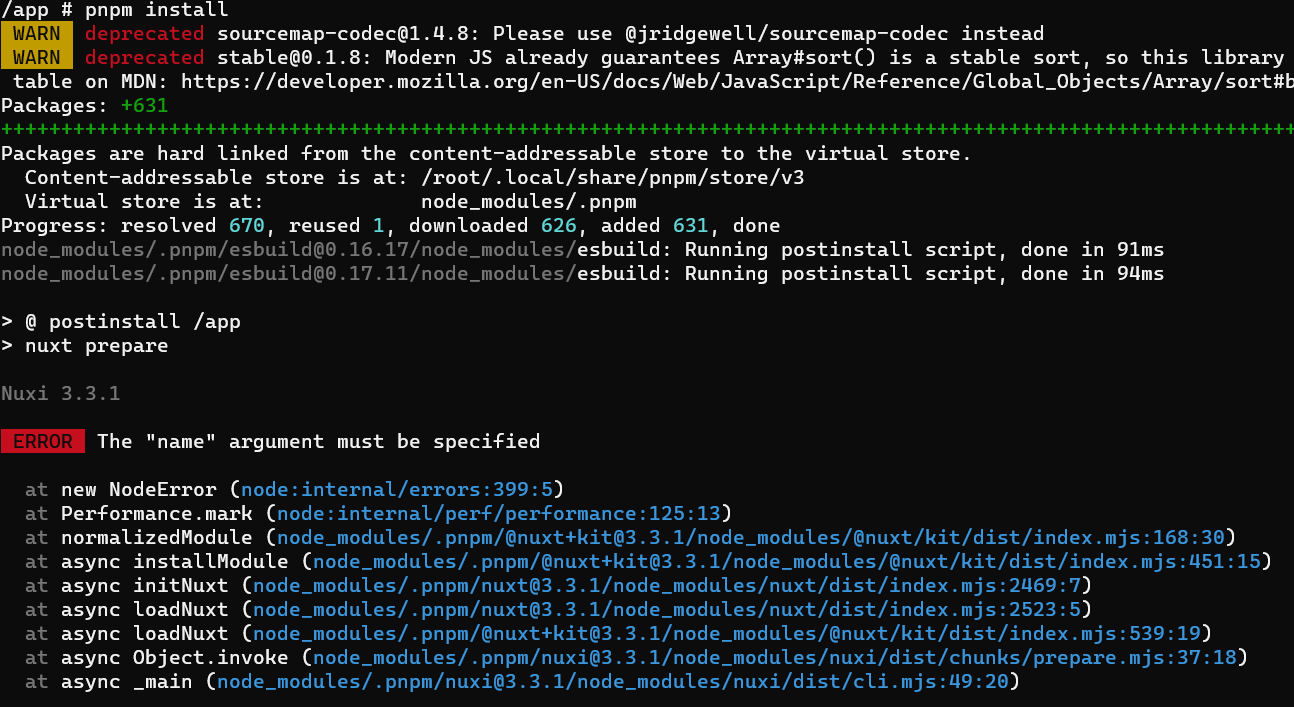
Additional context
No response
Logs
No response
About this issue
- Original URL
- State: closed
- Created a year ago
- Reactions: 20
- Comments: 51 (13 by maintainers)
Commits related to this issue
- fix: force nuxt into 3.2.3 for now Due to https://github.com/nuxt/nuxt/issues/19682 , Nuxt 3.3 does not work with Node 19. I'm pinning the version for now until a patch is released for Node 19. — committed to Phoenix-Wing/Reservoir by BD103 a year ago
- Update lint.yml ci: Workaround to nuxt3.3 series errors caused by nodejs changes (https://github.com/nuxt/nuxt/issues/19682) — committed to toreis-up/nuxt3-template by toreis-up a year ago
- Update lint.yml ci: Workaround to nuxt3.3 series errors caused by nodejs changes (https://github.com/nuxt/nuxt/issues/19682) — committed to toreis-up/nuxt3-template by toreis-up a year ago
- fix bug : node version downgrade node 19.6以降で発生するバグなのでどうしようもできない。大した影響もないのでバージョンを下げて対応。 https://github.com/nuxt/nuxt/issues/19682 — committed to yuki-koma2/sandbox-tools by yuki-koma2 a year ago
- chore: upgrade nuxt (nuxt/nuxt#19682) — committed to toeverything/AFFiNE.pro by Flrande a year ago
- Revert "chore: upgrade nuxt (nuxt/nuxt#19682)" This reverts commit 8fa5d68e36eb1598ce05a99474f99ad80109fee9. — committed to toeverything/AFFiNE.pro by Flrande a year ago
- fix @nuxt/kit by setting minimum version - refer to https://github.com/nuxt/nuxt/issues/19682 — committed to specklesystems/speckle-server by iainsproat 7 months ago
This will be fixed in the next release: v3.3.2. Until then, he can use Node v18, or upgrade to the edge channel, linked above.
Thanks. My project down. Nice fix downgrade solve -_-
Contributors fix for 19.7.0 win please.
Note: This problem is not Windows-only, I’m getting the same error on Linux with Node 19 (v19.7.0).
I solved the problem by adding in my
package.jsonfile:“resolutions”: { “@nuxt/kit”: “3.2.3” }
Would you try running with a different node version?
confirmed. with node v18.15.0 it is working fine.
This should be resolved in the edge channel, or you can use node v18 until the next release of Nuxt: v3.3.2.
Version nuxt 3.2.3 work in node 18.1 and 19.7
3.3.0 and 3.3.1 not work in node 18.1 and 19.7 i tested it
I too , can confirm. Downgrading node version from
20.0.0to18.12.0solved this issue for me as well 👍Greetings, downgrading node version to 18.15.0 fixed the problem
This is either a bug or a breaking change in Node 19. I’ve created an issue to track here: https://github.com/nodejs/node/issues/47097.
We’ll push a fix to nuxt/kit but the workaround at the moment is to use Node 18. This is perhaps a useful place to note that we recommend against using odd-numbered versions of Node with Nuxt; they are less stable by design.
I have same problem. node - 19.3.0 nuxt - 3.3.1
however, when i downgraded to node v18.15.0 , my app started to work
@palachX yes, but nuxt 3.2.3 works in node 19 only when forced “@nuxt/kit”: “3.2.3” otherwise v3.3 will be installed, and will end up with error The “name” argument must be specified
Woops. Since it happens while installing the packages how can I use nuxi-edge to installthe packages?
npx nuxi-edge@latest preparedoesn’t work.Edit: I workarounded the npm install error by adding
"@nuxt/kit": "3.2.3",to thedevDependenciesEdit0: Better workaround
Another workaround for now:
vim node_modules/@nuxt/kit/dist/index.mjsand put any string inmark()method on line 168Go to downgrade nodejs version to v18.15.0 , with this its ok !!. For my project , i had to downgrade my version nodejs v19.* to v18.15 for work
Getting this on my Mac using node v19.5.0, too.
Using
in my dev-dependencies does not work for me and
as mentioned before, did not solve the problem for me.
I agree. I have the same error on Macos with Node v19.7.0.