nuxt: DevTools failed to parse SourceMap
Version
Reproduction link
https://github.com/kyrsquir/nuxt-source-map-bug
Steps to reproduce
Chrome 80.0.3987.87, bootstrap vue starter boilerplate.
# install dependencies
$ yarn install

# serve with hot reload at localhost:3000
$ yarn dev
Open the console, reload the page and look for console warnings.
What is expected ?
No console warnings.
What is actually happening?
The following console warnings are shown:
DevTools failed to parse SourceMap: http://localhost:3000/bootstrap.css.map
DevTools failed to parse SourceMap: http://localhost:3000/bootstrap-vue.css.map
Additional comments?
Probably related to https://developers.google.com/web/updates/2020/01/devtools#sourcemaperrors
Might be related to https://github.com/nuxt/nuxt.js/issues/2840 but its solution does not work, looks like 404ed files are still considered as invalid by Chrome.
About this issue
- Original URL
- State: closed
- Created 4 years ago
- Reactions: 18
- Comments: 38
That’s not really a fix, though. I want it to parse sourcemaps. This fix just tells it to stop trying.
I debugged this a little using @kyrsquir’s example repo. I’m not a vue or webpack expert, but I do know chrome devtools and sourcemaps kinda well.
hopefully this helps a nuxt core developer…
In this project the
http://localhost:3000/bootstrap-vue.css.mapresource oddly 404’s but delivers actual content:{"version": "3", "sources": [], "mappings": "" }(an empty sourcemap).My best guess is that this failure case is related to the fact that these bootstrap files are pulled in via a nuxt module.
During build the css contents are inlined into the HTML, but the sourcemap reference points to a file that next doesn’t have record of:
Interestingly, I tried editing this line: https://github.com/nuxt/nuxt.js/blob/75bb0884cb922188edb7381e0729d391734fbcb8/packages/webpack/src/config/client.js#L23 to just
return 'inline-source-map'. The nice part is that the CSS sourcemaps now work great, however…devtooloption that’d be faster to build and still resolvegenerally, i guess what’s happening is the
/*# sourceMappingURL=xxx.js.map */comments have url paths that are not part of the rest of the nuxt/webpack pipeline. the pipeline probably knows the actual sourcemap for it, but just lost the association.good luck.
Removing chrome vuejs extension fixes this for me 🤷♂️:(
Same thing is happening here, latest Nuxt.
This works for me.
nuxt.config.js
module.exports = {modules: ['bootstrap-vue/nuxt'],bootstrapVue: {bootstrapCSS: false,bootstrapVueCSS: false}}~/assets/scss/custom.scss @import ‘bootstrap/scss/bootstrap.scss’; @import ‘bootstrap-vue/src/index.scss’;
~layouts/default.vue
<script>import "~/assets/scss/custom.scss";</script>Same error here:
While clicking the link doesn’t actually return 404, it returns an empty sourcemap file:
My guess is that
"sources":[]is empty so that might trigger aGETto a wrong address, which explains the 404? Or having an empty sourcemap file is sort of equal to a 404.Like @paulirish said, this is an issue with the Nuxt client.js webpack configuration.
I did read @paulirish’s reply but I do have some concern if is really nuxt or Chrome instead.
My reasoning: I’ve been using nuxt
2.9.2since it’s release (Aug 28, 2019) and keep using it up to this day. That’s because2.10.xonwards gives me CSP error using helmet as I did not allow eval policy and>=2.10.xuses modules with eval while2.9.2uses entire module (as I pointed at https://github.com/nuxt/nuxt.js/issues/4876#issuecomment-545152774 ).Keeping in mind that I always had soucemaps working in my project and that nuxt was never updated past that point, I do see that Chrome now does not render my sourcemaps anymore and I cannot debug my project as before. Since I did not upgrade my nuxt but chrome does upgrade itself, I’m going towards the idea that DevTools sourcemap parser is broken.
To illustrate further, see the below screenshot:
The sourcemaps of chrome extensions are now giving the same error While network reports it to be a 200:

HTTP error: status code 404, net::ERR_UNKNOWN_URL_SCHEMEbut clicking on them does fare the file, e.g., theinclude.postload.js.mapin the screenshot is part of Adblock, and clicking on the “404” url does give a correct sourcemapConsidering this issue is from February and both Chrome Stable and Canary are now giving same ERR_UNKNOWN_URL_SCHEME even on Nuxt released last year, seems the parser issue went into Chrome Stable?
Ideas?
Bump
Followup:
After just trying lots of options, I somehow decided to remove the line that sets the source map type from the
nuxt.config.js, which has been working just fine since Sep 2021, and now it is working again:You can also import it globally in the nuxt.config.js instead of the script section of default, depending on your needs. I followed the guide in here to solve it: https://medium.com/javascript-in-plain-english/customize-bootstrap-in-nuxt-3da863703b35
DevTools failed to load SourceMap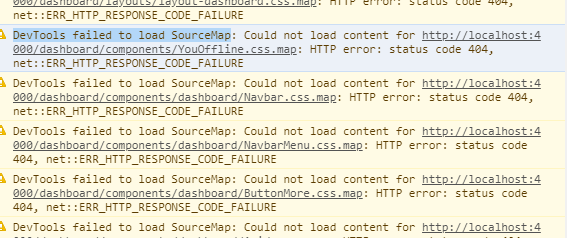
bump I guess
Not for me though