nuxt: Default test does not pass
Version
Reproduction link
Steps to reproduce
Run: yarn create nuxt-app project
Choose Linter and JestJs and SPA mode.
Without adding any additional content, run yarn test
What is expected ?
I expect the default test to pass.
What is actually happening?
I receive this error message:
yarn run v1.13.0
$ jest
 FAIL  test/Logo.spec.js
  ● Test suite failed to run

    Jest encountered an unexpected token

    This usually means that you are trying to import a file which Jest cannot parse, e.g. it's not plain JavaScript.

    By default, if Jest sees a Babel config, it will use that to transform your files, ignoring "node_modules".

    Here's what you can do:
     • To have some of your "node_modules" files transformed, you can specify a custom "transformIgnorePatterns" in your config.
     • If you need a custom transformation specify a "transform" option in your config.
     • If you simply want to mock your non-JS modules (e.g. binary assets) you can stub them out with the "moduleNameMapper" config option.

    You'll find more details and examples of these config options in the docs:
    https://jestjs.io/docs/en/configuration.html

    Details:

    /home/begueradj/Development/project/test/Logo.spec.js:1
    ({"Object.<anonymous>":function(module,exports,require,__dirname,__filename,global,jest){import { mount } from '@vue/test-utils';
                                                                                                    ^

    SyntaxError: Unexpected token {

      at ScriptTransformer._transformAndBuildScript (node_modules/jest-runtime/build/script_transformer.js:403:17)

Test Suites: 1 failed, 1 total
Tests:       0 total
Snapshots:   0 total
Time:        0.803s
Ran all test suites.
error Command failed with exit code 1.
info Visit https://yarnpkg.com/en/docs/cli/run for documentation about this command.
Note
This occurs only when I move the content of project to an other folder where of course I remove node_modes and .nuxt folders.
I need to copy the content of the generate folder to an other place because I am working with Git branches
<div align="right">This bug report is available on Nuxt community (#c8573)</div>About this issue
- Original URL
- State: closed
- Created 5 years ago
- Comments: 20 (2 by maintainers)
@brandonaaskov, I’m experiencing the same issue when running jest inside a docker container based on the vuejs/ci image.
The test passes when I run it in Git Bash on Windows 10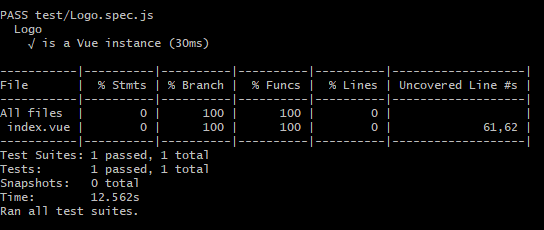
package.json
I found the problem, You should add set NODE_ENV to test before running the jest try this in your package.json file:
"scripts": { .... "test": "NODE_ENV=test jest" },@aldarund I still see the same error. And I did double check my
node_modules/vue-jest/package.jsonfile to make sure that it was actually using the correct version, but alas, I’m still seeing the same.@begueradj could you elaborate? I have the same problem you are seeing.
@manniL is there something I’m missing? I run
npx create-nuxt-app my-app-name, and after choosing my setup options, I immediately runyarn testand it fails.Proof here (albeit a boring video): https://cl.ly/50d8c8f90d8b