numba: Error on import with numpy HEAD
Reporting a bug
- I have tried using the latest released version of Numba (most recent is visible in the change log (https://github.com/numba/numba/blob/main/CHANGE_LOG).
- I have included a self contained code sample to reproduce the problem. i.e. it’s possible to run as ‘python bug.py’.
This will be a somewhat sparse bug report, but putting here early in case anyone recognizes this. We can do more work to replicate the environment if not.
In our upstream tests, xarray tests nightly against unreleased versions of our dependencies to get ahead of any incompatible code. Occasionally it also catches bugs in upstream libraries.
Here, we’re getting an error importing some items from numba.np.ufunc, including the somewhat confusing SystemError: initialization of _internal failed without raising an exception at the bottom of the stack trace.
https://github.com/pydata/xarray/issues/7306
Any ideas on what might be causing this?
Thanks in advance!
About this issue
- Original URL
- State: closed
- Created 2 years ago
- Reactions: 17
- Comments: 31 (14 by maintainers)
Links to this issue
- python - How to remove the error "SystemError: initialization of _internal failed without raising an exception" - Stack Overflow
- python 3.x - How to resolve SystemError: initialization of _internal failed without raising an exception? - Stack Overflow
- python - shap : SystemError: initialization of _internal failed without raising an exception - Stack Overflow
Commits related to this issue
- Add numba to nightly upstream I saw that we didn't have this while investigating https://github.com/numba/numba/issues/8615. We should probably wait until that's resolved before merging this (this do... — committed to max-sixty/xarray by max-sixty 2 years ago
- fix: pin numpy version see https://github.com/numba/numba/issues/8615 — committed to Nixtla/hierarchicalforecast by AzulGarza 2 years ago
- [FIX] Matplotlib and numba errors (#142) * fix: add missing matplotlib dep to environment * fix: add tqdm to conda deps * fix: fill between matplotlib behaviour * fix: pin numpy version s... — committed to Nixtla/hierarchicalforecast by AzulGarza 2 years ago
- Workaround for numba/numba#8615 — committed to blue-yonder/tsfresh by kempa-liehr 2 years ago
- Less restrictive workaround for numba/numba#8615 — committed to blue-yonder/tsfresh by kempa-liehr 2 years ago
- Less restrictive workaround for numba/numba#8615 — committed to kempa-liehr/tsfresh-feedstock by kempa-liehr 2 years ago
- requiremens: Pin numpy < 1.24 Recently released numpy 1.24 causes an import problem with numba from numba.np.ufunc import _internal SystemError: initialization of _internal failed without ra... — committed to emlearn/emlearn by jonnor 2 years ago
- dev-python/numba: fix Numpy dep https://github.com/numba/numba/issues/8615 Signed-off-by: Andrew Udvare <audvare@gmail.com> — committed to Tatsh/tatsh-overlay by Tatsh a year ago
- init_ufunc_dispatch: Handle unexpected ufunc methods gracefully If an unexpected ufunc method was encountered, `init_ufunc_dispatch()` would return an error code indicating failure without setting an... — committed to gmarkall/numba by gmarkall a year ago
- Fix numpy version to avoid numba conflict Issue originally reported here https://github.com/numba/numba/issues/8615 — committed to PowerGenome/PowerGenome by deleted user a year ago
- Pin numpy to avoid https://github.com/numba/numba/issues/8615 — committed to Phlya/snakemake-wrappers by Phlya a year ago
- pin numpy to avoid https://github.com/numba/numba/issues/8615 — committed to Phlya/snakemake-wrappers by Phlya a year ago
- Temporarily pin numpy numba/numba#8615 Signed-off-by: Johannes Mueller <johannes.mueller4@de.bosch.com> — committed to boschresearch/pylife by johannes-mueller a year ago
- Temporarily pin numpy to 1.23.5 numba/numba#8615 Signed-off-by: Johannes Mueller <johannes.mueller4@de.bosch.com> — committed to boschresearch/pylife by johannes-mueller a year ago
- Limit version of numpy to <1.24 To fix issue with numba and numpy 1.24 (see https://github.com/numba/numba/issues/8615) — committed to maxibor/bioconda-recipes by maxibor a year ago
- Add sourcepredict recipe (#40456) * add sourcepredict recipe * Limit version of numpy to <1.24 To fix issue with numba and numpy 1.24 (see https://github.com/numba/numba/issues/8615) * switch ... — committed to bioconda/bioconda-recipes by maxibor a year ago
- Add sourcepredict recipe (#40456) * add sourcepredict recipe * Limit version of numpy to <1.24 To fix issue with numba and numpy 1.24 (see https://github.com/numba/numba/issues/8615) * switch ... — committed to cokelaer/bioconda-recipes by maxibor a year ago
- bugfix: update py-numba to 0.57.1 which fixes https://github.com/numba/numba/issues/8615, and works with numpy-1.24.1. — committed to trombik/freebsd-ports-py-tiktoken by trombik a year ago
For devs who are trying to fix their environments The problem occurs in the latest version of numpy. Installing a lower version of numpy (<1.24) fixed the problem for us.
Just a heads up that I think I’m hitting this error in CIs now that NumPy 1.24 has been released:
https://github.com/mne-tools/mne-python/actions/runs/3732610574/jobs/6332287508#step:9:56
I expect others might hit it soon, too.
Hello everyone, the solutions posted here did not fix the problem for me. I tried numba v0.56.4 and v0.56.3 and both of these versions did not work with either numpy 1.23.0 or 1.24.0. I installed everything with conda-forge and I am using WSL. Any help would be greatly appreciated. Thank you!
Having the same issue over here with an old numpy version 😕 rolling back to an old version dindt work for me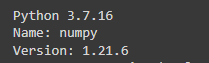
for me
numba=0.56.4fromconda-forgefails locally withnumpy=1.24.0.dev0+1120.gf30af6acd, so not sure what I’m doing wrong? @max-sixty, was that with thenumbahead?Edit: the install would be
and
pipdoes indeed complain thatnumbarequiresnumpy<1.24but installs it anyways (as intended in this case, because we do actually want to test with the most recent version, even if that breaks something). So while point 2 from https://github.com/numba/numba/issues/8615#issuecomment-1323926762 does not apply, point 3 may very well be the cause of the problem.The PR for review for NumPy 1.24 support is: https://github.com/numba/numba/pull/8691
Thanks. This help a lot. I reinstall numpy by “pip install numpy==1.23.0”. Then, the error when “import numba” was solved.
Having this issue with
python=3.8.15, build: h4de0772_0_cpython, Channel: conda-forge numba=0.56.4, build: pypi_0, channel: pypi numpy=1.23.5, build: pypi_0, channel: pypi
If you’re using the last released version of Numba (0.56.4 at time of writing), NumPy 1.18 - 1.23 are supported.
Thank you all for your comments/feedback on this issue. This issue seems to have diverged a little from the originally reported problem and so I’m closing this issue as resolved with some specific follow up issues to subscribe to if they are important to you:
HEAD.I was having the same problem with the librosa library (The reason was that librosa was working with different versions of scipy and matplotlib), so I uninstalled numpy, matplotlib, and scipy, installed librosa first which installed its own compatible versions of libraries above and then I installed the necessary libraries. That seems to work for me.
@max-sixty no problem, glad it was helpful.
Thanks for sharing this. I can see that for some projects, aspects of the described approach would certainly be beneficial in terms of maintenance burden.
The Numba maintainers do track changes to dependencies and work with other projects if issues are anticipated, they also often “try out” the code base against newer versions of projects that impact Numba (cPython, LLVM, NumPy) etc to assess the level of effort needed to do the necessary updates. I think the learning from the Numba side is probably, that in developing a compiler, having a stable and predictable environment in which to develop makes it easier to isolate problems. This is in part due to problems often being very niche e.g. one single Python+NumPy+OS+CPU combination might exhibit a particular issue!
The following is also needed because the deprecated
MachAris now removed:with this I’m able to start running the test suite - as things pass by, everything appears OK so far, but will update here if the test run completes.
I’m not sure what is best for the
Xarrayproject, however this information might help informing that decision.mainbranch has no restrictions on the version of NumPy, but it also doesn’t track NumPyHEAD. The folks who maintain Numba do an upgrade of the supported NumPy version, often in a single patch, as pre-release packages become available for testing. I’ll raise this issue with the other maintainers at the next triage meeting, but historically the view has been:HEAD.Hope this helps?