nx: ng g @nrwl/angular:application failing while running using externalSchematic on Windows machine
Current Behavior
ng g @nrwl/angular:application if i run it using externalSchematic.
Expected Behavior
It should not break the ng g @nrwl/angular:application
Steps to Reproduce
- Create a custom generator
- Run
ng g @nrwl/angular:applicationusingexternalSchematics
import { chain, externalSchematic, mergeWith, Rule, SchematicContext, template, Tree,  url } from '@angular-devkit/schematics';
   export default function(schema: Schema): Rule {
     return (host: Tree, context: SchematicContext) => {

       return chain([
         externalSchematic('@nrwl/angular', 'application', {
           name: 'myapp'
         })
       ])(host, context);
     };
   }
- After running above generator e.g. ng g @org/mylib:my-custom-generator
Failure Logs
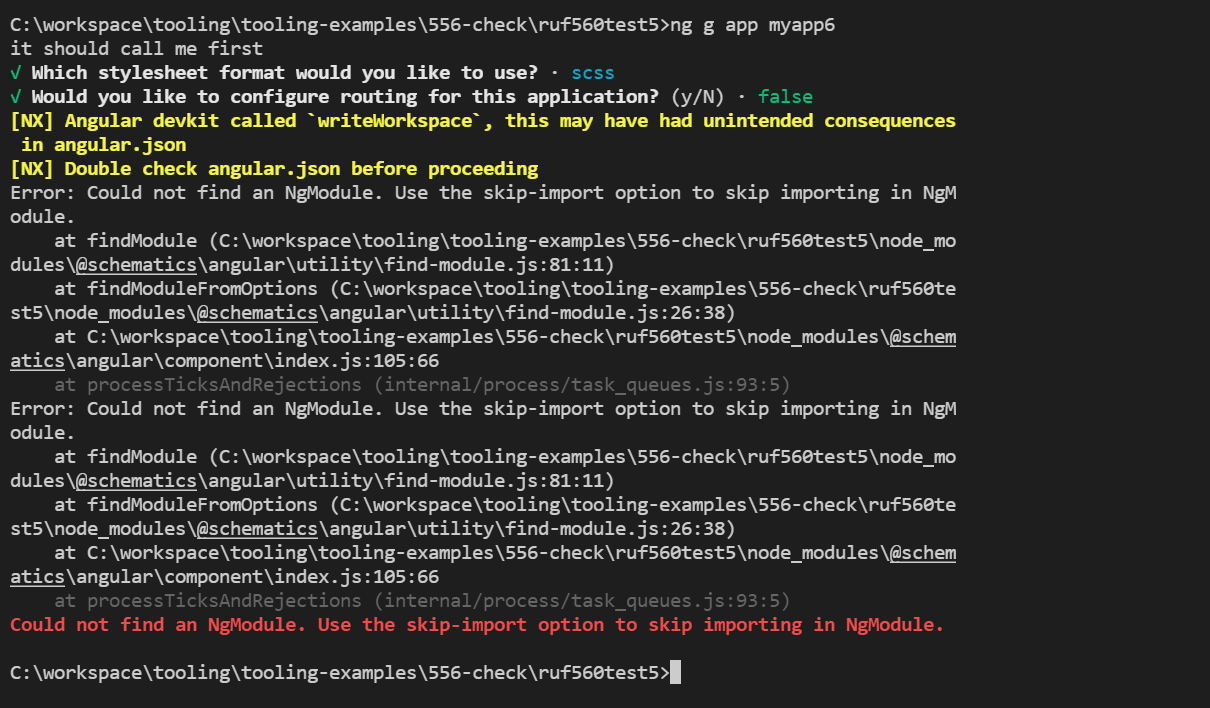
[NX] Angular devkit called `writeWorkspace`, this may have had unintended consequences in angular.json
[NX] Double check angular.json before proceeding
Error: Could not find an NgModule. Use the skip-import option to skip importing in NgModule.
   at findModule (C:\workspace\tooling\tooling-examples\556-check\ruf560test5\node_modules\@schematics\angular\utility\find-module.js:81:11)
   at findModuleFromOptions (C:\workspace\tooling\tooling-examples\556-check\ruf560test5\node_modules\@schematics\angular\utility\find-module.js:26:38)
   at C:\workspace\tooling\tooling-examples\556-check\ruf560test5\node_modules\@schematics\angular\component\index.js:105:66
   at processTicksAndRejections (internal/process/task_queues.js:93:5)
Error: Could not find an NgModule. Use the skip-import option to skip importing in NgModule.
   at findModule (C:\workspace\tooling\tooling-examples\556-check\ruf560test5\node_modules\@schematics\angular\utility\find-module.js:81:11)
   at findModuleFromOptions (C:\workspace\tooling\tooling-examples\556-check\ruf560test5\node_modules\@schematics\angular\utility\find-module.js:26:38)
odule.
   at findModule (C:\workspace\tooling\tooling-examples\556-check\ruf560test5\node_modules\@schematics\angular\utility\find-module.js:81:11)
   at findModuleFromOptions (C:\workspace\tooling\tooling-examples\556-check\ruf560test5\node_modules\@schematics\angular\utility\find-module.js:26:38)
   at C:\workspace\tooling\tooling-examples\556-check\ruf560test5\node_modules\@schematics\angular\component\index.js:105:66
   at processTicksAndRejections (internal/process/task_queues.js:93:5)
Error: Could not find an NgModule. Use the skip-import option to skip importing in NgModule.
   at findModule (C:\workspace\tooling\tooling-examples\556-check\ruf560test5\node_modules\@schematics\angular\utility\find-module.js:81:11)
   at findModuleFromOptions (C:\workspace\tooling\tooling-examples\556-check\ruf560test5\node_modules\@schematics\angular\utility\find-module.js:26:38)
   at C:\workspace\tooling\tooling-examples\556-check\ruf560test5\node_modules\@schem
Environment
@angular-devkit/architect v0.1301.2 @angular-devkit/build-angular v13.1.2 @angular-devkit/schematics v13.1.2 @nrwl/angular v13.3.11
About this issue
- Original URL
- State: closed
- Created 3 years ago
- Reactions: 4
- Comments: 33 (10 by maintainers)
Hey @leosvelperez, any chances this fix can be released on a patch version for NX 13? We have several repos running NX 13 with no bandwidth to migrate to 14, and this issue has been affecting several developers that are running windows.
I have a windows VM set up and ready to investigate this issue don’t worry. I’ll see what I can find that can help unblock you all! 😃
@sandeeppatidar30 We have tried this upgrade three times. 13 then 13.2.x and now on latest 13.8.x. We have had issues spanning across cypress, jest, storybook, and eslint across those upgrades. This has been the first time everything has worked (with some minor fixes on our side) disregarding this issue with schematics for angular applications. So, we will probably stay put until a fix/work around is put through for this instead of backporting to a lesser version of everything.
i’m still facing this issue even with Nrwl v13.8.2 and @schematics/angular v13.2.3.
Just an extra note:
I was using
wrapAngularDevkitSchematic('@nrwl/angular', 'library');to generate an Angular library as part of my generator.This started failing since upgrading to a Nx 14 version.
The warning is as in the original post, the error was
Using
libraryGeneratorfrom'@nrwl/angular/generators'instead works, the library is generated successfully, but I still get the warnings:This issue has been solved in https://github.com/nrwl/nx/pull/10113 and the fix was released in v14.1.0. Please make sure to migrate your workspace to that version or greater.
Also, as mentioned in https://github.com/nrwl/nx/issues/8253#issuecomment-1056856537, please consider writing generators using the Nx DevKit, it provides a better developer experience.
I’m closing this. If you still have an issue after migrating, feel free to reopen this issue or create a new one.
This worked out very well for us! We ended up only rewriting the one schematic that uses the angular application generator. We ended up crafting some quick utility functions to map from Nx devkit’s
Treetype and Angular devkitsTreetype forcreate/overwriteandwrite. Overall went smoothly and looking forward to rewriting the rest of our schematics over to using the nx devkit instead 😃Still working on it. Not sure when a fix will land for this.
A workaround, which is admittedly more involved, but does work:
The problem appears to be in the hand off to Angular Devkit, trying to narrow it down.
If you have a schematic like the following using the Angular Devkit
Then you can convert it to Nx Devkit by doing the following
Update
schema.jsonto add:"cli": "nx"Update the generator to be
@zjkipping, it works till NX v13.2.4 with Angular v13.1.x, so if you are planning for migration then you can still try with NX v13.2.4 till we get the fix.
Ah interesting. Ok, in that case, we’ll need to do some further investigation. Some path mapping from UNIX-style to Windows-style must be borked.
@sandeeppatidar30 Didn’t change the repo at all
https://user-images.githubusercontent.com/12140467/154994089-87c453c1-3086-44e7-bb33-bb019c691620.mp4
@Coly010 Could you verify this repo, by running
nx workspace-generator application? I dont get, why this error should not be reproduceable…@sandeeppatidar30 No, running
nx g appin terminal works. I did experience same issue when runningexternalSchematicsin a custom schematic.@Coly010 I can confirm same behaviour with Nrwl v13.8.1 and @angular-devkit v13.2.3 Running
nx g appon the other hand does not result in this issue. 🤔