Denaro: LC_MONETARY is not respected
Pretty much the same issue as #11.
Everything is shown as GPB, but I’m expecting to see EUR. My LANG is en_GB.UTF-8, but LC_MONETARY is set to de_AT.UTF-8.
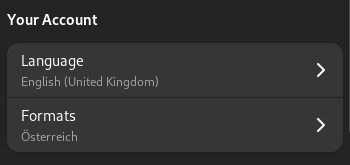
When I start the application, I get the warning Locale not supported by C library. Using the fallback 'C' locale.
I’m using version 2023.1.0-beta1 from flathub beta.
About this issue
- Original URL
- State: closed
- Created 2 years ago
- Comments: 17 (13 by maintainers)
We found a way to support LC_MONETARY individually. Track with #233
Ok @SoMuchForSubtlety
Unhandled exception. System.FormatException: String '31/01/2023' was not recognized as a valid DateOnly.is being caused by a bug in the code where updating a transaction does not store the date in en_US format, which is what the Account expects.I’ve fixed this issue for the next beta, however, it means that your
.nmoneyfile is bugged.As always,
.nmoneyfiles containing real data should never be used in beta versions for reasons as this. However, if you need to recover data from that.nmoneyfile, please use DB Browser and open the.nmoneyfile in there and correct the date formats to en_US format. After that, the file should be able to open in Money.The currency_symbol is displayed as
€in that command since that was you have your formats set tode_AT.UTF-8. But since your language isen_GB.UTF-8when an application tries to load the locale, it combines the two and tries to finden_AT.UTF-8which is not a valid C locale in any program, hence why it doesn’t display correctly.See #128. We are adding settings to an account where you could change the currency used by the account from Money itself.