nginx-proxy-manager: SSL duckdns internal error
Checklist
- Have you pulled and found the error with
jc21/nginx-proxy-manager:latestdocker image?- Yes
- Are you sure you’re not using someone else’s docker image?
- Yes
- Have you searched for similar issues (both open and closed)?
- Yes
Describe the bug
Internal SSL error
Nginx Proxy Manager Version
Version 3
To Reproduce Steps to reproduce the behavior:
- Go to ‘SSL certificates’
- Click on ‘add ssl and use a dns challenge’
- Select ‘duckdns add the token, agree the terms and click save’
- See error
Expected behavior
An ssl should appear.
Screenshots

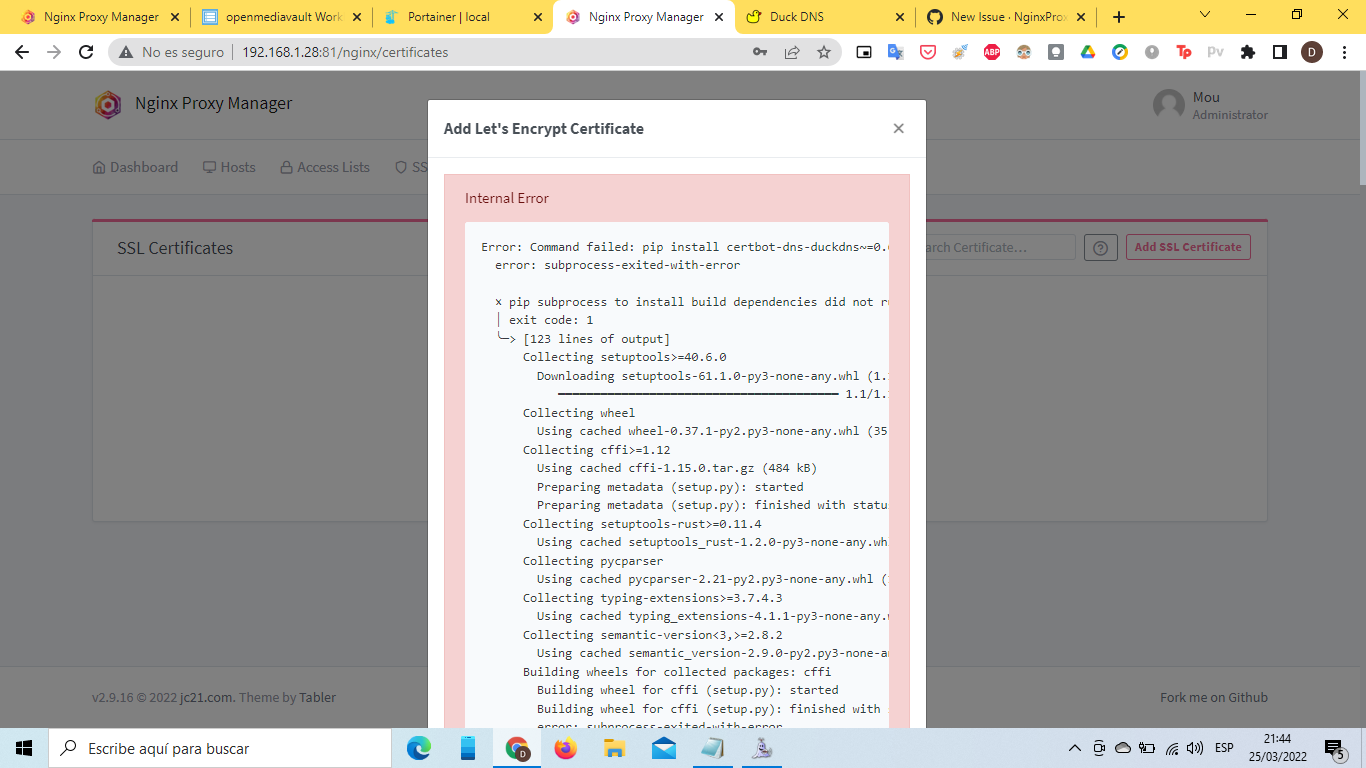
Operating System
Raspberry pi 4B+ running OMV 6 (Open Media Vault 6)
Additional context
Error: Command failed: pip install certbot-dns-duckdns~=0.6 error: subprocess-exited-with-error
× pip subprocess to install build dependencies did not run successfully. │ exit code: 1 ╰─> [123 lines of output] Collecting setuptools>=40.6.0 Downloading setuptools-61.1.0-py3-none-any.whl (1.1 MB) ━━━━━━━━━━━━━━━━━━━━━━━━━━━━━━━━━━━━━━━━ 1.1/1.1 MB 8.3 MB/s eta 0:00:00 Collecting wheel Using cached wheel-0.37.1-py2.py3-none-any.whl (35 kB) Collecting cffi>=1.12 Using cached cffi-1.15.0.tar.gz (484 kB) Preparing metadata (setup.py): started Preparing metadata (setup.py): finished with status ‘done’ Collecting setuptools-rust>=0.11.4 Using cached setuptools_rust-1.2.0-py3-none-any.whl (21 kB) Collecting pycparser Using cached pycparser-2.21-py2.py3-none-any.whl (118 kB) Collecting typing-extensions>=3.7.4.3 Using cached typing_extensions-4.1.1-py3-none-any.whl (26 kB) Collecting semantic-version<3,>=2.8.2 Using cached semantic_version-2.9.0-py2.py3-none-any.whl (15 kB) Building wheels for collected packages: cffi Building wheel for cffi (setup.py): started Building wheel for cffi (setup.py): finished with status ‘error’ error: subprocess-exited-with-error
    × python setup.py bdist_wheel did not run successfully.
    │ exit code: 1
    ╰─> [36 lines of output]
        running bdist_wheel
        running build
        running build_py
        creating build
        creating build/lib.linux-armv7l-3.7
        creating build/lib.linux-armv7l-3.7/cffi
        copying cffi/setuptools_ext.py -> build/lib.linux-armv7l-3.7/cffi
        copying cffi/lock.py -> build/lib.linux-armv7l-3.7/cffi
        copying cffi/vengine_gen.py -> build/lib.linux-armv7l-3.7/cffi
        copying cffi/backend_ctypes.py -> build/lib.linux-armv7l-3.7/cffi
        copying cffi/error.py -> build/lib.linux-armv7l-3.7/cffi
        copying cffi/model.py -> build/lib.linux-armv7l-3.7/cffi
        copying cffi/__init__.py -> build/lib.linux-armv7l-3.7/cffi
        copying cffi/ffiplatform.py -> build/lib.linux-armv7l-3.7/cffi
        copying cffi/api.py -> build/lib.linux-armv7l-3.7/cffi
        copying cffi/cparser.py -> build/lib.linux-armv7l-3.7/cffi
        copying cffi/vengine_cpy.py -> build/lib.linux-armv7l-3.7/cffi
        copying cffi/cffi_opcode.py -> build/lib.linux-armv7l-3.7/cffi
        copying cffi/commontypes.py -> build/lib.linux-armv7l-3.7/cffi
        copying cffi/verifier.py -> build/lib.linux-armv7l-3.7/cffi
        copying cffi/pkgconfig.py -> build/lib.linux-armv7l-3.7/cffi
        copying cffi/recompiler.py -> build/lib.linux-armv7l-3.7/cffi
        copying cffi/_cffi_include.h -> build/lib.linux-armv7l-3.7/cffi
        copying cffi/parse_c_type.h -> build/lib.linux-armv7l-3.7/cffi
        copying cffi/_embedding.h -> build/lib.linux-armv7l-3.7/cffi
        copying cffi/_cffi_errors.h -> build/lib.linux-armv7l-3.7/cffi
        running build_ext
        building '_cffi_backend' extension
        creating build/temp.linux-armv7l-3.7
        creating build/temp.linux-armv7l-3.7/c
        arm-linux-gnueabihf-gcc -pthread -DNDEBUG -g -fwrapv -O2 -Wall -g -fstack-protector-strong -Wformat -Werror=format-security -Wdate-time -D_FORTIFY_SOURCE=2 -fPIC -DUSE__THREAD -DHAVE_SYNC_SYNCHRONIZE -I/usr/include/ffi -I/usr/include/libffi -I/usr/include/python3.7m -c c/_cffi_backend.c -o build/temp.linux-armv7l-3.7/c/_cffi_backend.o
        c/_cffi_backend.c:2:10: fatal error: Python.h: No such file or directory
         #include
                  ^~~~~~~~~~
        compilation terminated.
        error: command 'arm-linux-gnueabihf-gcc' failed with exit status 1
        [end of output]

    note: This error originates from a subprocess, and is likely not a problem with pip.
    ERROR: Failed building wheel for cffi
    Running setup.py clean for cffi
  Failed to build cffi
  Installing collected packages: wheel, typing-extensions, setuptools, semantic-version, pycparser, setuptools-rust, cffi
    Running setup.py install for cffi: started
    Running setup.py install for cffi: finished with status 'error'
    error: subprocess-exited-with-error

    × Running setup.py install for cffi did not run successfully.
    │ exit code: 1
    ╰─> [36 lines of output]
        running install
        running build
        running build_py
        creating build
        creating build/lib.linux-armv7l-3.7
        creating build/lib.linux-armv7l-3.7/cffi
        copying cffi/setuptools_ext.py -> build/lib.linux-armv7l-3.7/cffi
        copying cffi/lock.py -> build/lib.linux-armv7l-3.7/cffi
        copying cffi/vengine_gen.py -> build/lib.linux-armv7l-3.7/cffi
        copying cffi/backend_ctypes.py -> build/lib.linux-armv7l-3.7/cffi
        copying cffi/error.py -> build/lib.linux-armv7l-3.7/cffi
        copying cffi/model.py -> build/lib.linux-armv7l-3.7/cffi
        copying cffi/__init__.py -> build/lib.linux-armv7l-3.7/cffi
        copying cffi/ffiplatform.py -> build/lib.linux-armv7l-3.7/cffi
        copying cffi/api.py -> build/lib.linux-armv7l-3.7/cffi
        copying cffi/cparser.py -> build/lib.linux-armv7l-3.7/cffi
        copying cffi/vengine_cpy.py -> build/lib.linux-armv7l-3.7/cffi
        copying cffi/cffi_opcode.py -> build/lib.linux-armv7l-3.7/cffi
        copying cffi/commontypes.py -> build/lib.linux-armv7l-3.7/cffi
        copying cffi/verifier.py -> build/lib.linux-armv7l-3.7/cffi
        copying cffi/pkgconfig.py -> build/lib.linux-armv7l-3.7/cffi
        copying cffi/recompiler.py -> build/lib.linux-armv7l-3.7/cffi
        copying cffi/_cffi_include.h -> build/lib.linux-armv7l-3.7/cffi
        copying cffi/parse_c_type.h -> build/lib.linux-armv7l-3.7/cffi
        copying cffi/_embedding.h -> build/lib.linux-armv7l-3.7/cffi
        copying cffi/_cffi_errors.h -> build/lib.linux-armv7l-3.7/cffi
        running build_ext
        building '_cffi_backend' extension
        creating build/temp.linux-armv7l-3.7
        creating build/temp.linux-armv7l-3.7/c
        arm-linux-gnueabihf-gcc -pthread -DNDEBUG -g -fwrapv -O2 -Wall -g -fstack-protector-strong -Wformat -Werror=format-security -Wdate-time -D_FORTIFY_SOURCE=2 -fPIC -DUSE__THREAD -DHAVE_SYNC_SYNCHRONIZE -I/usr/include/ffi -I/usr/include/libffi -I/usr/include/python3.7m -c c/_cffi_backend.c -o build/temp.linux-armv7l-3.7/c/_cffi_backend.o
        c/_cffi_backend.c:2:10: fatal error: Python.h: No such file or directory
         #include
                  ^~~~~~~~~~
        compilation terminated.
        error: command 'arm-linux-gnueabihf-gcc' failed with exit status 1
        [end of output]

    note: This error originates from a subprocess, and is likely not a problem with pip.
  error: legacy-install-failure

  × Encountered error while trying to install package.
  ╰─> cffi

  note: This is an issue with the package mentioned above, not pip.
  hint: See above for output from the failure.
  WARNING: You are using pip version 22.0.3; however, version 22.0.4 is available.
  You should consider upgrading via the '/usr/bin/python3 -m pip install --upgrade pip' command.
  [end of output]
note: This error originates from a subprocess, and is likely not a problem with pip. error: subprocess-exited-with-error
× pip subprocess to install build dependencies did not run successfully. │ exit code: 1 ╰─> See above for output.
note: This error originates from a subprocess, and is likely not a problem with pip. WARNING: You are using pip version 22.0.3; however, version 22.0.4 is available. You should consider upgrading via the ‘/usr/bin/python3 -m pip install --upgrade pip’ command.
at ChildProcess.exithandler (node:child_process:399:12)
at ChildProcess.emit (node:events:520:28)
at maybeClose (node:internal/child_process:1092:16)
at Socket. (node:internal/child_process:451:11)
at Socket.emit (node:events:520:28)
at Pipe. (node:net:687:12)
About this issue
- Original URL
- State: closed
- Created 2 years ago
- Reactions: 4
- Comments: 19
I had the same issue, also rpi4/arm7. There are some missing dependencies to build the certbot-dns-duckdns hook. I opened a terminal into the docker instance, and ran the following:
It takes a good while to finish, but it fixed the issue. Is there any way to received the compiled hook already with the docker image?
I solved the issue, First Update . apt update apt-get install build-essential libssl-dev libffi-dev python3-dev cargo pip install certbot-dns-duckdns~=0.6 Second , add SSL certificate WITHOUT usisng DNS challenge. I am using Cloudflare.